
For years, October has been Cyber Security Awareness Month. In 2026 the Australian Government renamed it Cyber Security Action Month. It’s a small change with a clear message: most small and medium businesses already know the risks. What’s missing is follow-through.
The month sits inside a wider Australian Signals Directorate program called Cyber Action Year 2026. It asks organisations to plan on the basis that a cyber compromise is a matter of “if, not when.” Insurers, auditors and larger clients already think about their suppliers this way, so it’s a useful lens for any business that wants to keep winning work.
Most business owners know they should have multi-factor authentication, and many already use it for email. More and more apps are making it a compulsory part of logging on to accounts these days. The gaps tend to be elsewhere: a shared admin login, an old accounting portal, a supplier system nobody has checked in years.
Those gaps are where incidents happen. The Australian Signals Directorate received over 84,700 cybercrime reports in 2024-25, roughly one every six minutes. The average self-reported cost was $56,600 for a small business, up 14%, and $97,200 for a medium business, up 55%.
Security work rarely feels urgent until something goes wrong. It competes with client deadlines, hiring and month-end, and it usually loses. A month named for action is a good reason to put two or three items in the calendar and see them through.
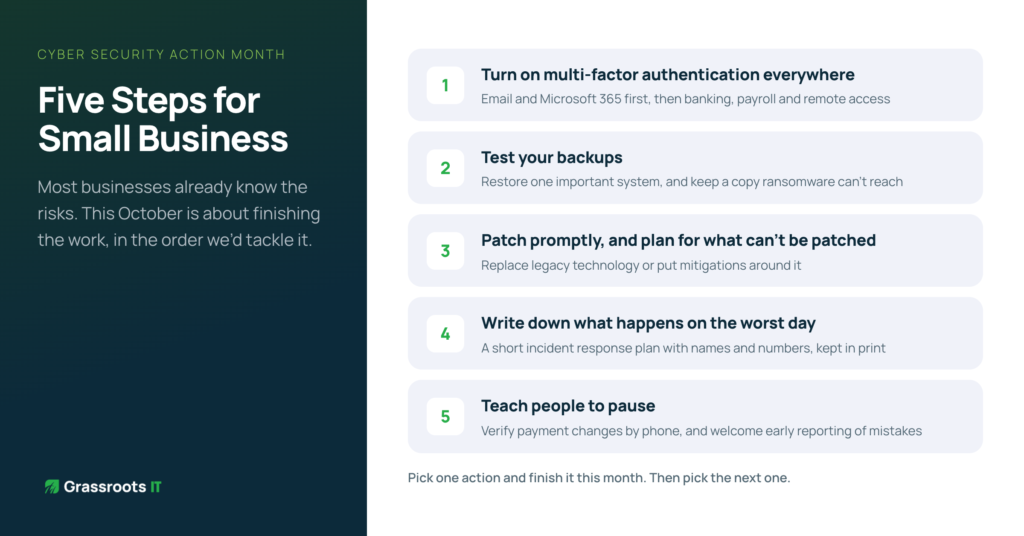
Here are five actions that line up with the basics the that the October campaign promotes, in the order we’d tackle them:
If you’re accountable for technology in your business, try this: if we were breached tomorrow, what would happen in the first hour? Who would you call? Could you still invoice, pay staff and talk to clients?
If the answers are vague, you’ve found your starting point. A tabletop exercise, where your leadership team walks through a realistic scenario together, surfaces gaps faster than almost anything else. It also turns an abstract risk into a set of decisions people have already practised.
It’s also worth checking your cyber insurance policy while you’re there. Many policies list conditions, such as multi-factor authentication or tested backups, that need to be in place for a claim to succeed. Knowing those conditions now is far better than discovering them mid-incident.
The five actions above make you safer. More and more, clients, insurers and tender panels also want you to prove it. Frameworks such as the Essential Eight and SMB1001 help here: they turn good intentions into a structured program with evidence you can show someone else.
We went through this ourselves when Grassroots IT achieved SMB1001 Gold certification. Over about six months, the biggest surprise was how much good practice we already had in place that simply wasn’t documented, so most of the work was writing it down and making it auditable.
Cyber Security Action Month runs until the end of October. It’s a great time to choose one action from this list and finish it before then. Then pick the next one.
SOURCES
A structural or civil engineering firm submits a bid through QTenders for a project it is genuinely well suited to deliver. Strong project history, the right licences, a competitive price. Weeks later, the bid comes back marked down, not on the technical submission, but on a section near the back asking for evidence of a cybersecurity framework. Nobody in the business had prepared an answer for that section, because nobody had ever needed to before.
That scenario is becoming common across Queensland, and it did not come from nowhere.
Under the Queensland Procurement Policy 2026 (QPP 2026), agencies are now required to actively consider cyber security risk, including supply chain risk, as part of every procurement decision, and to build appropriate information and cyber security clauses into the resulting contract. That requirement is scaled to the value, risk and complexity of the procurement, not a fixed checklist applied identically to every contract regardless of size. In practice, it still means a supplier bidding on anything beyond the smallest, lowest-risk work can expect cyber security questions or clauses to appear somewhere in the process, and the supplier who can only offer a verbal assurance is the one most likely to be marked down, or asked to accept a contract clause they have no way of actually meeting.
Agencies are also required to weigh supply chain risk as part of that same consideration, which is where this reaches beyond firms bidding directly to government. A subcontractor working under a head contractor, or a specialist consultant engaged on a government project, can find the same cyber security expectations passed down into their subcontract agreement, even if they never submit a bid to a government buyer directly. A mechanical or electrical subcontractor engaged by a head contractor on a council water treatment upgrade, for instance, can find a cyber security clause sitting in their subcontract, passed down from the head contract above it.
Tier one contractors, mining operators and oil and gas majors have been building the same expectation into their own supplier prequalification for some time. A cybersecurity posture now sits alongside the insurance certificates, ISO manuals and WHS plans that make up a standard prequalification submission for these clients. If your firm is on a mining or utility supplier panel, or hoping to get onto one, this is very likely already part of what you are being assessed against, whether or not it has been called out explicitly. The Essential Eight framework in particular has become a common reference point across both government and private prequalification, to the point where it now shows up as an expected baseline rather than a point of difference.
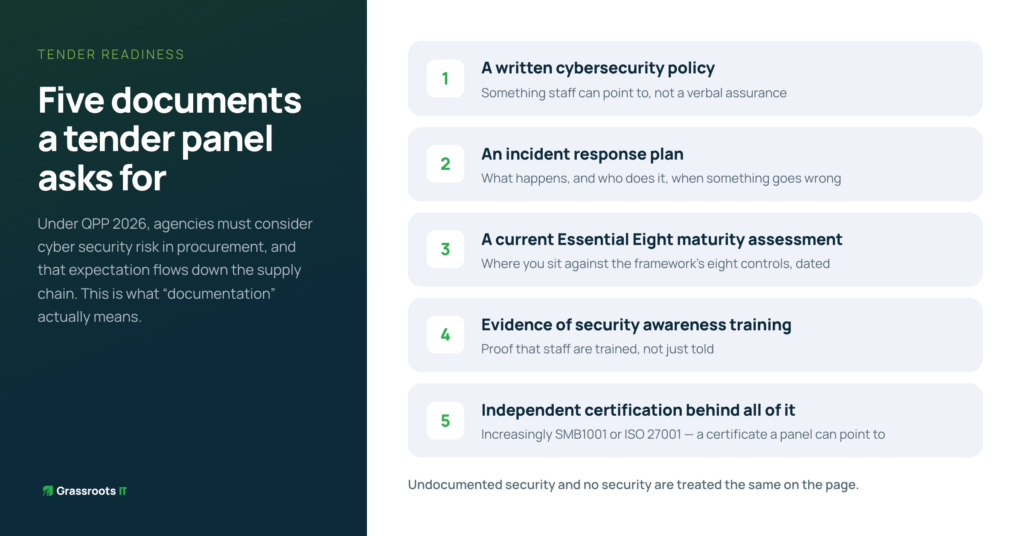
This is the part that trips firms up most, because “documentation” sounds vague until a panel is actually asking for it. In practice, it usually means being able to produce: a written cybersecurity policy that staff can point to, not just a verbal assurance that “we take security seriously”; an incident response plan setting out what actually happens if something goes wrong; a current Essential Eight maturity assessment showing where the business sits against the framework’s eight controls; evidence that staff receive some form of security awareness training; and, increasingly, independent certification such as SMB1001 or ISO 27001 sitting behind all of it. None of this needs to be built from scratch under tender pressure. It is groundwork that, done properly once, gets reused on every bid that asks for it.
Most firms caught out by this do not actually have a security problem. They run sensible IT, have never had an incident, and would probably pass a reasonable security review if anyone sat down and did one. What they lack is the paperwork: a documented framework, an evidenced process, a certificate a panel can point to. A prequalification or tender evaluation has no way to score good practice it cannot see. Undocumented security and no security are treated the same on the page, which is a genuinely frustrating position for a technically excellent firm to find itself in.
Firms getting ahead of this are not scrambling to build a cybersecurity policy the week before a tender closes. They already have a recognised framework in place, such as Essential Eight or SMB1001, documentation ready to attach without weeks of preparation, and, in a growing number of cases, independent certification behind it. Once that groundwork exists, a cybersecurity question on a QTenders submission or a mining panel prequalification stops being a risk and becomes one more thing your firm can answer confidently while a competitor is still working out what to say.
This is where we spend a lot of our time with engineering and technical firms: building security that is not just genuinely good, but provable on demand, whether that is for a QPP 2026 government tender, a supply chain flow-down requirement, or a private prequalification panel. We hold ourselves to the same bar as an ISO 27001 certified provider and an Essential Eight and SMB1001 specialist, so our clients can meet it without having to become security experts themselves.
If your firm bids on Queensland Government work, sits on a supplier panel, or is hoping to get onto one, it is worth finding out now whether your current documentation would hold up, rather than finding out when a bid comes back marked down over a section you did not expect.
Grassroots IT is a Brisbane-based managed IT services provider and Essential Eight and SMB1001 specialist for engineering and technical firms across South East Queensland. Learn more about our Cybersecurity services or SMB1001 program.
Your security tools might be doing their job. The question is whether you can demonstrate that to anyone who asks.
There’s a version of cybersecurity that feels solid from the inside but falls apart the moment someone asks you to account for it. The tools are there. The IT team or provider is on top of things. Nothing has gone wrong. And yet, if a cyber insurer, an enterprise client, or your own board asked you to demonstrate your security posture tomorrow, you’d struggle to know where to start.
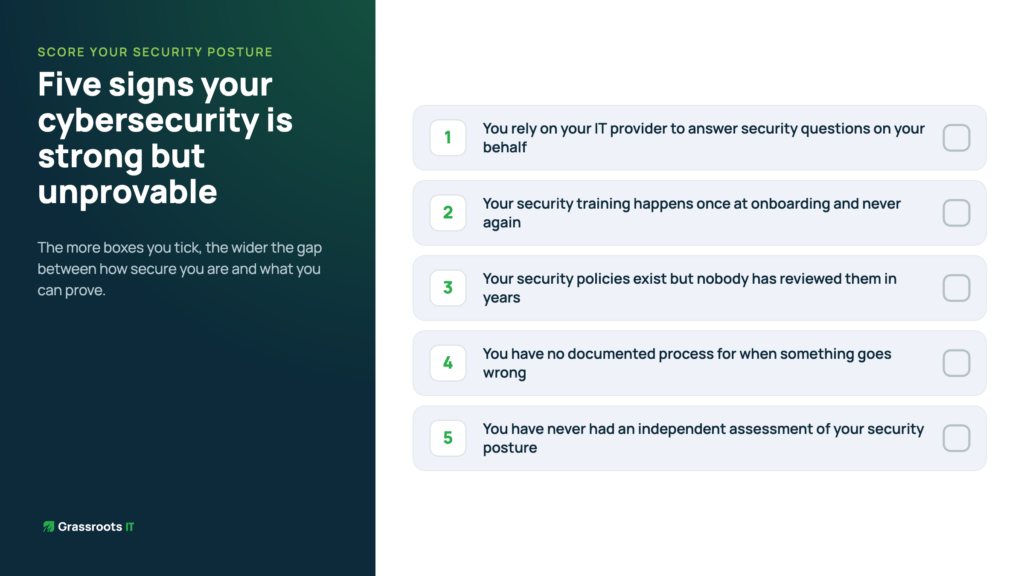
This is more common than most business owners realise, and it’s becoming a genuine liability. Here are five signs you might be in this position.
Cyber insurance is the most immediate place this shift is showing up. Not long ago, insurers would run through a checklist at renewal: multifactor authentication, regular patching, offsite backups. A yes across the board and you’d get your policy.
That process has changed substantially. Australian cyber insurance underwriting tightened significantly through 2024 and 2025. The informal tick-and-flick application form has been replaced by detailed technical questionnaires, and for higher cover, evidence of controls. Businesses that haven’t invested in structured security practices are increasingly finding that cyber insurance is either expensive or simply unavailable.
The market is also about to get more costly. After two years of softening rates, S&P Global forecasts a 15 to 20 per cent premium increase in 2026. Organisations with strong, documented security postures will be better placed to negotiate favourable terms. Those without them won’t.
There’s also a significant coverage gap that most business owners aren’t aware of. Only 10 to 20 per cent of businesses currently carry cyber insurance, compared to 40 to 50 per cent of mid-market firms. That means the majority of small businesses are carrying a risk they’ve largely left unquantified, and uninsured.
The procurement picture is similar. If your business sells to enterprise clients or operates in regulated industries like financial services or healthcare, you may already be fielding questions about your security posture from clients or partners. Insurers are increasingly requesting third-party security attestations, such as framework certifications or maturity assessments, for cover above $1 million. That expectation is spreading beyond the insurance conversation into tenders, contracts, and supplier assessments. It only moves in one direction.
Staff awareness training is one of the most consistently underestimated controls in a small business security program. It’s also one of the first things that gets asked about in an insurance renewal or a client security questionnaire.
A single induction session from two years ago doesn’t count. Neither does a policy document that lives in a shared drive nobody reads. What insurers and certification frameworks are looking for is evidence of regular, completed, documented training: monthly or quarterly cycles, completion tracking, and accountability for non-completion. If you can’t point to records showing your team is actively engaged with security awareness on an ongoing basis, that’s a material gap regardless of how good your technical controls are.
Most businesses at the 30-to-100-staff mark have some version of a password policy, an acceptable use policy, and possibly an incident response plan. What’s less common is any evidence that those documents are current, reviewed regularly, or actually reflect how the business operates.
Outdated policies are a problem for two reasons. First, they may no longer cover the tools, platforms, and working arrangements the business actually uses. A policy written before the shift to hybrid work and cloud storage is almost certainly missing something. Second, they signal to anyone reviewing your security posture that governance is informal, not a managed process. A document dated 2021 that hasn’t been touched since tells its own story.
Most small businesses have a rough idea of what they’d do in the event of a cyber incident: call the IT provider, shut things down, figure it out from there. What most don’t have is a documented, tested incident response plan that assigns roles, defines communication protocols, and sets out a recovery sequence.
This matters more than it might seem. Cyber insurers ask about it directly. More practically, when something goes wrong is the worst possible time to be working out who does what. Businesses that have rehearsed their response, even in a basic tabletop exercise, consistently handle incidents faster and with less collateral damage than those that haven’t. The plan doesn’t need to be long. It needs to exist and be known.
Internal confidence is not the same as verified maturity. Most businesses that haven’t had an external assessment tend to overestimate their position in some areas and have genuine blind spots in others. That’s not a criticism. It’s simply what happens when you’re assessing your own work without a reference standard.
An independent gap assessment against a recognised framework gives you something internal review can’t: a clear, objective picture of where you stand, what’s missing, and how significant the gaps are. For most businesses, the result is more reassuring than expected. The foundations are usually stronger than they think. The gaps tend to be in documentation and formalisation, not in the underlying controls. But until you’ve done the assessment, you’re operating on assumption.
Good cybersecurity and demonstrable cybersecurity are not the same thing. You can have genuinely strong security practices and still be unable to account for them in any meaningful way to an insurer, a client, or a board. That gap is closing as expectations rise, and the businesses that close it proactively are in a significantly better position than those that wait until someone asks.
If any of the five signs above felt familiar, it’s worth understanding where your business actually sits. An independent assessment is a reasonable first step, and for most businesses, the picture is clearer and more manageable than they expect.
Ready to move from research to action? The first step is understanding where you currently stand. A baseline security assessment can break decision paralysis by giving you concrete starting point. Contact us today to discuss your current cybersecurity posture and next best steps forward.
“Pretty secure” isn’t good enough anymore.
That’s the uncomfortable truth we put to our LinkedIn audience recently, and the response told us it landed. Because most businesses answer the cybersecurity question the same way: do we have antivirus, backups, MFA? Yes, yes, yes. So we’re pretty secure, right?
The problem is that “pretty secure” is doing a lot of heavy lifting. Cyber insurers don’t accept pretty secure. Enterprise clients putting you through procurement don’t accept pretty secure. And when something goes wrong, pretty secure won’t hold up in a board conversation either.
The shift happening right now is from cybersecurity as a tool checklist to cybersecurity as something you can actually demonstrate. Not describe. Demonstrate. That’s a different question entirely, and most businesses aren’t ready for it yet.
We spent the last six months getting ready for it ourselves. Here’s what that looked like, and what it means for your business.
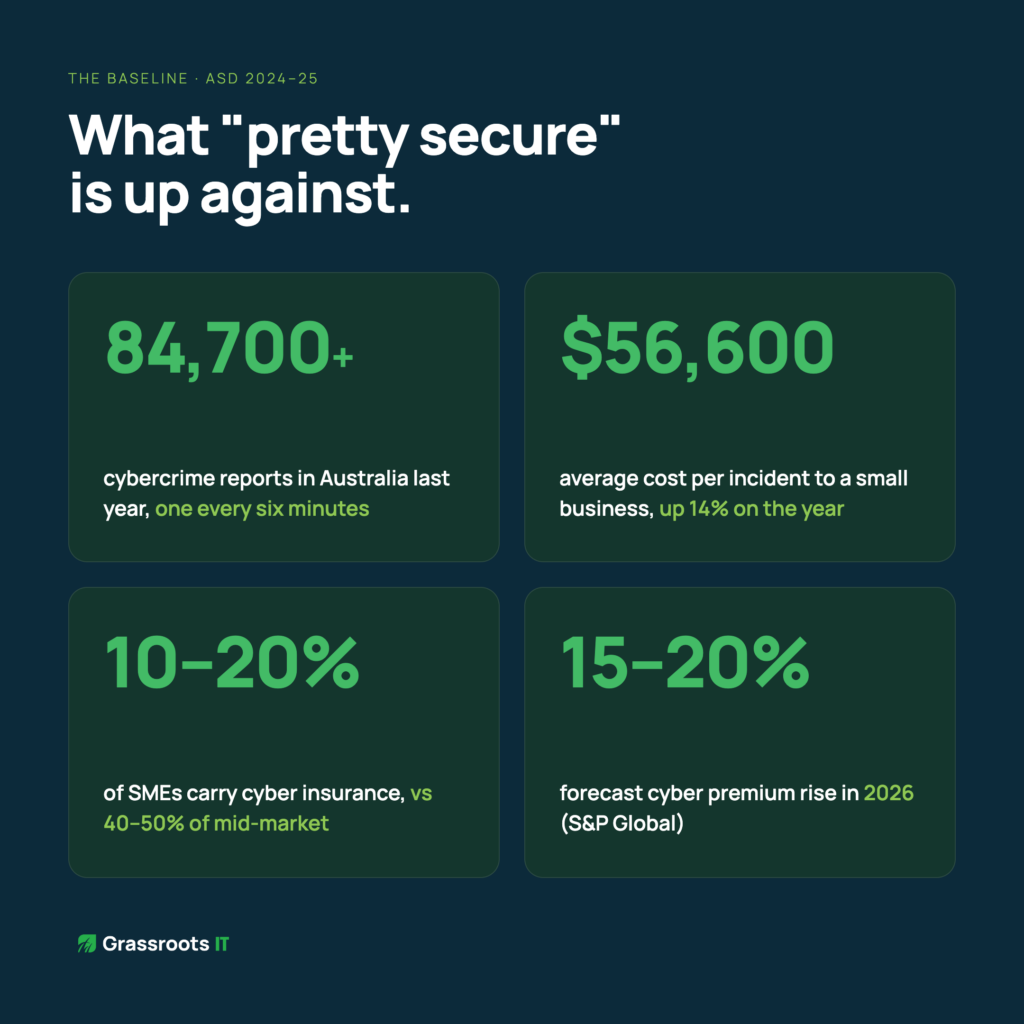
Before we get to the insurance conversation, it helps to understand the baseline. The ASD’s 2024-25 Annual Cyber Threat Report recorded over 84,700 cybercrime reports in Australia last financial year, one every six minutes, with the average cost to small businesses rising 14 per cent to $56,600 per incident. That’s not the cost of a catastrophic breach at a large organisation. That’s the average cost hitting businesses like yours and ours.
What’s notable is how many of those businesses thought they were pretty secure right up until they weren’t.
Cyber insurance is the most immediate place this shift is showing up. Not long ago, insurers would run through a checklist at renewal: multifactor authentication, regular patching, offsite backups. A yes across the board and you’d get your policy.
That process has changed substantially. Australian cyber insurance underwriting tightened significantly through 2024 and 2025. The informal tick-and-flick application form has been replaced by detailed technical questionnaires, and for higher cover, evidence of controls. Businesses that haven’t invested in structured security practices are increasingly finding that cyber insurance is either expensive or simply unavailable.
The market is also about to get more costly. After two years of softening rates, S&P Global forecasts a 15 to 20 per cent premium increase in 2026. Organisations with strong, documented security postures will be better placed to negotiate favourable terms. Those without them won’t.
There’s also a significant coverage gap that most business owners aren’t aware of. Only 10 to 20 per cent of businesses currently carry cyber insurance, compared to 40 to 50 per cent of mid-market firms. That means the majority of small businesses are carrying a risk they’ve largely left unquantified, and uninsured.
The procurement picture is similar. If your business sells to enterprise clients or operates in regulated industries like financial services or healthcare, you may already be fielding questions about your security posture from clients or partners. Insurers are increasingly requesting third-party security attestations, such as framework certifications or maturity assessments, for cover above $1 million. That expectation is spreading beyond the insurance conversation into tenders, contracts, and supplier assessments. It only moves in one direction.
Australia has two well-regarded cybersecurity frameworks that help businesses move from informal security practices to something documented, structured, and verifiable.
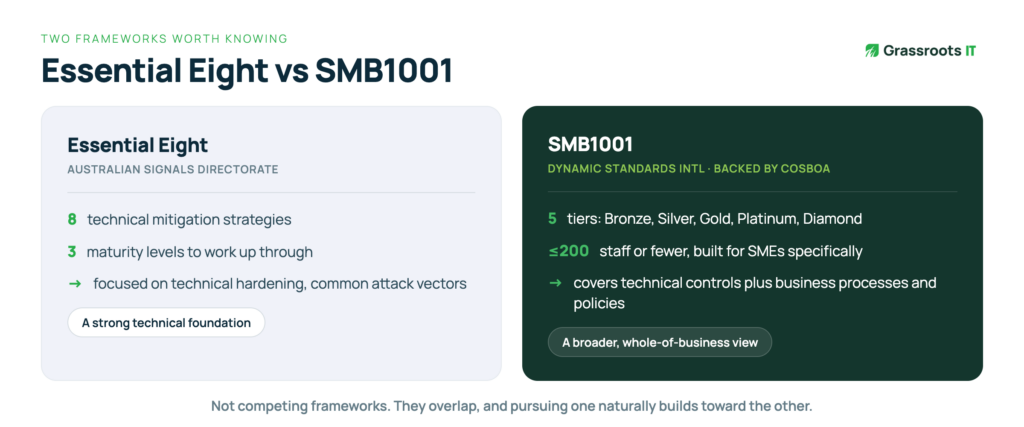
The first is the Essential Eight, developed by the Australian Signals Directorate. Most businesses have heard of it. It covers eight technical mitigation strategies across three maturity levels and is designed to reduce the most common attack vectors. It’s a strong technical foundation.
The second is SMB1001, developed by Dynamic Standards International and backed by the Council of Small Business Organisations Australia. It’s less well known, but it was built specifically for businesses of 200 staff or fewer, which makes it more practical for most businesses. SMB1001 runs across five certification tiers, Bronze, Silver, Gold, Platinum, and Diamond, and covers both technical controls and business processes and policies. Where the Essential Eight focuses primarily on technical hardening, SMB1001 takes a broader view of what a mature security posture looks like across an organisation.
They’re not competing frameworks. They overlap significantly, and pursuing one naturally builds toward the other. The right starting point depends on where your business is now and what your most pressing compliance or assurance needs are.
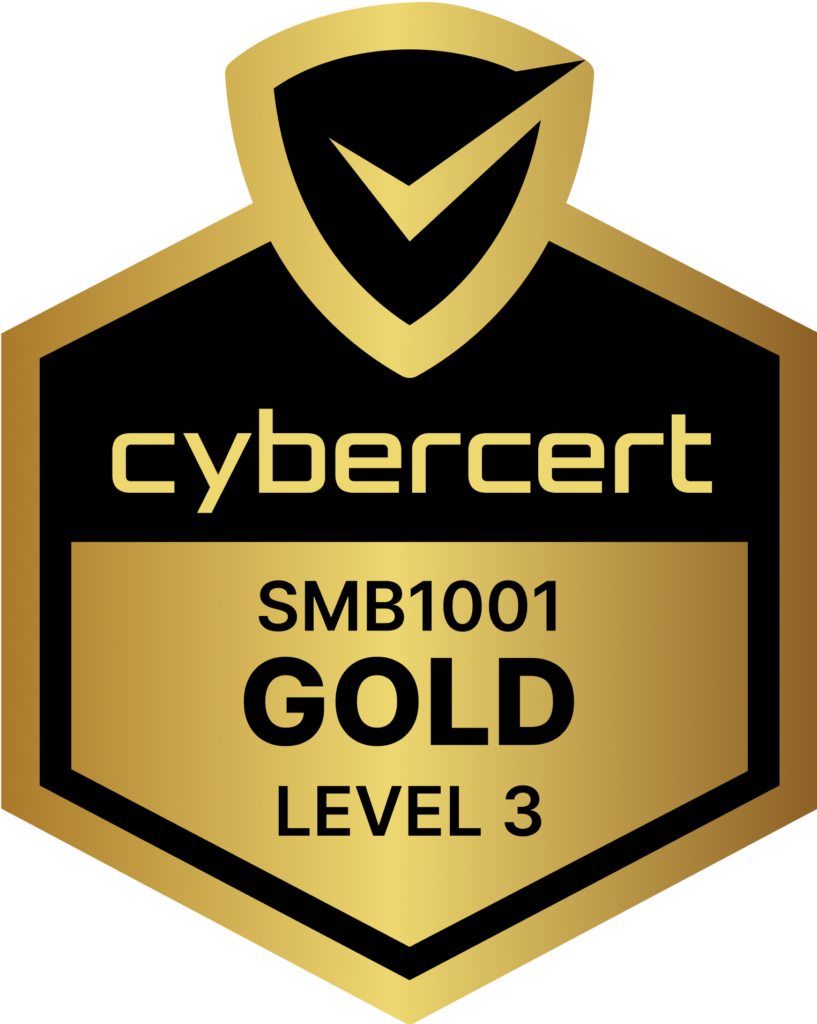
We recently achieved SMB1001 Gold, the third of five tiers. The process took around six months and covered technical uplifts, policy documentation, and third-party vendor accountability.
What it revealed wasn’t a long list of gaps. It was how much good practice we already had in place that simply wasn’t documented. Cyber awareness training that engineers were completing but nobody was formally tracking. Password governance that existed informally but hadn’t been written down. Account management processes that were sound but undocumented. The certification process forced us to formalise what we were already doing, and in doing so, made it auditable, repeatable, and demonstrable to anyone who asked.
That’s a pattern we see consistently across businesses at the 30-to-100-staff mark. The foundations are often stronger than people think. What’s typically missing is the structure and documentation to prove it.
If your cyber insurer, your biggest client, or your board asked you to demonstrate your cybersecurity maturity tomorrow, not describe it, but demonstrate it, what would you be able to show them?
If the honest answer is not much, that’s worth taking seriously. Not because a breach is necessarily imminent, but because the window for getting ahead of this expectation is narrowing. Businesses that can produce evidence of structured, certified security practices are increasingly differentiated in insurance conversations, in procurement processes, and in client confidence.
The good news is that for most businesses, the starting point isn’t as far away as it looks. A gap assessment against either framework will typically show that a significant portion of requirements are already being met. The work is usually in formalisation and documentation, not in building security from scratch.
If you’re not sure where your business sits, a gap assessment is the logical first step. It gives you a clear picture of what you have, what you’re missing, and what a realistic certification pathway looks like, without committing to anything before you understand the scope.
We’re also hosting a webinar shortly that will walk through both frameworks in detail, compare them side by side, and outline what a practical pathway to certification looks like for a Brisbane business. If this is something your business is starting to think about, it’s a worthwhile hour.
Ready to move from research to action? The first step is understanding where you currently stand. A baseline security assessment can break decision paralysis by giving you concrete starting point. Contact us today to discuss your current cybersecurity posture and next best steps forward.
Sources
Australian Signals Directorate, Annual Cyber Threat Report 2024-25, cyber.gov.au
Cliffside, Cyber Insurance Requirements Australia, cliffside.com.au (March 2026)
4iT, Cyber Insurance for Australian businesses in 2026, 4it.com.au (May 2026)
The most expensive cybersecurity decision most Brisbane businesses make isn’t the wrong product or the wrong vendor. It’s the decision to keep putting off a decision.
We see this pattern regularly: a business leader knows the security posture needs attention. They’ve probably known for a year or more. So they request a couple of quotes, attend a webinar, bookmark a few articles, and tell themselves they’re being diligent. Meanwhile, the calendar moves forward and the actual risk doesn’t go anywhere.
What looks like prudent deliberation is often something else: decision paralysis. And unlike a bad vendor choice, which you can reverse, paralysis has a way of quietly running up a bill that never appears on an invoice.
Decision paralysis around cybersecurity isn’t irrational. It comes from concerns that are genuinely legitimate.
All of these concerns are valid. The problem is that whilst you’re carefully weighing them, costs are accumulating in ways that don’t show up until it’s too late to avoid them.

Decision paralysis carries real costs: most of which don’t appear on invoices or in budgets. Here’s what accumulates whilst you delay:
Cost 1: Rising Insurance Premiums
Cyber insurance premiums have increased 50-100% over the past three years. Insurers now require detailed security questionnaires. Without demonstrated maturity: certifications, documented controls, evidence of ongoing management. You’re in the high-risk category.
The cost: For a typical Brisbane business, the difference between high-risk and demonstrated-maturity premiums can be $5,000-15,000 annually. That’s $60,000-180,000 over three years of delayed security improvements.
Cost 2: Lost Tender Opportunities
More RFPs require security certifications or demonstrated framework compliance. If you can’t tick those boxes, you’re not even shortlisted. Your competitors with Essential Eight or ISO 27001 certifications win by default.
The cost: How many tenders have you declined or not pursued because you knew you couldn’t meet security requirements? Even one missed $100,000+ contract dwarfs most security investments.
Cost 3: Client Confidence Erosion
When clients send security questionnaires and you can’t answer confidently, you’re creating doubt. “We’re working on it” or “That’s on our roadmap” sounds like you’re not taking their data seriously.
The cost: Client relationships are hard to quantify, but erosion is real. Clients who lose confidence in your security posture start evaluating alternatives. By the time they switch, it’s too late to rebuild trust.
Cost 4: Leadership Time Waste
How many hours have you and your leadership team spent researching cybersecurity, getting quotes, attending vendor demonstrations, reviewing proposals, and discussing options without reaching decisions?
The cost: If your leadership team has spent 10 hours monthly for six months researching without deciding, that’s 60 hours. At $200/hour opportunity cost, that’s $12,000 spent on indecision, with nothing to show for it.
Cost 5: Catching Up Is More Expensive
When you finally must improve security, because an insurer demands it, a client requires it, or a regulation mandates it, you’re implementing under pressure. Rushed implementations cost more:
The cost: Urgent security projects typically cost 30-50% more than planned implementations. Plus, quality suffers when you’re racing deadlines.
Cost 6: Regulatory Exposure
Privacy and security regulations are tightening globally. The Australian Privacy Act amendments, mandatory breach notification requirements, and industry-specific regulations all increase compliance obligations.
Businesses that haven’t built security maturity face regulatory risk. When breaches occur, and statistically, they will, demonstrable security efforts influence both regulatory response and public perception.
The cost: Regulatory fines, legal fees, remediation costs, and reputational damage. For Australian businesses, data breach costs on average $4.26 million according to IBM’s 2024 Cost of a Data Breach Report.
Beyond direct costs, decision paralysis carries opportunity costs: benefits you forgo by not improving security:
Competitive Advantage Lost
Security maturity is becoming a competitive differentiator. Businesses that can demonstrate Essential Eight compliance or ISO 27001 certification win contracts against competitors who can’t. They command premium pricing because clients value demonstrated security.
Whilst you delay, competitors are building this advantage.
Strategic Clarity Missed
Businesses with strong security posture make better strategic decisions. They can confidently pursue cloud migrations, enable remote work, adopt new technologies, and expand into regulated industries: all opportunities that require security confidence.
Decision paralysis on security creates decision paralysis on strategy.
The Cost of Deferring
There’s a psychological cost to ongoing uncertainty. Business leaders who aren’t confident in their security spend mental energy worrying. Every news story about a breach triggers anxiety. Every client questionnaire creates stress.
Confidence in your security posture frees mental bandwidth for growth activities.
Understanding the costs of inaction helps, but it doesn’t answer the underlying question: where do you actually start?
In our experience, what breaks the cycle isn’t more information. It is structure. Most of the businesses we work with that have been stuck in research mode for months aren’t lacking data; they’re lacking a decision-making framework and someone they trust to guide them through it.
Trusted guidance matters more than most people realise. When you’re evaluating vendors who all have an interest in the outcome, you can’t get unbiased prioritisation. What actually moves things forward is an adviser who can look at your specific situation and say: given where you are, here’s what matters first, and here’s what can wait.
Recognised frameworks like Essential Eight and SMB1001 are genuinely useful here, not because they make the decision for you, but because they dramatically reduce the number of decisions you need to make. Instead of evaluating every possible security improvement against every other, you’re working through a structured set of proven controls that insurers, clients, and regulators already recognise. The scope becomes manageable.
Staged investment helps too. You don’t need to commit to everything at once, and framing security improvement as a 12-month journey rather than a single project changes the calculus entirely.
But the thing that matters most, and what we see makes the biggest difference, is simply a clear starting point. Most businesses delay because they don’t know where they currently stand. A baseline assessment against a recognised framework gives you that. Once you know the gap between where you are and where you need to be, the next decision becomes obvious rather than overwhelming.
Let’s put the costs of inaction into perspective with actual numbers:

Meanwhile, strategic cybersecurity investment typically ranges from $30,000-60,000 annually for comprehensive guidance and implementation.
The question isn’t whether you can afford to invest in cybersecurity. It’s whether you can afford to keep delaying.
If you recognise your business in any of this, the path forward is simpler than the research phase has probably made it feel.
The gap between where most businesses are and where they need to be is almost always smaller than the paralysis suggests. And the businesses that finally move forward consistently say the same thing: the relief of having a concrete plan, rather than an open-ended research project, was immediate. The hard part wasn’t the work. It was making the first move.
Start by acknowledging that inaction has a cost. Then get a baseline. From there, the decisions get progressively easier, because you’re working from facts rather than estimates.
If you’d like to understand where you currently stand, a baseline assessment against Essential Eight or SMB1001 is the natural first step.
The businesses that make real security progress aren’t necessarily the ones with the biggest budgets. They’re the ones who’ve recognised that structured action, even imperfect action, beats indefinite research.
If you’ve been stuck in cybersecurity decision paralysis, calculate what delay is actually costing you. The number might surprise you, and it might be exactly what finally moves things forward.
Ready to move from research to action? The first step is understanding where you currently stand. A baseline security assessment can break decision paralysis by giving you concrete starting point. Contact us today to discuss your current cybersecurity posture and next best steps forward.
Every business leader knows cybersecurity matters. Yet most still struggle to make meaningful progress. The problem isn’t awareness. It is knowing what to do next.
Most Brisbane business leaders we speak to can articulate the cybersecurity risks their business faces. They’ve read the breach headlines. They know their clients are asking harder questions. They understand the insurance market has changed.
Awareness is no longer the problem.
What most businesses haven’t solved is what comes after awareness: making confident, informed decisions about what to actually do. Ask a business leader what specifically they’re working on, how they decided those were the right priorities, and how they measure progress and that’s usually where the certainty evaporates.
Over the past decade, cybersecurity awareness has skyrocketed. Businesses understand the risks. They’ve read the headlines about ransomware attacks. They know client data needs protecting. They’re aware insurance companies are asking harder questions.
Awareness is no longer the problem.
The problem is what comes after awareness: making informed decisions about what to actually do.
Most businesses get stuck on what we call the Awareness Plateau. They know cybersecurity matters, but without expertise to guide decisions, they’re left guessing:
These aren’t questions about whether cybersecurity matters. They’re questions about how to make progress when you don’t have internal expertise to guide the journey.
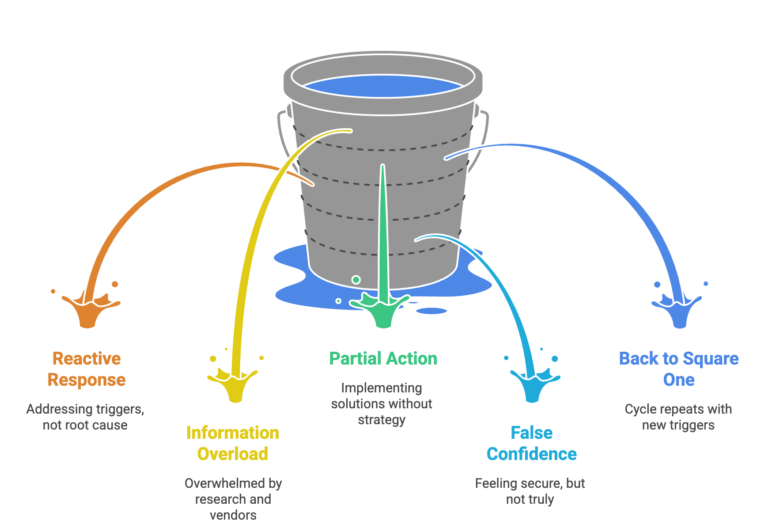
Here’s what the decision-making process looks like for most businesses without dedicated cybersecurity expertise, and it tends to follow a familiar pattern.
Something triggers concern: a client questionnaire, an insurance renewal, a news story about a breach that hits close to home. So the research begins. Google returns millions of results, every vendor claims their solution is the critical one, and the more you read, the more overwhelming it becomes.
Eventually, something gets implemented, usually whatever seemed most urgent or was recommended by the last person you spoke to. A firewall upgrade, a security audit, a new backup solution. For a while, it feels like progress. The immediate concern is addressed and security feels handled.
Then, six months later, another trigger arrives. A different client questionnaire. A new insurance requirement. And the realisation sets in: you’re still not confident about your overall security posture. You still don’t know if you’re focusing on the right things. You’re back to square one.
This cycle repeats because the underlying problem hasn’t changed: security decisions are being made without security expertise to guide them.
Many businesses assume their IT support provider handles cybersecurity. And in a sense, they do, but there’s a critical distinction most people miss.
Your IT support keeps your environment secure operationally. They patch systems, configure firewalls, manage antivirus, respond to incidents, and maintain security configurations. This is essential. It is your security foundation.
But operational security and strategic security are different capabilities:
Operational Security (What IT Support Provides):
Strategic Security (The Missing Layer):
Think of it this way: operational security keeps your house locked and the alarm working. Strategic security ensures you’re protecting the right rooms, meeting building codes, and can prove it to your insurer.
You need both. But most businesses only have the operational layer.
When businesses do seek strategic guidance, they often turn to security frameworks like Essential Eight or ISO 27001. These frameworks are excellent: they represent best practice distilled from thousands of organisations’ experiences.
But here’s what many businesses discover: frameworks tell you what good security looks like. They don’t tell you how to get there from where you are now.
Essential Eight, for example, specifies eight critical controls. For each control, it defines three maturity levels. The documentation is comprehensive and freely available.
Yet businesses still struggle to implement it. Why?
Frameworks are maps. But maps don’t navigate for you. You still need a guide who knows the territory.
Recognising they need expert guidance, many businesses commission a security audit or assessment. This seems logical: get an expert to evaluate your security and recommend improvements.
And it works: to a point. You receive a comprehensive report identifying vulnerabilities and recommending controls. For a moment, you feel clarity. Finally, someone has told you what to do.
Then the report arrives. Forty-seven recommendations. Prioritised as ‘Critical,’ ‘High,’ ‘Medium,’ and ‘Low.’ All valid. All important. All overwhelming.
Now you face new questions:
The audit provided a snapshot. But you need ongoing navigation. Without continued guidance, most audit reports end up filed away, with scattered implementation attempts that never build into coherent security maturity.
One-off audits create what we call ‘Point-in-Time Clarity’: you understand your security posture on the day of the audit. But security is a journey, not a destination. The clarity fades as your environment changes, threats evolve, and you implement controls without verification.
So if awareness isn’t enough, frameworks need interpretation, IT support handles operations not strategy, and one-off audits leave you stuck. What does work?
Strategic cybersecurity guidance provides what’s missing: ongoing expert advice that helps you make informed decisions month by month.
Here’s what that looks like in practice:
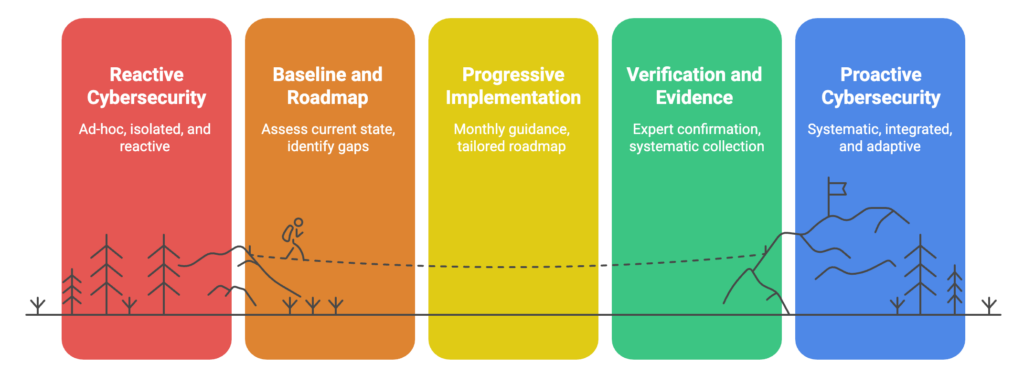
Month 1: Baseline and Roadmap
Assess where you are across recognised frameworks. Identify what you’ve already implemented and where gaps exist. Create a prioritised roadmap based on your specific situation, not generic recommendations, but tailored guidance considering your industry, risk profile, budget, and capacity.
Months 2-12: Progressive Implementation
Monthly meetings guide you through implementing the next controls on your roadmap. Not rushed: at a pace that suits your team’s capacity. Some months you tackle multiple improvements. Other months you focus on embedding one change properly whilst managing other business priorities.
When obstacles arise, you have expert guidance to overcome them. When circumstances change, the roadmap adapts. When new threats emerge, priorities adjust.
Throughout: Verification and Evidence
As you implement each control, expert verification confirms it’s done properly. Evidence is collected systematically, not scrambled together when audit time arrives. When you’re ready for certifications, everything is organised and prepared.
This approach transforms cybersecurity from guesswork into systematic capability building. You’re not wondering if you’re doing the right things. You have ongoing expert confirmation. You’re not stuck implementing an audit report in isolation. You have continuous guidance adapting to your reality.
The businesses that make real security progress aren’t necessarily the most aware of cybersecurity risks. They’re the ones who’ve stopped treating security as a research project and started treating it as a capability to be built, steadily, with expert guidance.
The good news is that the path from awareness to action is more straightforward than the overwhelm suggests. It starts with understanding where you actually stand, not a rough sense of it, but a proper baseline against a recognised framework. From there, the decisions get progressively clearer, because you’re working from facts rather than estimates.
If you’re stuck on the Awareness Plateau, knowing cybersecurity matters but uncertain about what to do next, a baseline assessment is the natural first step.
You open your cyber insurance renewal and see a 40% premium increase. Again. The fine print highlights “required security controls” and references frameworks you’ve never heard of. Meanwhile, one of your key clients just sent a vendor security questionnaire asking about your “cybersecurity maturity framework.”
This isn’t just paperwork, it’s the new cost of doing business. Australian businesses are discovering that basic antivirus and backups no longer satisfy insurers, clients, or compliance requirements. The challenge isn’t just implementing better security; it’s finding a structured approach that delivers enterprise-level protection without enterprise-level complexity.
Modern cybersecurity requires layered defences, documented processes, continuous monitoring, and measurable outcomes. Yet most security frameworks were designed for large enterprises with dedicated security teams and unlimited budgets.
That’s exactly why SMB1001 exists, the cybersecurity framework built for businesses that do not have a dedicated security function.
Before diving into technical details, let’s address the financial reality. Cybersecurity incidents don’t just cost money. They disrupt operations, damage client relationships, and can permanently impact your reputation. Meanwhile, cyber insurance premiums continue rising while coverage becomes more restrictive.
What we’re seeing across our client base is clear: businesses with documented security frameworks experience faster vendor approval processes, reduced insurance scrutiny, and access to opportunities that were previously out of reach.
The revenue opportunity is significant. Enterprise clients increasingly require vendor security assessments before engagement, and demonstrable alignment with the SMB1001 standard satisfies most security questionnaires. This opens doors to contracts and partnerships that security-conscious organisations simply won’t consider without proper documentation.
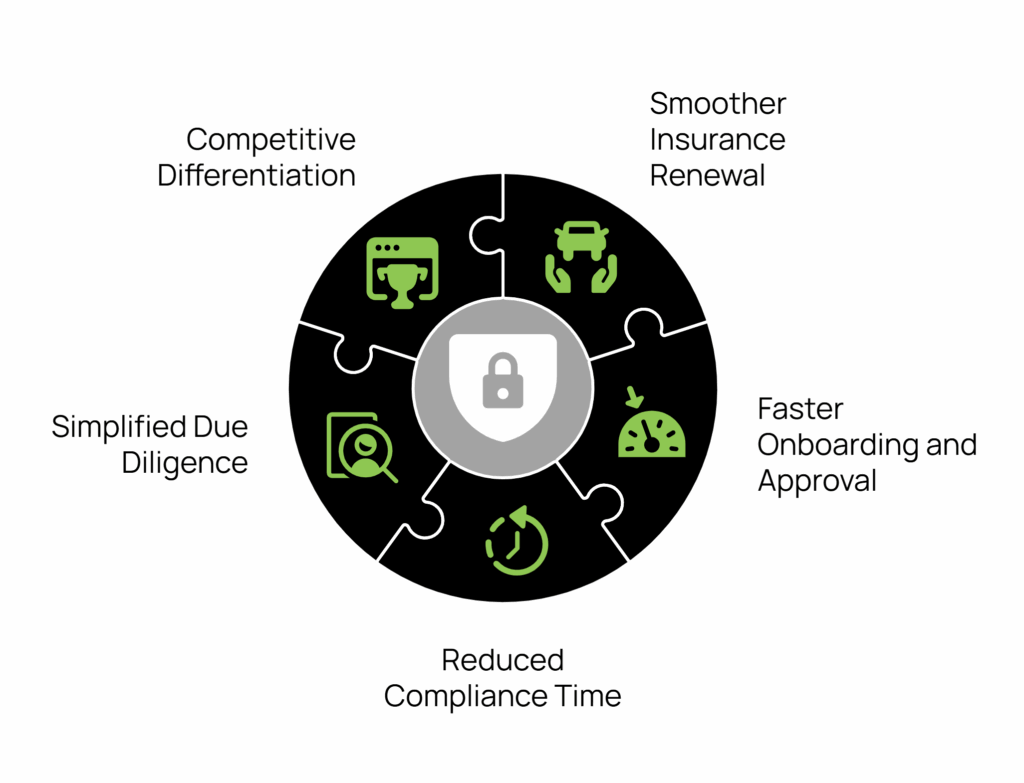
Structured security implementation delivers measurable business benefits:
Established cybersecurity frameworks like ISO 27001 and NIST are excellent, comprehensive standards that have proven their value across thousands of organisations worldwide. The challenge? These frameworks were designed for enterprises with dedicated security teams, substantial budgets, and complex organisational structures.
“SMB1001 takes the proven security principles from these established frameworks and adapts them specifically for smaller organisations, making enterprise-level cybersecurity both practical and achievable for growing businesses.”
The SMB1001 framework delivers this practical approach through four key characteristics that address the specific challenges growing businesses face:
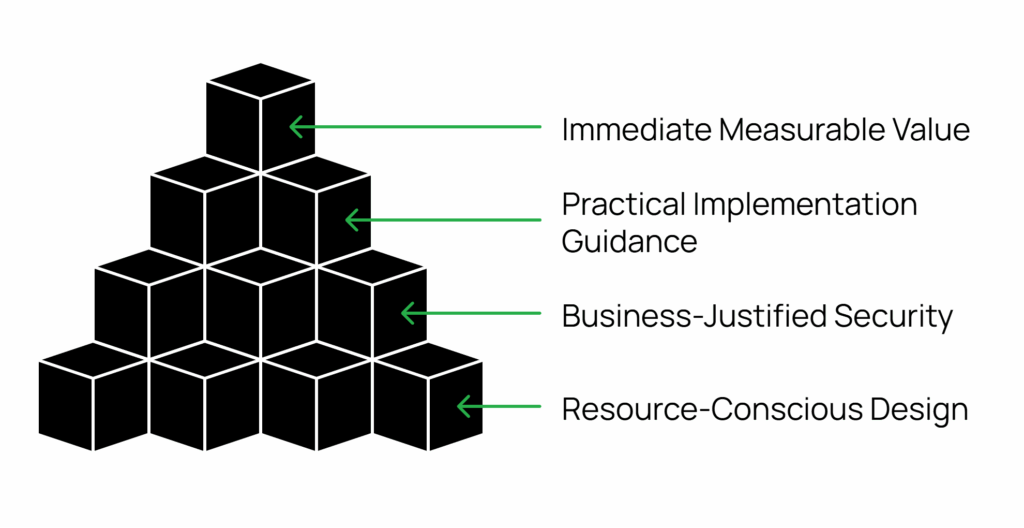
Resource-Conscious Design: Every control is evaluated against implementation cost and ongoing maintenance requirements. No recommendations require dedicated security staff or enterprise-grade budgets.
Business-Justified Security: Rather than generic best practices, each security measure directly ties to protecting your revenue, reputation, and operational continuity. This approach ensures businesses understand not just what to implement, but why it matters to their specific business model.
Practical Implementation Guidance: Step-by-step processes your existing team can follow without specialised cybersecurity expertise, supported by templates, checklists, and decision trees that eliminate guesswork.
Immediate Measurable Value: Quick wins and visible improvements establish momentum while building toward comprehensive protection that scales with your growth.
Perfect for establishing baseline protection and meeting basic compliance requirements. Achieving Bronze-level alignment addresses the most common attack vectors and can typically be accomplished within 6-8 weeks.
Core implementations:
Business outcome: Satisfies most insurance and basic client security requirements while dramatically reducing your exposure to common attack vectors.
Designed for businesses handling sensitive data or operating in regulated industries. Silver builds advanced capabilities on your Bronze foundation over an additional 8-10 weeks.
Enhanced capabilities:
Business outcome: Documented security controls needed for enterprise client contracts while significantly reducing successful cyberattack risk.
Full cyber resilience for organisations viewing cybersecurity as a competitive advantage. Gold-level organisations often see security transform from cost centre to revenue driver.
Advanced capabilities:
Business outcome: Win contracts specifically because of your security posture. Access previously restricted markets where security certification is mandatory. Above Gold sit two further levels, Platinum and Diamond. The practical difference is verification: Bronze, Silver and Gold are self-attested, signed off by a company director, while Platinum and Diamond require independent verification by an approved assessor. Most growing businesses certify at Bronze, Silver or Gold.
Rather than overwhelming you with detailed project plans, SMB1001 focuses on sustainable progress through clear phases:
Foundation Phase: Comprehensive security assessment establishes your baseline and identifies quick wins. Basic access controls and password policies provide immediate risk reduction.
Core Controls Phase: Deploy essential systems including asset management, incident response procedures, and reliable backups. Complete initial staff security training and document key policies.
Assessment Phase: Evaluate your implementation against Bronze-level requirements and address any remaining gaps. Establish a baseline for potential advancement to silver or gold levels.
The cybersecurity landscape continues evolving rapidly. Regulatory requirements expand, insurance standards rise, and client expectations grow more sophisticated. The organisations implementing structured cybersecurity frameworks today position themselves as trusted partners for tomorrow’s opportunities. These are part of the evolving cyber insurance requirements.
More critically, cyber threats evolve daily. Every day without proper security controls exponentially increases your exposure to incidents that could devastate operations and reputation.
SMB1001 cybersecurity framework isn’t about achieving perfect security overnight, it’s about building practical, sustainable cybersecurity that fits your business reality. Whether you need Bronze-level alignment to satisfy current requirements or Gold-level maturity to pursue enterprise opportunities, the framework provides a clear, achievable path forward.
The question isn’t whether you’ll eventually need structured cybersecurity, it’s whether you’ll implement it proactively or be forced into it reactively after an incident.
Our SMB1001 Gap Assessment Audit identifies your current security posture and maps your most efficient path to certification. Get clarity on your cybersecurity journey with a practical evaluation of your existing controls and priority improvements.
Transform cybersecurity from a compliance burden into a strategic business asset.
More and more Australian organisations are discovering the strategic advantage of ISO 27001 certification. It’s exciting to see businesses of all sizes embracing this globally recognised security standard, opening doors to new partnerships and market opportunities. What was traditionally the domain of enterprise organisations has evolved into a powerful business enabler for growing companies across the country.
Strip away the fancy language, and ISO 27001 is simply an internationally recognised way to prove you’re serious about protecting information. While it might sound complex, at its heart it’s about having a systematic approach to keeping customer data safe, protecting your business from cyber threats, managing access to information, and being prepared when things go wrong. Think of it like a driver’s licence for information security: it proves you know what you’re doing and can be trusted to handle sensitive information properly.
The good news is that Microsoft 365 already includes a range of features that can directly support your journey to ISO 27001 compliance. Let’s look at exactly how you can use Microsoft 365 features to meet specific ISO requirements. Here’s your practical guide to ticking those ISO boxes using tools you already have.
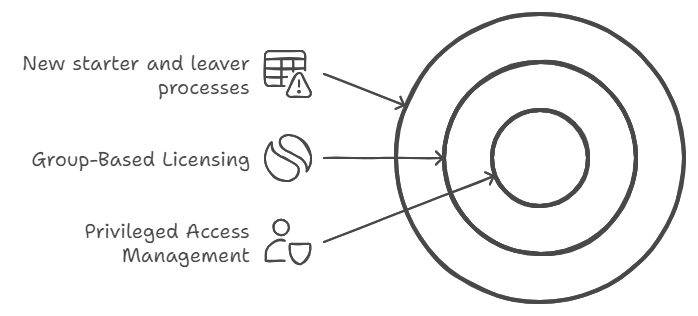
The standard demands formal processes for managing user access throughout the entire employee lifecycle. This control exists because inappropriate access rights are a major security risk: think ex-employees with active accounts, or staff with more system access than they need. ISO wants to see that you’re actively managing these risks through formal processes and regular reviews. You need a systematic way to grant, modify, and revoke access based on people’s roles, ensuring everyone has exactly what they need to do their job: nothing more, nothing less.
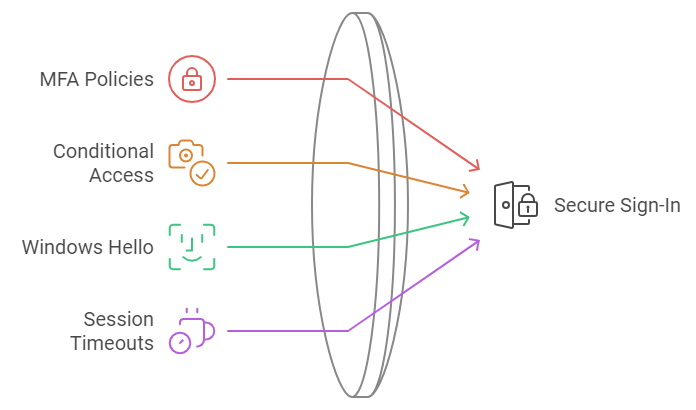
You need to prove you’re properly controlling system access. This requirement recognises that passwords alone aren’t enough anymore. ISO wants evidence that you’re using modern authentication methods to verify users’ identities, especially when accessing sensitive information or systems. It’s about making sure that even if someone gets hold of a password, they can’t automatically access your systems. The standard also emphasises the importance of protecting access information: like making sure password rules are strong enough and that you can detect and block suspicious login attempts.
You must show that sensitive information is properly identified and protected. This control recognises that not all information needs the same level of protection: your marketing brochure doesn’t need the same security as your customer credit card details. ISO requires you to think through what types of information you handle, how sensitive each type is, and what protection it needs. Then you need to show that you’ve got systems in place to consistently identify and protect information based on its sensitivity level.
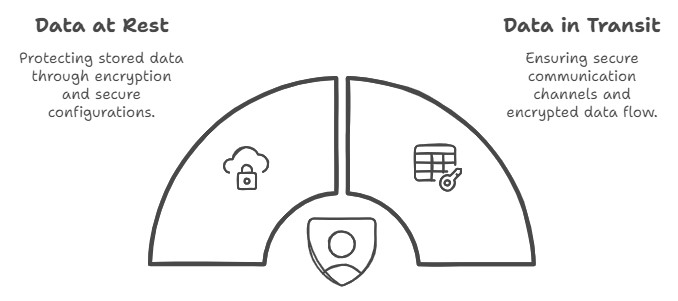
Sensitive data must be properly encrypted. This requirement goes beyond just turning on encryption: ISO wants to see that you’ve thought through when and where encryption is needed, and that you’re managing it properly. This includes having formal policies about what needs to be encrypted, managing encryption keys securely, and making sure your encryption methods are strong enough for the sensitivity of the data you’re protecting. It’s about ensuring that if someone does get unauthorised access to your systems, they still can’t read your sensitive data.
ISO needs you to prove you’re actively monitoring your systems. This means having systems in place to detect, capture, and investigate security events and user activity. It’s not just about recording what happens: you need to show that you’re actively reviewing these records and can spot potential security incidents quickly. Think of it like CCTV for your IT systems: it needs to be recording, but someone also needs to be watching the monitors.
Information needs to be protected whenever it’s being shared or moved around. This control focuses on keeping data safe when it’s in transit between systems or being shared with external parties. It’s about making sure sensitive information can’t be intercepted or tampered with when it’s moving between point A and point B, whether that’s within your network or out to external partners.

Getting ISO 27001 certified doesn’t mean buying new security tools. Microsoft 365 includes powerful features that map directly to ISO requirements: you just need to know what to turn on and how to configure it.
Need help setting up these controls or mapping them to your ISO requirements? That’s what we do. Let’s talk about getting your Microsoft 365 environment ISO-ready.
For small to medium-sized businesses, Microsoft 365 Business Premium offers a suite of productivity tools coupled with advanced security features. However, many organisations are not taking full advantage of the security capabilities included in their subscription. In this post, we’ll explore the key security features of Microsoft 365 Business Premium and how you can leverage them to protect your business.
Microsoft 365 Business Premium is more than just a productivity suite: it’s a comprehensive solution that combines the familiar Office applications with advanced security and device management capabilities. This license tier is often considered the “sweet spot” for small to medium-sized businesses, offering enterprise-grade features at a fraction of the cost.
Let’s dive into the security features that come standard with your Business Premium license:
Microsoft Defender for Office 365 is a cloud-based email filtering service that helps protect your organisation against advanced threats like phishing and zero-day malware.
Key components include:
Pro Tip: These features aren’t necessarily enabled by default, so make sure to activate them to take full advantage of their capabilities.
Intune is Microsoft’s mobile device management (MDM) and mobile application management (MAM) platform. It allows you to manage both company-owned and personal devices used to access company data.
Key benefits include:
Pro Tip: Start with basic policies like requiring a device PIN and the ability to remotely wipe company data. Gradually introduce more advanced policies as your team becomes comfortable with the system.
AIP helps you classify, label, and protect sensitive information. It can automatically detect sensitive data types (like credit card numbers or health information) and apply appropriate protections.
Key features:
Pro Tip: Begin by identifying your most sensitive data types and creating policies to protect them. Educate your users on the importance of data classification and how to use the AIP tools effectively.
MFA is one of the most effective ways to protect against unauthorised access. It requires users to provide two or more verification factors to gain access to a resource, significantly reducing the risk of compromised accounts.
Pro Tip: Implement MFA for all users, starting with administrators and gradually rolling out to all staff. Consider using the Microsoft Authenticator app for a user experience.
Conditional Access allows you to control access to your resources based on specific conditions. You can create policies that grant or restrict access based on factors like user location, device status, and detected risk level.
Key use cases:
Pro Tip: Start with a few critical policies and gradually expand. Always test new policies in a limited pilot before full deployment.
While primarily a compliance feature, Exchange Online Archiving contributes to security by helping you retain and protect important email data. It provides users with an archive mailbox for storing old email messages.
Key benefits:
Pro Tip: Set up retention policies that align with your industry regulations and business needs. Train users on how to access and use their archive mailboxes effectively.
One of our clients, a local mining company with 70 employees was struggling with security concerns, particularly around protecting client financial data. By implementing Microsoft 365 Business Premium and fully leveraging its security features, the company saw significant improvements:
The firm faced initial challenges with user adoption, particularly around MFA and Geo Location policies. However, with a comprehensive user training campaign, they achieved full adoption within three months.
Microsoft 365 Business Premium offers a wealth of security features that can significantly enhance your organisation’s cybersecurity posture. By fully leveraging these tools, you can protect your business against a wide range of threats while also improving productivity and compliance.
Remember, cybersecurity is not a one-time effort but an ongoing process. Regularly review and update your security measures to stay ahead of evolving threats.
At Grassroots IT, we specialise in helping businesses make the most of their Microsoft 365 investments. Our team of experts can:
Don’t leave your business vulnerable. Contact us today for a consultation, and let’s explore how we can enhance your cybersecurity with Microsoft 365 Business Premium.
Traditional security measures, while still important, are no longer sufficient to protect your organisation from sophisticated attacks. Enter Conditional Access Policies: a powerful tool in the Microsoft 365 suite that can significantly enhance your cybersecurity posture. In this post, we’ll explore how these policies work and why they are becoming an essential component of modern cybersecurity strategies.
Conditional Access Policies are a feature of Microsoft 365 that allows you to control access to your organisation’s resources based on specific conditions. Think of them as smart gatekeepers for your digital assets. Instead of a simple “yes” or “no” to access requests, these policies consider various factors before granting access, such as:
By evaluating these factors in real-time, Conditional Access Policies can make nuanced decisions about whether to grant access, deny access, or require additional verification.
It’s not hyperbole to say that cybersecurity threats are growing exponentially, so before we dive deeper into Conditional Access Policies, let’s consider the current cybersecurity landscape.
In this environment, a static, one-size-fits-all approach to security is no longer adequate. Organisations need dynamic, context-aware security measures that can adapt to different situations and threat levels.
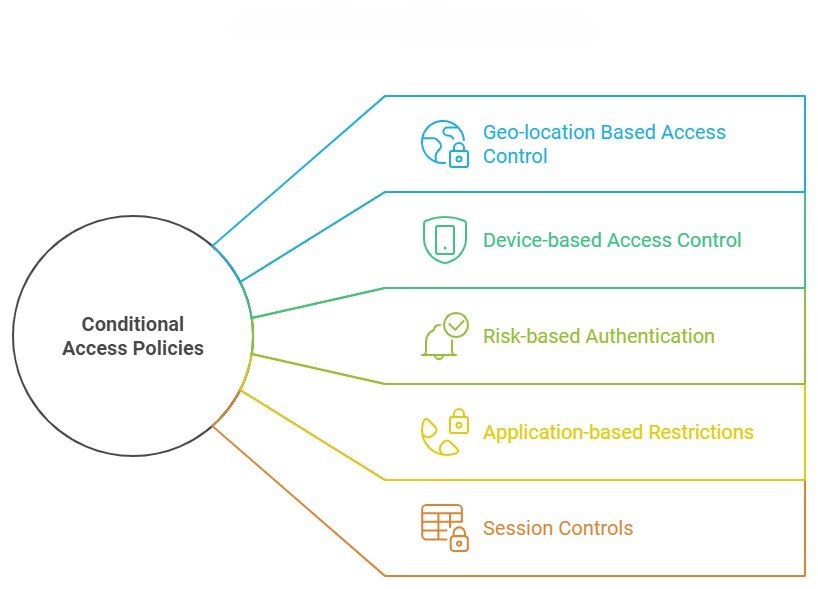
Let’s explore five keyways that Conditional Access Policies can dramatically improve your cybersecurity posture:
One of the most powerful features of Conditional Access Policies is the ability to restrict access based on geographic location.
How it works: You can set policies that only allow access from specific countries or regions where your business operates. Attempts to access your resources from other locations can be blocked or require additional verification.
Ensuring that only trusted devices can access your resources is another crucial aspect of cybersecurity.
How it works: Conditional Access Policies can be set to only allow access from devices that are managed by your organisation or that meet certain security requirements.
Why it matters: This prevents scenarios where an employee might access sensitive company data from a personal device that lacks proper security measures. It also mitigates risks associated with lost or stolen devices. This is particularly important in the context of your organisation’s BYOD policy.
Microsoft’s cloud intelligence can detect signs of suspicious activity, which Conditional Access Policies can use to adjust authentication requirements in real-time.
How it works: If a login attempt is flagged as high-risk (e.g., it’s from an unfamiliar location or shows signs of bot activity), the policy can require additional verification steps or block access entirely.
Why it’s powerful: This adaptive approach means that routine, low-risk activities aren’t disrupted, but potential threats are met with appropriate security measures.
Not all company resources are equally sensitive. Conditional Access Policies allow you to set different access requirements for different applications or data types.
How it works: You might set a policy that allows broad access to the company intranet but requires multi-factor authentication and a company-managed device to access financial systems.
Conditional Access doesn’t stop working after the initial authentication. It can also control what users can do during their sessions.
How it works: Policies can be set to limit activities like downloading, printing, or copying data from certain applications, even after a user has been granted access.
Why it matters: This can prevent data exfiltration attempts, where a bad actor who has gained access tries to download large amounts of sensitive data.
Let’s look at how one of our clients, a mid-sized financial services firm, leveraged Conditional Access Policies to enhance their security:
Before implementing these policies, Company X had experienced several minor security incidents, including a case where an employee’s credentials were used to access company data from overseas during a time when the employee wasn’t travelling.
We helped them implement a comprehensive set of Conditional Access Policies, including:
The result? In the six months following implementation:
While the IT team initially worried about user pushback, they found that most employees appreciated the additional security, especially once they understood how it protected both the company and their own personal information.
In an era where cyber threats are constantly evolving, static security measures are no longer enough. Conditional Access Policies provide a dynamic, intelligent approach to cybersecurity that can dramatically improve your organisation’s security posture.
By implementing these policies, you can:
Remember, cybersecurity is not a one-time effort, but an ongoing process. Regularly reviewing and updating your Conditional Access Policies should be a key part of your overall security strategy.
At Grassroots IT, we specialise in helping businesses leverage the full power of Microsoft 365, including advanced security features like Conditional Access Policies. Our team of experts can:
Don’t wait for a security incident to occur. Take proactive steps to protect your organisation today. Contact us for a consultation, and let’s explore how we can enhance your cybersecurity with Conditional Access Policies.
