
Microsoft Office 365 is built from the ground up to be a highly secure platform, but that doesn’t necessarily mean that your own Office 365 environment is configured securely. There are numerous different ways that organisations can use Office 365, and just as many ways that it can be configured.
Ultimately the responsibility for securing your Office 365 environment, and the information and data stored in there, rests with you. Microsoft provides the platform and the means, but it’s up to you to consider your unique situation and ensure that appropriate security measures are taken.
So how do you know if your Office 365 environment is secure? Every organisation is different, and with so many ways of using and securing Office 365 there is no one-size-fits-all solution. The good news is that there are some well-established best-practices that can significantly strengthen the security of your environment.
Here are five critical questions that you need to ask about your Office 365 security to ensure that you’re properly protected.
Let me start by saying that Microsoft has a frustrating habit of changing product names and bundles regularly, which can lead to some confusion. So, for the sake of clarity, let me share a bit of history with you.
First there were the Office 365 plans, offering a suite of products such as Word, Excel, Email and Teams. Then Microsoft added a whole new line of plans called Microsoft 365, which included all the things from Office 365, plus added a whole lot more, mainly to do with security and governance. Then more recently the Office 365 name has been retired entirely, leaving only Microsoft 365 plans to choose from. If you were using Office 365 plans before these changes happened, you will still be on those same Office 365 plans now.
It’s important to understand which Microsoft Office 365 plan you subscribe to, because not all of them have access to the better security features. For most organisations, we recommend that you subscribe to the Microsoft 365 Business Premium plan, or for some larger organisations, the enterprise level Microsoft 365 E3 or Microsoft 365 E5 plans. The important services that are included in these plans (but not the lower plans) are Azure Information Protection and Intune, both of which bring a range of security and data governance capabilities to your environment.
Review all your Microsoft Office 365 subscriptions and consider upgrading any that are not Microsoft 365 Business Premium, E3 or E5 so that you can take advantage of the better security and governance capabilities.
Microsoft Secure Score is a rating of your organisation’s Microsoft 365 security posture, compiled from a range of configurations, metrics and various other data points, depending on what Microsoft 365 plan you subscribe to, and what services you use. The higher the number, the more secure you are.
In addition to a numeric score, the Secure Score dashboard will also provide actionable insights and prioritised recommendations tailored to your unique needs. By following these recommendations, you can progressively improve your Secure Score and strengthen the security posture of your Microsoft 365 environment to provide better protection for your confidential data.
Review your Secure Score and progressively implement the recommendations to improve your score.
Multi-factor authentication (MFA) is an authentication method that requires a user to provide two or more verification factors to prove their identity and gain access to your Microsoft 365 environment, most often a password plus a unique code provided by a separate app.
Despite being one of the most effective cybersecurity measures you can implement in your Microsoft 365 environment, MFA is not always enabled by default or enforced across all accounts. The important point to remember is that your security is only as strong as the weakest link, so for MFA to be most effective it must be enforced on all accounts in your Microsoft 365 environment, not only some of them.
Review all accounts in your Microsoft 365 environment and enable MFA where necessary. Configure Microsoft 365 to enforce MFA on all accounts by default.
Read more: 3 reasons you need to enable Multi-factor Authentication (MFA) today
Every Microsoft 365 environment has one or more “admin” user accounts. These accounts possess elevated privileges that allow them to perform sensitive tasks such as changing system settings and accessing data anywhere across the environment. These admin privileges can be seen as the “keys to the kingdom”, and if allowed to fall into the wrong hands can be exploited to cause significant damage.
User accounts used for everyday tasks such as checking email and editing work documents should never be granted such elevated admin privileges, so as to reduce any potential harm should the account be compromised. Instead, dedicated “admin” accounts should only ever be used for duties requiring elevated security privileges.
Not only does this approach reduce the risk of accidental changes or security breaches, but it also makes it easier to monitor and audit their activities, improving accountability and traceability of any suspicious actions taken within your Microsoft 365 environment.
Review all user accounts in your Microsoft 365 environment for elevated admin privileges and remove such privileges in favor of dedicated admin accounts.
Even with a well secured Microsoft 365 environment, ongoing monitoring and alerting of unusual activity is important for the prevention of a full-blown security incident. Monitoring can help identify a range of suspicious activities, such as multiple failed login attempts, unusual data access or transfers, and changes in user permissions. These could be signs of a brute force attack, data breach, or insider threat.
Moreover, monitoring isn’t just about detection, it’s also about response. When you spot suspicious activity, you can quickly investigate, take corrective action, and learn from the incident to strengthen your defences.
Ensure monitoring is configured within your Microsoft 365 environment, and alerts are sent to the most appropriate person to take action as required.
Microsoft 365 is a highly secure platform, but that doesn’t mean that your organisation’s Microsoft 365 environment is secure by default. Microsoft provides the means, but ultimately, it’s up to you to ensure that your environment is secured appropriately, and that starts with asking the right questions.
If you have questions about your Microsoft 365 security, Grassroots IT can help. Speak with us today.
Cybersecurity awareness is the level of understanding and mindfulness that people in your organisation have of the various cybersecurity threats that they may face, and how they should best respond.
A shocking 82% of all data breaches involve some human element, such as social engineering or through plain old human error and misuse. What this tells us is that people, our staff, suppliers and partners, can not only be the weakest link in our cybersecurity posture, but also offer the greatest potential to help protect against cyberattack.
Cybersecurity awareness is the lever that we must use to shift our people from being our biggest cyber-risk to being our strongest line of defence.
With the average cost of a data breach in Australia reaching $4.4 million, cybersecurity attacks pose a very real and present threat to organisations of all types. Cybersecurity frameworks such as the ACSC Essential Eight and the NIST CSF can help us with strategies and security controls to help mitigate these risks, but technical controls can only help so far.
With the statistics clearly showing that the human element plays a major role in the effectiveness of our defences, we ignore cybersecurity awareness at our peril.
Intentionally building any culture takes time, commitment and consistency to create and reinforce the behaviours that we wish to see in our organisation. Building a culture of cybersecurity awareness is no different.
Here are five practical ways to engage your organisation and build the cyber-aware culture you need.
Culture is lead from the top and cybersecurity awareness is no different. All organisations look to their leaders to set the direction for the company not only through explicit statements, but also through implicit and implied messaging. Leaders must be seen to embrace the importance of a cybersecurity aware culture, and to lead by example.
Securing leadership buy-in can be helped by:
cybersecurity policies and procedures are at the heart of any cyber-secure organisation. Policies and procedures must walk the fine line between protecting the organisation and being overly restrictive on how staff may go about their work. Too lenient and they may be ineffective: too stringent and staff satisfaction and productivity may suffer.
Policies and procedures should be promoted regularly to keep them top of mind with staff, along with examples of best practice responses to various likely scenarios.
Some common ways of promoting cybersecurity policies and best practices can include:
Regular cybersecurity training will not only keep cybersecurity top of mind and reinforce best-practice threat response, but it will provide an avenue for keeping staff updated on the latest cyber-threats they may face. The challenge of course is to keep training engaging and effective.
You might like to consider these Ideas for delivering engaging cybersecurity awareness training:
Research has shown simulation-based cybersecurity awareness training to be the most effective when compared to other methods such as instructor led (a close second place) and online delivery. Simulations may be run periodically to quantify the level of cybersecurity awareness in the organisation and identify improvement over time.
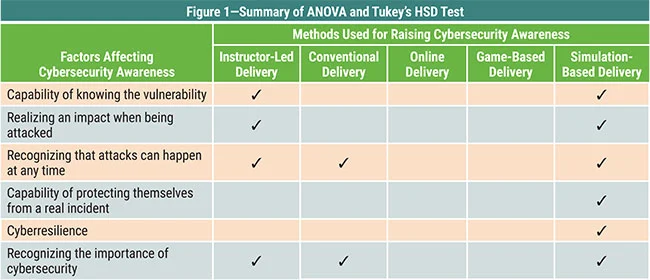
Table courtesy of ISACA.orgIn practice, the most common form of simulated cyberattack is referred to as “Friendly Phishing”, whereby staff are sent a fake phishing email to see how they respond. Those who are successfully tricked by the fake phishing email are immediately shown the error of their ways and are offered a brief online training snippet to educate them on how they could have identified the threat in time, and what a more appropriate response would have been.
When impacting any organisational change, it is important to be consistent both in the message and the delivery. Be clear up front what you want your cybersecurity culture to look like and ensure that all key stakeholders are aligned and have the tools available to drive the necessary change.
Organisational culture requires ongoing stewardship. It takes time to establish the culture that you want, and ongoing vigilance to keep it strong. Maintaining an effective culture of cybersecurity awareness is an ongoing process, not a once-off activity
Cybersecurity awareness presents both the biggest threat and the largest opportunity to your organisation’s cybersecurity posture. A poor level of awareness will leave you exposed to attack, regardless of what technical security measures you may have in place. A culture of high cybersecurity awareness on the other hand will be your strongest line of defence in protecting your company.
Most cybersecurity conversations start with tools: firewalls, endpoint protection, multi-factor authentication. Fewer start with policy, and that’s a gap worth closing. A business can own every security tool on the market and still get caught out, because nobody wrote down who’s responsible for reviewing access, what happens in the first hour of an incident, or what a staff member is and isn’t allowed to do on a personal device connected to the network. Tools enforce rules. Policy decides what the rules are.
We’ve pulled together five resources we point clients towards when they’re building or reviewing their own policy framework. None of them are ours, and that’s deliberate: these are the primary sources, straight from the bodies that set the standards.
The ACSC, part of the Australian Signals Directorate, is the first stop for anything cybersecurity-related in Australia. Cyber.gov.au carries current threat alerts, guidance for businesses of every size, and a straightforward way to report a cybercrime if one happens to you. If you bookmark one government resource, make it this one.
Also from the ACSC, the Essential Eight sets out eight mitigation strategies that, done properly, stop the large majority of cyber incidents businesses actually face. It’s increasingly showing up as a mandatory requirement in tenders, contracts and cybersecurity policies, not just a nice-to-have. [EDITORIAL NOTE: we cover Essential Eight in far more depth in a separate post, and it’s worth linking the two together once both are live.]
The Australian Securities and Investment Commission has put together a set of questions board members should be able to answer about cyber risk: whether a risk management framework exists, whether the board understands its organisation’s specific cyber risks, and whether there’s a clear plan for the first hours after an incident. If you sit on a board or report to one, this is a useful checklist to work through before someone else asks you these questions.
The federal government’s business.gov.au site has a practical guide to drafting a cybersecurity policy from scratch, covering the basics most businesses miss: password requirements, rules around social media and personal device use, and what an incident response plan needs to include. It’s a reasonable starting template if you don’t have a policy at all yet.
The University of Queensland publishes its own Cyber Security Policy in its policy library. Reading a real, working policy from an organisation with genuinely complex requirements is often more useful than a generic template, because it shows you what the finished document actually looks like in practice.
Policy and governance won’t stop every attack. Nothing does. But when something does go wrong, having already decided who does what, and having a documented framework to point to, is often the difference between a contained incident and a chaotic one. If you’re not sure where your own policy stands, that’s a reasonable place to start a conversation with us.
It is a common understanding that passwords are supposed to protect our accounts. But how much does your designated password protect you and your information? If the bad guys come hacking into your personal and corporate accounts one day, how sure are you that it’s going to be a tough job for them? Let us help you assess how easy it is for a hacker to take a quick guess of your password.

Your password is your first line of defence from wrong doers in the digital world. And yet, it is something that we often overlook and take for granted. When was the last time you spent a dedicated amount of time to think about what password to use for your new account? We often just use a single password across all of our accounts to save us the time and effort. Am I right? This is a definite no-no! Using a single password for all accounts is just making a hacker’s job much easier. So what is the best way to manage passwords and protect your accounts?
In order to plan for an effective account protection strategy, let’s start with a rundown on how hackers guess passwords:
Although you can’t really call it ‘wild.’ These hackers are trained to squeeze the juice out of your public information just to get a list of sophisticated guesses to your password. They use sophisticated programs and procedures to ultimately catch that one ticket into your personal data.
Sadly there are lurkers who discreetly stick their heads out from behind your shoulder as you type in your password, prying on what you type and browse. Don’t underestimate them: always be cautious of who can see your information in your surroundings.
There are some hackers who are so hard working that they would endure matching your personal data with every word in the dictionary. Yes, they exist. They would browse through every possible word to partner with, for example, your birth month, in order to guess your passwords.
Be careful of strange emails that you find in your inbox: this might be a phishing attack. They might be schemes sent by scammers who are trying to lure you into clicking and opening malicious files that intend to steal your personal information. As of October 2018, phishing activities has already cost victims $47,676 of loss this year (source: scamwatch.gov.au). So beware of being tricked into opening an email about winning a brand new car and clicking on links.
As the label implies, it’s a pretty vicious attack on your accounts. All the hacking techniques mentioned above are used on your account to track your keystroke and eventually get whatever important data can be stolen from you.
Knowing these hacking strategies and your current password choices, can you confidently say that your accounts are safe? Now that you already have an idea how cyber criminals do it, here are some ways on how you can minimise your risks:
I know people will usually recommend starting at 6 but, it wouldn’t hurt to add in two more characters if it means increasing your security because nowadays, the longer your passcode is, the more time a hacker needs to spend cracking their way into your account.
To make it harder to track and follow your keystrokes, you might want to utilise as much letters and characters as you can.
Remember that most of the time, the people who are trying to hack their way into your account already know enough about you. Don’t use a word or phrase that can be obviously related to you.
What I mean by this is that you can use words that are hard to “guess” and identify. Maybe use that one phrase you came up with in primary school that nobody understood.
Hackers can track your keystrokes in order to decipher which letters or characters you are constantly using. Making your password random can help minimise the risk of getting your usual password input tracked and followed by cyber criminals.
You can also have a look at an infographic of an anatomy of a secure account to have a more comprehensive view of how you should be securing your accounts.

Don’t take your password for granted and take the easy way out, rather than thinking of a good one. And if you’re like me who tends to forget anything (and everything), including passwords, there are tons of useful tools and apps that you can use to store your precious security passcodes.
Here are some of the more well known password management programs.
1. LastPass
One of the top on the list of best password managers. It features advanced hashing that provides a secure haven for your passwords. It runs across a wide range of operating systems and is free of charge unless you want to buy Premium subscription. Having the free version is not bad at all with 2 Factor Authentication feature and a password generator.
2. Dashlane
Aside from keeping your password safe. Dashlane also has a feature called digital wallet where you can safely manage your credit card information so you can securely make online purchases. It also allows you to sync your data to the cloud so you can access your passwords wherever.
It is one of the most user-friendly password applications in the market. It may look a little outdated but works as well as the other ones already mentioned. It provides secure management for an unlimited number of passwords. It is free of charge unless you upgrade to premium then you can sync your data into different devices.
4. bitwarden
It is an open source software (which means it’s free!) that features 2-Factor Authentication, end-to-end encryption and enables syncing to multiple devices without limits. It also boasts a password generator and runs through multiple operating systems.
At Grassroots IT, we recommend the BEST way to protect your accounts is using Multi Factor Authentication (MFA). So that even if the hackers guess your passwords, they still need a real-time authenticator to get into your accounts. Read more about that over here.
It can be easy to overlook such a thing as your account passwords but we really do live so much of our lives online these days, that it’s become increasingly important to be vigilant about protecting our personal information and corporate data. If you need any help setting up some additional security for your personal accounts, don’t hesitate to make a time with us.
Back to more news, updates and resources or learn more about Cybersecurity
CEO’s play a vital role in protecting their business from cybersecurity attack, however for many CEO’s, the world of cybersecurity leaves them feeling confused and vulnerable. This is perfectly understandable given the complex and rapidly changing nature of security threats facing all organisations. So how does a CEO properly secure their business? The good news is that there is no need to become a cybersecurity expert! Here are our top 5 cybersecurity tips for CEOs to help their organisation stay safe from online attacks.
In the past, cybersecurity was a technical IT responsibility. However, cybersecurity has been developing more into a business driver rather than a technology issue for some time. That’s why it’s important to ensure board level buy-in and support.
The main ways that CEOs can gain buy-in from their board are:
A cybersecurity plan is something every staff member, at every level, must be aware of. This means that if a breach occurs, everyone knows what to do.
A cybersecurity plan should include:
This plan can also be called a ‘Crisis Management Plan’, which you can learn more about in our blog ‘5 questions board members need to ask’.
Cybersecurity is not a one-size-fits-all kind of investment. Many companies: especially businesses, Non Profit organisations and start-ups: struggle to make the right security choices. Yet choosing cheaper options will end up costing more in the long term.
Cybersecurity is more than just having anti-virus software in place. The best cybersecurity measures are outlined in the Essential Eight Framework, as identified by the Australia Cyber Security Centre.
Essentially, your cybersecurity needs to cover:
The chance of experiencing a ransomware breach, so it’s important to quickly identify when an attack has occurred. The sooner a breach has been identified, the better!
The main things for a CEO to understand are:
All company departments and employees should be involved in protecting the company’s valuable and sensitive data. Crafting a culture where all employees see themselves as having an active cybersecurity role is the key to addressing an inevitable ransomware attack. It’s important that this culture starts at the top with the CEO.
Three ways to help create this desired culture are:
Understanding ransomware and what to do when it occurs is the job of a CEO. By implementing the above 5 cybersecurity tips for CEOs, you will be well on your way to properly protect yourself from a ransomware attack, and ensure your company isn’t tomorrow’s news!
A cybersecurity breach can be extremely disruptive and expensive, potentially resulting in significant downtime and lost productivity, permanent loss or public exposure of confidential information, reputational damage and direct financial loss. The potential impact of a security breach could be devastating or potentially fatal to any organisation. That’s why cybersecurity should have oversight at the highest level.
A cybersecurity strategy will also call on resources from across the organisation, including finance, human resources, IT, and operations. To gather this appropriate support and commitment from across the organisation requires a suitably senior authority to champion the cause.
Here are the 5 cybersecurity questions board members need to ask.
Although board members don’t need to have a deep technical knowledge of the organisation’s cybersecurity defences, some understanding of the systems that are in place is important. Equally critical is an understanding of how these systems are resourced and managed on an ongoing basis, as well as how the board will be kept informed.
Cybersecurity is not a “once-and-done” proposition; it’s one that must be actively managed. Are your security measures current and always evolving to keep up with new and more sophisticated threats? Are they being audited regularly to identify gaps and ensure compliance with established standards? Are your systems proactively tested, such as with mock attack scenarios and penetration testing?
In the event of a successful cybersecurity attack against your organisation, a rapid response is critically important to limit the extent of the attack and minimise the potential impact. The longer a successful attack is allowed to remain in place, the further it may spread and the more complex and expensive it may become to resolve.
As a board member you should satisfy yourself that any security breach will be rapidly identified and responded to. Ask:
Instead of considering how your organisation will respond if a breach occurs, think instead in terms of responding when a breach occurs. Assume that a breach will occur and plan accordingly by having an incident response plan in place.
At a basic level, a cybersecurity incident response plan should include:
When you’re thinking about how the organisation will respond in the event of a security breach, there are three plans of critical importance. Satisfy yourself that all three plans are in place, and are reviewed and tested on a regular basis.
In many cases, when recovering from a security breach the organisation may need to recover lost or damaged data from backup. The backup plan should detail how the organisation backs up important data, and how often? What is included in the backups? How often are the backups tested? How secure are the backups if a security breach occurs?
A disaster recovery plan details how the organisation will recover from a disaster, such as a security incident. Disaster recovery will often rely on the backup plan, but will also consider how the backups are to be used, what order systems are to be recovered in, how long recovery efforts may take, and what additional resources may be required, such as new data centre equipment or cloud tenants.
A security breach may result in significant disruption to business operations, with key systems rendered useless. A business continuity plan should address how the business may keep operating (even at reduced capacity) while the security incident is addressed and business systems recovered to an operational state.
Cyber insurance can help not only with the immediate response to an incident, but also with immediate and longer-term recovery efforts. Ensure you understand the scope and limitations of cyber insurance policies, that sufficient coverage is in place, and satisfy yourself that all policy obligations are being met by your organisation to ensure any claims are not denied. Cyber insurance may cover:
It’s no secret that, as we become more and more dependent on technology to run our businesses and become reliant on internet-connected devices, both for our personal and professional lives, we also become more vulnerable to cyber threats. US$2.9 billion is lost to cybercrime each minute and, as at 2020, the average cost of a data breach was a staggering US$3.86 million. However, there are some cybersecurity essentials that we can put in place, ranging from simple to more complex, in order to protect ourselves and our businesses from cyber attacks.
This is one of the simplest, but most effective cybersecurity essential strategies. It’s usually free, if not very cheap and easy to activate. Most applications (including Microsoft 365 and social media apps like Instagram and Facebook) have now adopted Multi Factor Authentication (MFA or 2FA) methods that you can activate by doing a quick look at your account settings.
This adds another layer of security (besides your username and password) to your accounts, requiring a real-time password before allowing entry to your account, making it far more difficult to penetrate and access your data. There are different methods depending on which app you’re using but the most common ones would be via a unique One-Time-Code sent through text, email or a code generator app like Google Authenticator.
These days, no business is “too small” to put adequate cybersecurity defences in place. All businesses who access the internet need a cybersecurity strategy, including endpoint security protection and management, network firewall management and security monitoring and alerting. Cybersecurity is more than just anti-virus software. If you aren’t sure what your business requires when it comes to cybersecurity, consult an expert and ensure you have the best strategy in place for your business.
Unfortunately many cyber attacks occur because of human error, when someone clicks on a malicious link or opens a suspicious email. Make sure that cybersecurity is a regular topic of conversation between your staff. Promote the importance of a positive cybersecurity stance in your business and make sure that everyone is following the trend. Welcome ideas about how you can better improve your cybersecurity measures and keep an active discussion around it.
help your staff with better knowledge of cybersecurity, its risks and effect on the business by conducting cybersecurity training: either internally or by hiring a knowledgeable cybersecurity expert to conduct the training. Making sure that everyone in your organisation is equipped with proper knowledge of cybersecurity best practices could save you from the otherwise dreadful consequences.
Although cybersecurity defences can physically protect your business from cybersecurity risks, having an incident response plan and insurance coverage could literally save your business from going under if the worst case scenario happens. It’s important to consult an insurance broker to source the best protection for your business, as coverage can change from policy to policy, but most cyber-insurance will cover your business in the event of:
Cybersecurity can often be put in the “too hard basket”, especially by smaller businesses who don’t perceive their risk to be very high. But when we are so connected to the internet through so many devices these days, we cannot afford to become complacent. Ensure you have all the cybersecurity fundamentals covered for your business in order to stay safe from cyberattacks.
Cyberattacks aren’t slowing down, and the businesses getting hit aren’t only the big, obvious targets. According to the ACSC’s own threat reporting, malware, data breaches and intrusion attempts have all continued to rise, and small businesses carry a real cost when it happens to them. [STAT CHECK: average reported cybercrime cost currently cited at $46,000 per small business, a 14% increase on the prior year, needs a current source.]
The Australian Cyber Security Centre built the Essential Eight in 2017 specifically to give organisations a practical, prioritised answer to that problem, rather than a vague instruction to “take security seriously.” The Australian Signals Directorate treats it as one of the most effective baseline defences available, for organisations of any size. [STAT CHECK: “mitigates approximately 85% of targeted attacks” needs a current, correctly attributed source.]
We push Essential Eight with clients for the same reason we hold our own ISO 27001 certification: certifications and frameworks are how you prove a security posture rather than just claim one. Essential Eight isn’t a checklist you complete once. It’s a maturity model, and where you sit on it is something an auditor can actually verify.
The eight strategies split across three goals: stopping attacks before they land, limiting how far an attack spreads if one gets through, and making sure you can recover data and keep operating if the worst happens.
Stopping attacks starts with controlling what’s allowed to run on your systems at all. Application whitelisting means only approved software executes, full stop, which closes off a huge amount of the malware that relies on tricking someone into running something they shouldn’t. Alongside that sits patching: keeping every application, driver and piece of firmware current, because vendors stop supporting old versions and every unpatched gap is a known, documented way in. Microsoft Office macros get their own strategy, because a macro embedded in an unassuming document is still one of the more common ways malware gets a foothold, so unverified macros get blocked outright. Application hardening rounds this group out: turning off the features you don’t use, browser plugins, Flash, unnecessary Java, so there’s less surface area for something to go wrong.
Limiting the extent of an attack is mostly about who can do what. Administrative accounts are the prize attackers go looking for, so those accounts shouldn’t be used for email or everyday browsing, and access should be granted based on what someone’s job actually requires, reviewed regularly rather than left to accumulate. Multi-factor authentication sits alongside this: a password alone is one factor, and requiring a second, a one-time code, a biometric check, a prompt on a registered device, closes off the single most common way accounts get compromised. Patching your operating systems matters here too, for the same reason application patching does: unsupported, unpatched systems are a standing invitation.
The last goal is making sure a bad day doesn’t become a business-ending one. Daily backups, stored somewhere an attacker can’t reach and overwrite, and tested regularly rather than assumed to work, are what turn a ransomware incident into an inconvenience instead of a catastrophe.
The ACSC scores Essential Eight maturity from level 0 (little to no implementation) through to level 3 (fully implemented, consistently, across the organisation). Level 3 is the practical target for most businesses we work with, and getting an honest read on where you currently sit takes an actual audit, not a guess. This is still the current model as it stands, though see the note below on where it’s heading.
Essential Eight isn’t standing still. In June 2026, the Australian Signals Directorate opened consultation on an evolution of the framework: a new “Essentials series,” starting with a first chapter called Essentials for enterprise IT, that expands on Essential Eight rather than replacing it outright. ASD has been clear that organisations already working through Essential Eight should expect strong alignment with the controls and investment they’ve already made. Consultation closed in July 2026, and we’re watching for what ASD does with that feedback.
For now, the eight strategies above and the maturity model they sit inside are still exactly what auditors, insurers and boards are asking about. That won’t change overnight, and we’ll update this post (and our maturity self-assessment) once ASD actually publishes something rather than just consults on it.
Essential Eight started life as guidance for federal government agencies. That history sometimes leads businesses to assume it’s not meant for them. It is. The threats it defends against don’t check what sector you’re in first, and we work with plenty of mid-sized, mid-complexity organisations for whom Essential Eight is now the baseline their insurer, their biggest client, or their board is asking about directly.
If you’re trying to work out whether your organisation is closer to level 0 or level 3, that’s exactly what our Essential 8 maturity self-assessment is for, and it’s a faster starting point than trying to read the ACSC’s own documentation cold. [STAT CHECK: businesses that suffer a serious data breach carry real risk of not surviving it, though the specific “60% within six months” figure circulating widely needs a proper source before we repeat it.]
No single control on this list is the whole answer. It’s the combination, applied consistently and checked honestly, that gets you somewhere defensible. Essential Eight gives you a specific, achievable target instead of an open-ended anxiety about cybersecurity in general, and that’s worth something on its own.
Microsoft 365 has many security features and capabilities built in, however with a few simple steps you can improve your Microsoft 365 security and greatly increase your cybersecurity stance with some easy changes to system configuration and business practices.
Multi-Factor Authentication is by far one of the most effective ways to improve Microsoft 365 security and protect accounts from being hacked. When you have multi-factor authentication in place, your employees will be required to enter in a unique, constantly changing code along with their usual username and password in order to log on to their Microsoft 365 account. Even better, Microsoft 365 has some super clever features that mean you will not be constantly prompted for this code if you are connecting from a trusted location or device.
Using Multi-Factor Authentication ensures that your valuable data doesn’t get compromised should your employees use easy-to-guess passwords or leave the password written down out in the open. While it’s important to use strong passwords, this second step ensures that a malicious party won’t be able to gain access as they would need the employee’s phone as well.
Your admin accounts come with elevated privileges, options, and security features. The people who use these accounts can grant rights to other users, install software, and more. This makes them a prime target for cybercriminals and hackers. Each administrator should have their own account, and they should have a separate user account for non-admin tasks.
Every admin account should have multi-factor authentication equipped. You should also routinely monitor these admin accounts to ensure they’re not granting unauthorised privileges to users who don’t need them because this increases your security risks. When an admin leaves the business, immediately shut down their admin account so they can’t use it against the business.
The Harvard Kennedy School has an excellent handbook to assist you in training your staff on cybersecurity called the Cybersecurity Campaign Handbook. This book can help you set up a culture of cybersecurity awareness that your staff can use from the moment you hire them. You’ll train your users to identify phishing attacks through their emails to keep hackers out.
Your staff should know what a strong password is, and how to set them up, how to protect their devices and how to enable security features on Mac PCs and Windows 10. Giving your staff ongoing training allows them to keep up with the latest threats.
Ransomware is a program that restricts an infected computer’s access to data by locking the computer or encrypting the data. Once you get locked out of the computer, it usually asks for a “ransom” to extort money out of the victims. This money is typically cryptocurrency like Bitcoin, and the hackers claim they’ll give you access back to your computer once they get the money.
You can create mail flows that block any file extensions that cybercriminals commonly used for ransomware. You can either block all file types that could contain malicious code or ransomware, or you could set up a rule that warns your staff that they’re about to open an Office file attachment that has macros.
Malware is an umbrella term that covers many types of software that purposely damage a computer. Malware can be Trojans, viruses, spyware, ransomware, or worms. Malware is short for “malicious software,” and training your staff on avoiding it is critical.
Luckily, Microsoft 365 comes with built-in protection against this form of cyber attack. You can enhance this protection by automatically blocking file types or attachments that cybercriminals commonly use for malware.
Encryption adds another layer of protection to any messages you send both inside and outside of your organisation. This way, if a staff member accidentally types in the wrong email and sends it to an unintended party, they can’t pass it around. The encryption lets only the intended party see the email when they open it.
You can have your staff use the “Do not forward” or the “Encrypt” prompt each time they send an email. Encryption comes built into Office 365, and it works with Yahoo!, Outlook.com, Gmail and other email providers.
Your emails are a vulnerable point for your organisation, especially if your staff have a habit of forwarding them. Any hacker that gains access to your staff’s inboxes can configure the inbox to automatically forward mail. When they do, they can attach Malware to the email and spread it throughout the organisation.
The first step you take is to make sure your staff aren’t forwarding emails on their own. You can set up a mail flow rule that prevents auto-forwarding emails from external senders. This way, even if a hacker does get in, they won’t be able to infect the entire system.
Your staff will routinely receive, share, and send attachments like spreadsheets and presentations. It’s very difficult to tell which attachments are safe to open and which ones are infected with malware.
Some Microsoft 365 plans come equipped with Advanced Threat Protection built-in. This suite includes ATP Safe Attachment protection. You have to enable it and set up a new rule for it. However, it can protect your staff from spreading malicious software through attachments.
You can configure anti-phishing protection in both Office 365 or Microsoft 365. You can set up a policy to protect your custom domain and your staff. This software protects your organisation from general phishing attacks and malicious impersonation-based phishing attacks. Hackers won’t be able to send impersonation emails from any user you have listed in your custom domain.
Grassroots IT are the Microsoft Office 365 security experts, keeping our clients cyber safe in Brisbane and across Australia since 2005. One thing we understand about Microsoft 365 security and compliance is that unless you work with these tools every day, it can be hard to “know what you don’t know”. For that reason, we created our Microsoft 365 Security & Compliance Packs: simple, fixed-price packs to help you take advantage of all of the advanced security and compliance features in Microsoft 365, without the complication of drawn out project scoping and design. Contact us today to learn more.
In years gone by, we may have thought the chance of experiencing a cybersecurity breach was pretty low but, these days, the more aware business leaders talk not about the possibility but of when a cyberattack will happen. So let’s talk about how can we take preventative action to defend our computer systems and keep the risk of an attack to a minimum.
In this market where almost everything can be found online and in the cloud, malicious attackers have a much wider window of opportunity to conduct their mischievous agendas. Businesses are becoming more and more familiar with cyber security breaches and the associated damage and downtime which impacts those attacked.
For the first half of 2019 alone, over forty organisations in Australia reported data breaches (source: webberinsurance.com.au) and they are just the cases officially reported. One report gathered from the quarterly statistics report of the Office of the Australian Information Commissioner (OAIC) showed a staggering ten million people affected by a single data breach incident that happened this year. On average, the OAIC received around 72 notifications of data breach reports per month from January to March 2019. That is contact information, financial details, personal identification, health information and more sensitive data being passed around the dark web unbeknownst to its users.
Many cyber security defences set up for businesses are primarily focused on protecting high profile accounts, but what is often overlooked is that cyber attacks have evolved over the years and the attackers have become more patient and strategic with their actions. Often they begin by targeting the more vulnerable and least protected profiles. From there, they penetrate upward into the organisation’s core data and before you know it, you’ve lost vital information just by leaving the backdoor open.
With the advancement in technology and the evolution of cyber attacks, cyber security is no longer optional. It is now a necessary part of building and maintaining a long-running, secure business.
One of the primary ways of defending our computer systems is through the use of firewalls.
What is a firewall? In order to use programs and apps that connect to the cloud, we need to be able to access the public internet from our private network. Firewalls block access to or from our private networks from unauthorised web users or illicit software while we’re connected to the Internet. A firewall may be implemented using hardware, software, or a combination of both.
Routers can provide some basic firewall services, but only offer minimal defence. As cyber criminals improve their strategies in conducting their attacks, the development and usage of firewalls has also needed to evolve. Enter the intelligent unified threat management firewall.
An intelligent firewall is similar to an ordinary router but it does more than basic firewalling. It works through your Internet traffic to filter, scan and look for potentially malicious activities going on in the background and sends out alerts to let you know about threats coming into your network so you can immediately diagnose the problem.
It also has the ability to enforce internal policies like preventing your staff from browsing and accessing potentially harmful or inappropriate websites at work. With the evolution of AI, some manufacturers are even using deep learning in their machines to track historical attacks to automatically prevent similar actions in the future.
The simplest way to learn if you do have an intelligent firewall in place is to ask your IT partner.
You can also look for some of the most trusted names when it comes to intelligent firewall devices. Here are some of the vendors that are known to do an extremely great job of securing your business network through the use of intelligent firewall appliances:
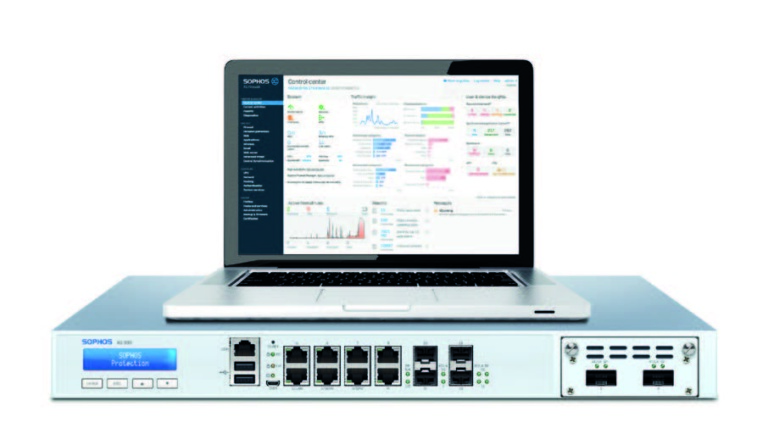
One of the top picks when it comes to endpoint protection. This award-winning vendor incorporates artificial intelligence and Endpoint Detection Response (EDR) technologies to provide a smart and reliable defence line for your network.

Created by the leading network device manufacturer Cisco, Meraki pushes simplicity and Cisco technologies forward to provide a rich and experience to newer generations. By utilising the cloud with wireless connections, Meraki promotes a more convenient approach to network management while ensuring the security of data within a wireless network.

Sonicwall has a broad range of products from hardware to other services to provide effective network security, control and visibility. It also integrates deep learning to be able to prevent repetitive intrusions to the network.
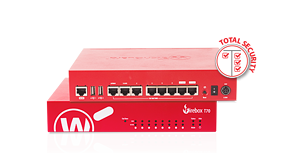
Costs and Benefits
Having an intelligent firewall will involve more costs than relying on a basic router, but also provides significantly more protection. An intelligent firewall is more than just a physical device. With the constant evolution and increasing sophistication of cyber attacks, an intelligent firewall needs to be connected to its vendor platform to deliver the latest updates, AI rules and knowledge in order to keep up and continuously provide you reliable security services.
Having a strong firewall protecting your network should not be considered optional in this day and age. With technology progressing so quickly and as we become more and more reliant on the internet to access our business systems, it’s imperative to have a solid layer of defence protecting your business data.
Now that you understand what an intelligent firewall is and its importance, start talking to your trusted IT partner to discuss the right firewall options for your business network. Seek the help of someone who can help you align your business goals and IT budget with your network security plan to ensure your business is well defended from cyberattacks.
This article is part of a cyber security series by Grassroots IT and The Power Up Project podcast.
Back to more news, updates and resources or learn more about Cybersecurity
