
A structural or civil engineering firm submits a bid through QTenders for a project it is genuinely well suited to deliver. Strong project history, the right licences, a competitive price. Weeks later, the bid comes back marked down, not on the technical submission, but on a section near the back asking for evidence of a cybersecurity framework. Nobody in the business had prepared an answer for that section, because nobody had ever needed to before.
That scenario is becoming common across Queensland, and it did not come from nowhere.
Under the Queensland Procurement Policy 2026 (QPP 2026), agencies are now required to actively consider cyber security risk, including supply chain risk, as part of every procurement decision, and to build appropriate information and cyber security clauses into the resulting contract. That requirement is scaled to the value, risk and complexity of the procurement, not a fixed checklist applied identically to every contract regardless of size. In practice, it still means a supplier bidding on anything beyond the smallest, lowest-risk work can expect cyber security questions or clauses to appear somewhere in the process, and the supplier who can only offer a verbal assurance is the one most likely to be marked down, or asked to accept a contract clause they have no way of actually meeting.
Agencies are also required to weigh supply chain risk as part of that same consideration, which is where this reaches beyond firms bidding directly to government. A subcontractor working under a head contractor, or a specialist consultant engaged on a government project, can find the same cyber security expectations passed down into their subcontract agreement, even if they never submit a bid to a government buyer directly. A mechanical or electrical subcontractor engaged by a head contractor on a council water treatment upgrade, for instance, can find a cyber security clause sitting in their subcontract, passed down from the head contract above it.
Tier one contractors, mining operators and oil and gas majors have been building the same expectation into their own supplier prequalification for some time. A cybersecurity posture now sits alongside the insurance certificates, ISO manuals and WHS plans that make up a standard prequalification submission for these clients. If your firm is on a mining or utility supplier panel, or hoping to get onto one, this is very likely already part of what you are being assessed against, whether or not it has been called out explicitly. The Essential Eight framework in particular has become a common reference point across both government and private prequalification, to the point where it now shows up as an expected baseline rather than a point of difference.
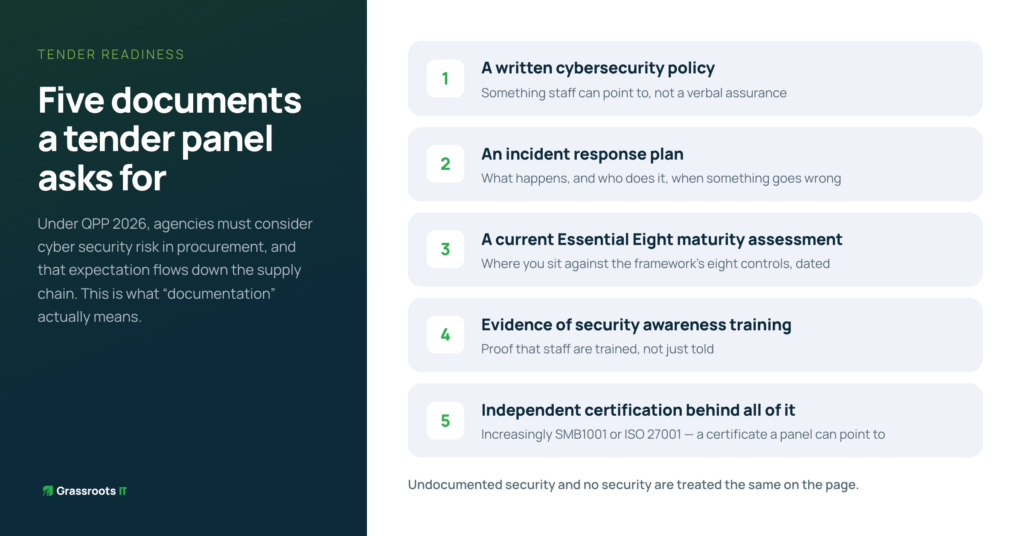
This is the part that trips firms up most, because “documentation” sounds vague until a panel is actually asking for it. In practice, it usually means being able to produce: a written cybersecurity policy that staff can point to, not just a verbal assurance that “we take security seriously”; an incident response plan setting out what actually happens if something goes wrong; a current Essential Eight maturity assessment showing where the business sits against the framework’s eight controls; evidence that staff receive some form of security awareness training; and, increasingly, independent certification such as SMB1001 or ISO 27001 sitting behind all of it. None of this needs to be built from scratch under tender pressure. It is groundwork that, done properly once, gets reused on every bid that asks for it.
Most firms caught out by this do not actually have a security problem. They run sensible IT, have never had an incident, and would probably pass a reasonable security review if anyone sat down and did one. What they lack is the paperwork: a documented framework, an evidenced process, a certificate a panel can point to. A prequalification or tender evaluation has no way to score good practice it cannot see. Undocumented security and no security are treated the same on the page, which is a genuinely frustrating position for a technically excellent firm to find itself in.
Firms getting ahead of this are not scrambling to build a cybersecurity policy the week before a tender closes. They already have a recognised framework in place, such as Essential Eight or SMB1001, documentation ready to attach without weeks of preparation, and, in a growing number of cases, independent certification behind it. Once that groundwork exists, a cybersecurity question on a QTenders submission or a mining panel prequalification stops being a risk and becomes one more thing your firm can answer confidently while a competitor is still working out what to say.
This is where we spend a lot of our time with engineering and technical firms: building security that is not just genuinely good, but provable on demand, whether that is for a QPP 2026 government tender, a supply chain flow-down requirement, or a private prequalification panel. We hold ourselves to the same bar as an ISO 27001 certified provider and an Essential Eight and SMB1001 specialist, so our clients can meet it without having to become security experts themselves.
If your firm bids on Queensland Government work, sits on a supplier panel, or is hoping to get onto one, it is worth finding out now whether your current documentation would hold up, rather than finding out when a bid comes back marked down over a section you did not expect.
Grassroots IT is a Brisbane-based managed IT services provider and Essential Eight and SMB1001 specialist for engineering and technical firms across South East Queensland. Learn more about our Cybersecurity services or SMB1001 program.
Updated 27 May 2026 with new licensing details.
Every few months we speak with a business owner or operations manager who tried Microsoft Copilot, found it underwhelming, and quietly switched it off. Sometimes they blame the technology. Sometimes they blame themselves for expecting too much. Usually, the real issue is neither.
Copilot is a capable tool. But it operates entirely within the environment you give it, and if that environment isn’t set up properly, even a sophisticated AI assistant will produce mediocre results. The gap between expectation and reality almost always comes down to a handful of predictable problems. Here’s what we see most often.
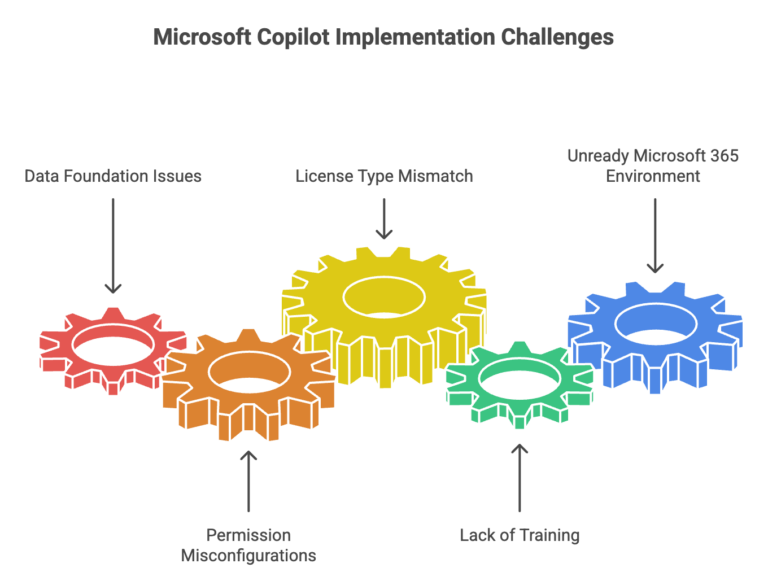
The data foundation isn’t there
Copilot draws on the information it can access within your Microsoft 365 environment: SharePoint files, emails, Teams conversations, and documents. This is what distinguishes it from generic AI tools: it can work with your actual business information, not just publicly available knowledge.
But that also means it reflects whatever your data looks like. Ask Copilot to summarise your organisation’s approach to a particular process, and it might surface a policy document from 2019 that nobody has opened since. Ask it to help draft a proposal, and it might pull context from the wrong project because files aren’t clearly named or consistently stored.
This isn’t a Copilot failure. It’s a data problem that Copilot makes visible. In our experience, businesses with well-organised SharePoint environments and consistent file management practices see noticeably better results from day one. Those with digital clutter accumulated over years find that Copilot is essentially trying to help you from inside a disorganised filing cabinet.
The fix isn’t an overnight overhaul. It is identifying where your actual sources of truth sit for the work your team does most often, making sure they’re in SharePoint or OneDrive, and ensuring they’re current. That foundation makes everything downstream work better.
Copilot respects the same access controls as your staff. If a user has access to a file, Copilot can use it. If they don’t, it can’t.
This is by design. It is good for security. But it also means that whatever your permission structure looks like today, Copilot inherits it. We regularly see two failure modes that cause problems.
The first is overly permissive environments. Broad, undifferentiated access means Copilot can surface sensitive information to users who shouldn’t see it: financial data, HR records, or confidential client information shared with staff who have no business reason to access it. This is a genuine risk, and businesses often don’t realise how open their SharePoint permissions actually are until they start thinking about AI.
The second is overly restrictive environments. Permissions so locked down that Copilot has almost nothing useful to work with, making it barely functional for the people trying to use it.
A permission review before rolling out Copilot is time well spent, not just for Copilot’s sake, but because it’s often the first honest look businesses have had at who can access what in years.
There’s currently more than one version of Copilot available to Microsoft 365 users, and the differences are significant.
Copilot Chat is now included at no extra cost across most Microsoft 365 business plans. It provides AI-powered chat functionality and is useful for web-grounded queries and basic assistance, but it doesn’t integrate into your Microsoft 365 apps, and it doesn’t have access to your organisational data.
Microsoft 365 Copilot is the full offering. It’s a separate paid add-on licence that integrates Copilot directly into Word, Excel, PowerPoint, Outlook, Teams, and other apps, and it can draw on your Microsoft 365 data. This is what most businesses mean when they talk about ‘getting Copilot.’
The reason this matters: some businesses believe they have Copilot when they’re actually using Copilot Chat. They’ve set expectations based on what the full product can do, tested it, found it lacking, and concluded Copilot doesn’t work. In reality, they’ve never had access to the product they were evaluating.
Rolling out Copilot and expecting staff to figure it out on top of their existing workload is one of the most common reasons it fails to take hold. People try it a few times, don’t find the output particularly impressive, and quietly stop using it. The tool gets a reputation as overhyped.
The problem usually isn’t Copilot. It is that nobody was given realistic time and space to develop prompting skills. Getting genuinely useful output from Copilot requires knowing how to ask the right questions, with the right context, at the right level of specificity. That’s a learnable skill, but it takes practice, and it doesn’t happen in stolen minutes between meetings.
The businesses we see getting consistent value from Copilot treated the rollout like any other tool adoption: dedicated time for learning, realistic expectations upfront, and a mechanism for sharing what’s working across the team. The investment is modest, but skipping it almost always leads to the ‘we tried it and it wasn’t worth it’ conclusion.
Copilot sits on top of your existing Microsoft 365 setup. If that setup has drifted over time: inconsistent security configurations, apps deployed but not properly adopted, licences that don’t reflect actual usage: those issues become more visible when you try to layer something like Copilot on top.
Multi-factor authentication needs to be enabled and consistently enforced. The current M365 desktop apps need to be deployed and in active use. Security policies need to be configured in ways that are appropriate for AI tools accessing organisational data. None of these are unusual requirements. They’re good IT hygiene that should be in place regardless. But they matter more once AI is in the picture.
For businesses with the right foundations in place, yes. We’ve seen genuinely meaningful productivity improvements across a range of functions: from drafting and summarising to meeting follow-up and data analysis. The businesses getting the most from it aren’t necessarily the most sophisticated technology users; they’re the ones who took the time to prepare properly.
If Copilot underwhelmed for you, or if you’re thinking about deploying it and want to understand what’s actually needed, a readiness assessment is a practical starting point. It looks at your data environment, permission structures, M365 configuration, and adoption approach, and gives you an honest picture of where you stand before you invest further.
Grassroots IT is a Brisbane-based managed IT services provider specialising in Microsoft solutions for businesses. Learn more about Copilot implementation and readiness assessments at grassrootsit.com.au/microsoft-copilot/
Updated 21 April 2026 with new licensing details.
Most businesses we speak with aren’t choosing between using AI and not using it. Their staff are already using AI tools in some form: whether that be ChatGPT, Google Gemini, Claude, or something else. The question that actually matters is whether those tools are the right ones for a business environment, and whether they’re being used in a way that’s safe and appropriate.
This distinction is where Microsoft Copilot sits in a different category from most of the AI tools your team might be reaching for on their own. Understanding the difference helps you make a more informed decision about where to invest and how to structure AI use across your business.
ChatGPT, Claude, Google Gemini, Microsoft Copilot, and similar tools are all built on large language models: AI trained on enormous amounts of text that can generate, summarise, translate, and reason through language-based tasks. At a basic level, they all do similar things: help you write faster, summarise information, answer questions, and work through complex problems.
For simple tasks, drafting a quick email, brainstorming ideas, explaining a concept in plain language, most of these tools perform well. The differences become significant when you move into business-critical work, when you need the AI to work with your actual company information, and when data security matters.
This is the distinction that matters most for businesses, and it’s the one most often overlooked.
Consumer AI tools like ChatGPT and Google Gemini (in their standard free or subscription forms) are general-purpose assistants. They work from publicly available knowledge and whatever information you type or paste into them. They don’t know anything about your business unless you tell them. And when you do tell them, by pasting in a client email, an internal report, or a proposal you’re working on, that information is going into an external system that isn’t governed by your security policies.
This is a risk most businesses haven’t fully reckoned with. We regularly work with organisations where staff have been using ChatGPT or similar tools productively for months, and where nobody has stopped to ask what data is being pasted in. Confidential client information. Internal financial data. Sensitive HR content. Once it’s in an external AI tool, you’ve lost control of it in ways that can have serious consequences.
Microsoft 365 Copilot operates entirely within your Microsoft 365 environment. It can draw on your SharePoint files, your emails, your Teams conversations, and your documents, but all of that stays inside your Microsoft tenant, subject to your existing security policies and access controls. Nothing goes to an external system. Microsoft’s enterprise data protection commitments apply. This is what makes Copilot fundamentally different from general-purpose AI tools when it comes to business use.
General AI tools: No. You have to manually provide context in every conversation, and providing it means sending data externally.
Microsoft 365 Copilot: Yes. It can draw on your documents, emails, Teams threads, and files: securely within your Microsoft environment.
General AI tools: Limited. You can copy content in and out, but there’s no native connection to Outlook, Word, Teams, or the other tools your team uses every day.
Microsoft 365 Copilot: Deep. Copilot is built directly into the apps your team already uses. In Outlook, it can summarise long email threads. In Teams, it can recap meetings you missed. In Word, it can draft from scratch or improve existing content. In Excel, it can analyse data and surface insights.
General AI tools: Variable, and often inappropriate for business use. Consumer AI terms of service are not designed for organisational data. Enterprise tiers of some tools offer better protections, but require separate evaluation.
Microsoft 365 Copilot: Built on Microsoft’s enterprise security framework. Data stays within your Microsoft 365 tenant. Existing permissions and access controls apply. Compliant with Australian data residency requirements when configured correctly.
General AI tools: Minimal. Most are consumer products that individuals sign up for and use independently. This is also part of the risk: there’s no central visibility into what your team is using them for.
Microsoft 365 Copilot: Requires proper deployment and configuration. This is not a plug-and-play product: it requires your Microsoft 365 environment to be in good shape, permissions to be configured appropriately, and adoption to be managed deliberately. This is additional effort, but it’s also what makes it appropriate for a business environment.
General AI tools: Free or low-cost consumer tiers are widely available. Enterprise tiers with better security controls cost more.
Microsoft 365 Copilot: AU$26.91 per user per month (excluding GST, current promotional pricing) as an add-on to a qualifying Microsoft 365 subscription. This is a meaningful investment, and the return depends on proper implementation.
For individual, low-stakes tasks where no company information is involved, general AI tools are useful and many of your staff are probably already using them. That’s not necessarily a problem.
For any work involving your company’s own information: client data, internal documents, financial information, or anything that could be sensitive: Microsoft 365 Copilot is the appropriate choice. It’s the tool that was designed for a business environment, with the security architecture to match.
The honest recommendation for most Brisbane businesses: start by getting clear on what your staff are already doing with AI tools. That conversation often reveals both the risk exposure and the productivity opportunity more clearly than any comparison article can. Then assess whether your Microsoft 365 environment is ready for Copilot, because the quality of deployment determines the quality of results.
We’ve seen businesses get meaningful value from Copilot and we’ve seen businesses find it underwhelming, and the difference is almost always in how it was set up and adopted, not in the underlying technology. If you’re considering it, a readiness assessment is the sensible first step.
Grassroots IT is a Brisbane-based managed IT services provider specialising in Microsoft solutions for businesses. Learn more about Microsoft Copilot implementation at grassrootsit.com.au/microsoft-copilot/
