
Phishing is a form of cyberattack whereby fake emails are sent to your staff with the intention of tricking them into sharing password details, granting access to a secure system, or otherwise taking some action to benefit the cybercriminal. Of the various types of cyberthreat that your organisation is likely to experience, phishing will be the most common, making it vital that you can quickly identify a phishing email.
Ideally you will have security systems in place, such as good email filtering, to ensure that phishing emails are blocked before even reaching your inbox. Unfortunately, even with good security systems in place, it’s not uncommon for the occasional phishing email to slip through.
With the average cost of a data breach in Australian now at $4.4 million, and over 82% of all data breaches involving some form of ‘human element’ (such as accidentally engaging with a phishing email), you can see why it’s important to be able to identify a phishing email, and to know how to respond safely.
Over the last few years several distinct types of phishing attack have emerged. They all have the same ultimate intent but take slightly different approaches to achieving it.
The most common form of phishing attack involves the cybercriminals casting a wide net, with fake emails sent indiscriminately and often in huge numbers. These emails are generally not targeted to their recipients in any meaningful way, apart from pretending to be from well-known brands that the recipient is likely to have some level of trust in, such as Commonwealth Bank or Microsoft. Phishing emails seek to trick the recipient into either sharing personal data or installing malicious software onto their computer to enable further attack.
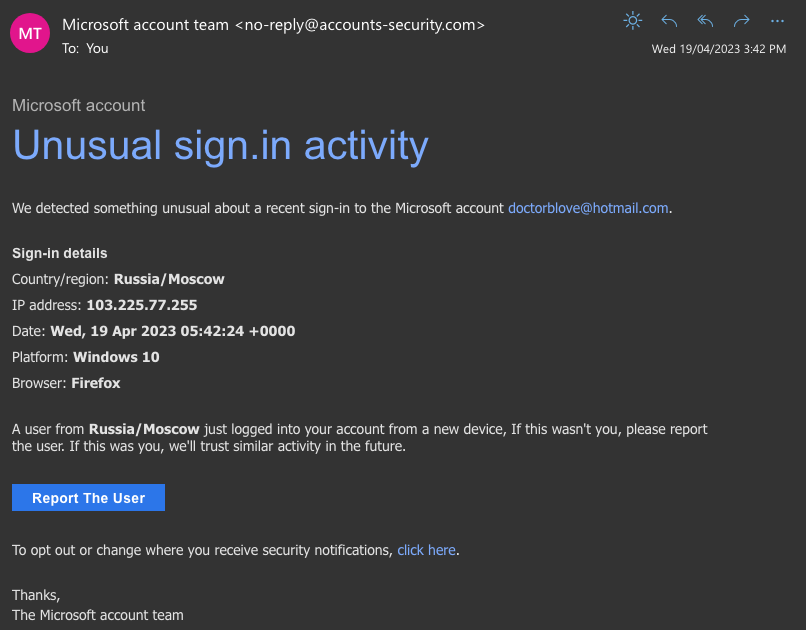
Spear phishing is similar to standard phishing, with the one difference being that spear phishing is targeted at and personalised for specific individuals. This requires the attackers to have some personally identifiable information on their victims, such as email address, first and last names and job title.
This slightly more sophisticated form of attack takes more time to craft and will therefore generally target victims with a higher perceived value, such as more senior staff or those likely to have access to higher value systems.
Whaling is a further evolution of spear phishing, targeting senior executives and others in privileged positions. Whaling emails are individually crafted based on specific knowledge of the target organisation and key individuals, and often play on the pretext of a busy executive asking for some information or action to be taken urgently (such as the transfer of funds to a specific bank account).
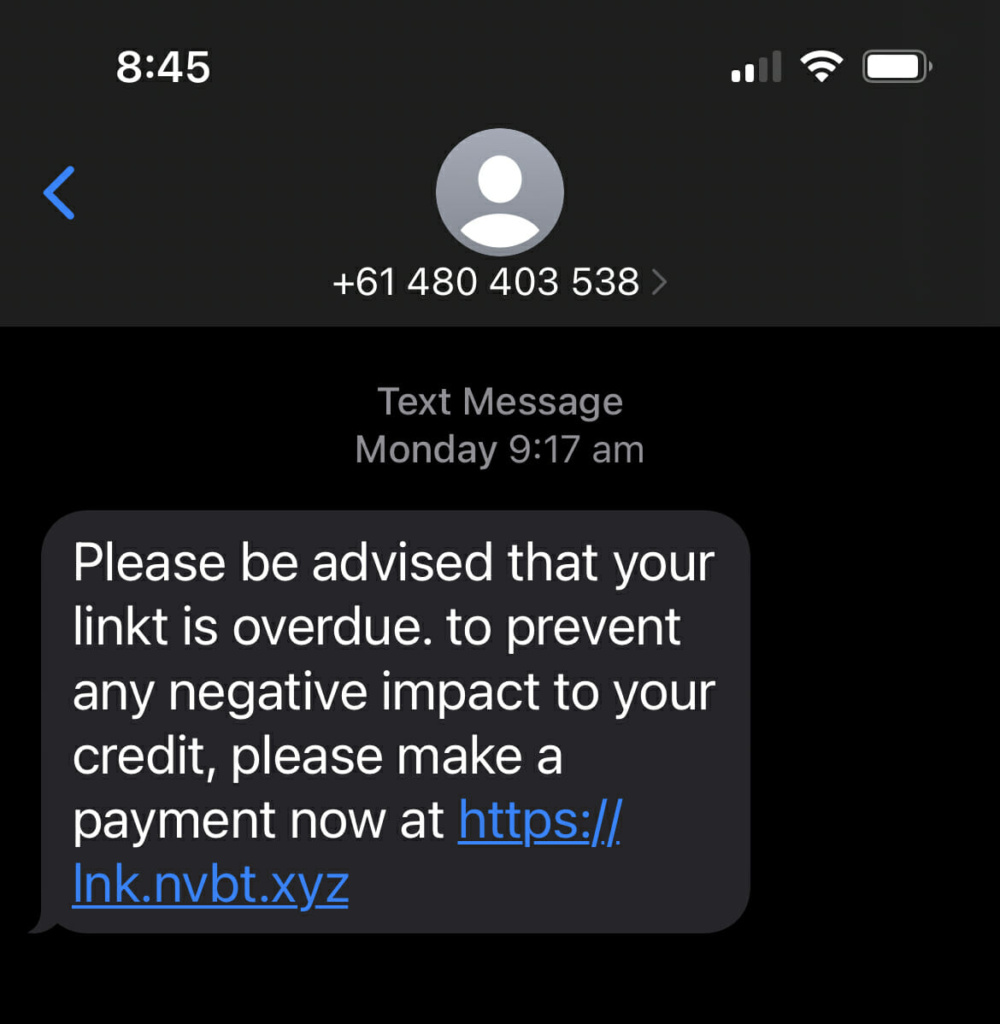
Smishing is a variant of phishing that uses SMS messages rather than emails to trick the recipient into clicking on a fake link and sharing personal data. Common examples in Australia may pretend to be from familiar brands such as Australia Post and Linkt.
Of all the different types of cyberattack, why is phishing so prevalent? First is the fact that phishing attacks can be extremely cheap and easy to execute. Email use is extremely commonplace, providing a vast audience of potential targets, while the tools required to execute an attack can be obtained cheaply and easily on the dark web.
The second key point is that humans are, well, human. We can be extremely susceptible to influence through common psychological techniques, such as our tendency to follow rules. We also tend to make mistakes, many of which pass without consequence, but some (such as clicking on the wrong email link) may not.
We can also add that at an organisational level there is often a lack of cybersecurity awareness, meaning staff simply do not recognise a phishing email, nor do they know how to safely respond when they do
Read more: Building a culture of cybersecurity awareness in your business
To protect against a phishing attack, it’s extremely important that you be able to identify a phishing email so that you can delete it safely, and not accidentally fall prey. The good news is that there are some common identifiers that you can look out for. After just a little bit of practice you will quickly recognise a malicious phishing email without a second thought.
Phishing emails will often purport to come from either a generic corporate sender, or a person that you are unfamiliar with. This isn’t to say that you won’t ever receive legitimate email from an unfamiliar sender, but when you do, be cautious to validate it carefully.
Given that most attackers will not have any personal information about you beyond your email address, phishing emails are likely to use generic greetings such as “Dear Sir”, rather than identifying you by name.
Phishing emails often convey a sense of urgency, encouraging you to ‘click now’ to claim a reward or avoid a penalty.
Phishing emails may contain an offer that’s too good to be true. How likely is it that your long lost (and forgotten) great-aunt has died and left you a million dollars?
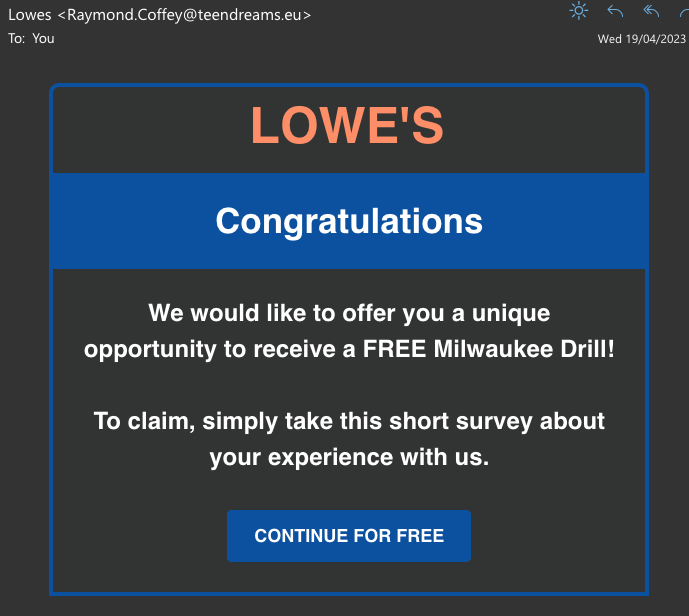
Phishing emails often contain bad spelling and grammar, something you’re unlikely to see from a legitimate, professional organisation. This poor use of language may be due to an amateur translation from a foreign language, or it may be intentional in an attempt to avoid email filters.
Many phishing attacks will try to get personal information from you, such as passwords or credit card details. Legitimate organisations will never ask for such information via email.
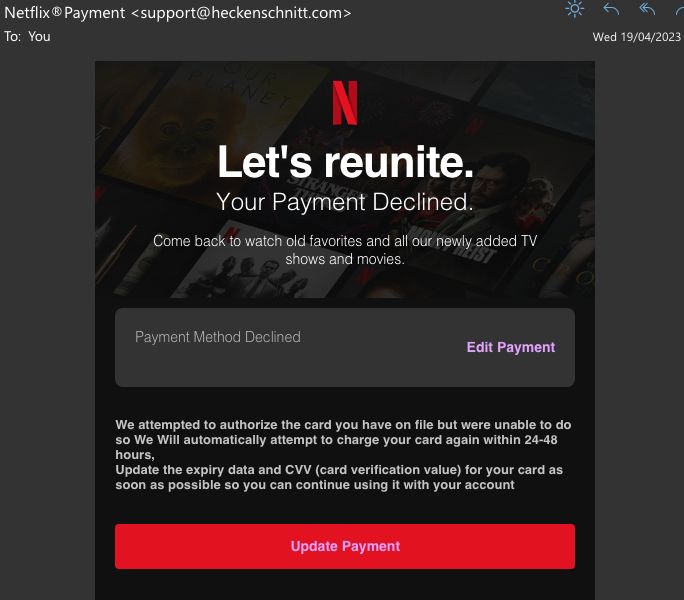
All legitimate organisations have their own domain name, such as “grassrootsit.com.au” which they will use for their website and their email addresses. Capitalisation of domain names isn’t important; however, all other spelling and punctuation is. Phishing email will often come from email addresses that clearly don’t use the purported organisation’s domain name, or in some more sophisticated phishing attacks may use a domain name that closely matches the legitimate one, but with a sneaky minor change.
As with email addresses, any links offered in a legitimate email should use the sending organisation’s proper domain name. Check all links carefully before clicking them to ensure that they do in fact use the correct and legitimate domain name. You can check the link address by hovering your mouse curser over the link without clicking.
Always be suspicious of attachments on emails that you weren’t expecting, especially when the email is from an unfamiliar sender. Email attachments are an effective way for attackers to infect your computer with malicious software, but that can only happen if you open the attachment.
Once you’re familiar with the common tell-tale signs of a phishing email, it will be clear as day when you next receive one. What you do next is crucially important.
The most important thing to remember is to not click on any links or attachments in the email, and to immediately delete the email. Some organisations may ask staff to report any phishing emails to their IT department, in which case you should follow the process provided and do so.
If you do accidentally click on either a link or an attachment in a phishing email, notify your IT department immediately and follow their instructions. There is a good chance that no harm has been done, but it is better to be safe than sorry.
Phishing is the most common form of cyberattack that you are likely to experience, but with a little knowledge it’s easy to identify a phishing email and take appropriate steps to avoid a security incident.
If you are using one of the major Software as a Service Offerings (SAAS), such as Office 365 or public cloud file storage, then you are benefitting from incredible economies of scale. Your data is highly available and accessible from almost anywhere securely.
So, you may be thinking…
But the thing is, this doesn’t necessarily mean that your data is backed up in such a way that you can recover it on-demand.
It’s a common misconception that your data in SaaS applications is fully backed up. For a service to be highly available and resilient, as guaranteed in service levels and expected by the modern workplace, Cloud vendors layer on security and redundancy. Your data is almost definitely backed up by the vendor in the sense that it lives in different parts of the data centre, possibly even in different states, and this makes it highly resilient. But, this is for their benefit. It doesn’t necessarily mean that you are able to roll back and recover data that is lost for whatever reason.
Here are three ways that the unthinkable might just happen:
Data loss can be the result of human interaction pre-caffeination. Quite simply, it can be caused by human error as simple as someone accidentally hitting that big dirty delete button. Human error is by far the most common cause for data deletion and also potentially the most dangerous because it may not be discovered for some time: longer than many traditional backup regimes accommodate for.
As well as files being accidentally deleted, information can also be unknowingly overwritten by both users and third-party applications. Many systems hold large volumes of data. Living data that is constantly added to and updated. Bulk uploads, mass importation of large data sets by integrated third-party applications which manage the data inside your applications. Not everything is always operating as it should.
International espionage may seem far-fetched for your company’s cloud data so let’s leave aside the black hoody wearing hacker boogey man, surpassing security systems to delete and corrupt your data complete with retro 90s soundtrack. One of the benefits of having data stored in a cloud system is the increased levels of security that the sheer scale of resources permits. If a nefarious user were able to break through the significant defences in Microsoft world, it would make more than a ripple in the news.
A far more likely scenario would be the disgruntled employee. When employees leave, be it under a less than ideal circumstance or not, they may delete important information. You want a solution that enables you to easily restore deleted data.
Additionally, you want a system that lets you easily access the information that former employees have left behind in their inbox and My Documents folder without having to pay for their seat license. Many organisations are still retaining the accounts of departed employees in order to ensure that critical data, mail and documents are safely retained and not lost. This is obviously not the best use of scarce resources.
Regardless of how data is lost, it can happen. It’s important that you know that Office 365 doesn’t back up anything long term. If you delete something, after a 30-day period it is gone forever.
Microsoft 365 backup solutions can fill a gap in the Office 365 offering by backing up the data in your mailboxes, One Drive and SharePoint sites.
Cloud Backup Solutions can offer unlimited retention and could be an effective way to not only insure your business against the risk of data loss but also provide you with some very useful features. They allow you to restore your data at a granular level. Individual files or emails can be recovered directly to your computer. This is a unique and very handy capability not available in other products.
An easy-to-use dashboard gives you the ability to view and manage your backups, use search capabilities to target specific emails or files and either restore them to a user’s account or, as a very handy bonus feature, download them directly to your computer.
Whether you have a rogue employee deleting files, accidental user error or ransomware attacks, it’s important to know that there are solutions available to protect you from these risks and keep your data safe.
Talk to us today about the data-saving solution that is right for your business.
Securing critical business systems from cyber-attack can be a complex task, with a seemingly endless array of methods available to choose from, each with pros and cons. To help focus our efforts there are various cybersecurity models and frameworks available such as The Essential Eight Maturity Model and the NIST Cybersecurity Framework, both of which offer excellent guidance on improving your cybersecurity posture.
Irrespective of which cybersecurity framework you choose, and which strategies you decide to pursue, there is one cybersecurity control that should be a no-brainer in every organisation, and that’s Multi-factor Authentication.
Multi-factor authentication is an authentication method that requires a user to provide two or more verification factors in order to prove their identity, and gain access to a secure system. In many cases this will mean the user providing their usual password along with some other unique and verifiable piece of information.
There are three main forms of multi-factor authentication in common use:
Unfortunately, multi-factor authentication isn’t always enabled by default on the systems that you use, even though it most likely is available as a feature. Until you actively choose to enable MFA on each system that you use, you won’t receive the extra value that it offers, leaving critical business systems potentially exposed to cyber-attack.
So, what are the top 3 reasons to enable MFA?
The traditional approach of only requiring a username and password to logon to a secure system is unfortunately not actually very secure, particularly as cyber-criminals become increasingly more determined.
Usernames are often easy to discover, often just being the user’s email address. Passwords can be hard to remember, particularly with so many different systems and passwords to keep track of, so people tend to pick simple ones, or use the same password on many different systems, all of which makes them easier to crack.
Multi-factor authentication on the other hand is extremely effective at protecting user accounts from unauthorised access. This is why most online services make MFA available, and why many such as banks have made MFA compulsory. Even if a cyber-criminal were to obtain your username and password, without access to your second authentication factor they would still not be able to access your user account.
Multi-factor authentication offers several opportunities to enhance the user experience and, in the process, improve productivity, efficiency and user satisfaction. Single sign-on services that user multi-factor authentication allow users to sign-on once, and then be automatically and securely authenticated into multiple other systems, negating the need for them to sign-on to each system individually.
Biometric multi-factor authentication can alleviate the need to manually enter any authentication details at all. A single fingerprint touch, or a glance at the camera in your laptop can be sufficient to securely login.
Finally, contrary to long held wisdom, the current guidance from security experts such as Microsoft and the NIST is to not force users to change their password periodically, but instead to let them keep the same password indefinitely: on the condition that the password chosen is long, complex, and multi-factor authentication is in use.
As many organisations seek to push cybersecurity compliance down through their supply chains, demonstrating the maturity of organisational cybersecurity is rapidly becoming a requirement for many government and commercial dealings.
Aligning with a broadly recognised cybersecurity framework such as The Essential Eight or the NIST is an effective and widely adopted approach to not only improving cybersecurity posture, but also being able to demonstrate that maturity to partner organisations when required.
Multi-factor authentication is identified as an essential security control in not only the major cybersecurity frameworks, but also directly in many commercial engagements such as cyber-insurance policies.
Watch our free on-demand webinar now: The Essential Eight Cybersecurity Maturity Model
Multi-factor authentication should be a non-negotiable requirement in every organisation’s cybersecurity strategy. Not only does it provide an effective layer of protection against user account breach, but it can enhance user experience and productivity, while also helping to align the organisation with widely recognised cybersecurity standards.
In just the last five years, business leaders have changed the tone of their cyber security conversations. It is no longer a discussion about layers of defence or the beefiness of the firewall, instead Directors now understand it’s no longer a matter of ‘if’ but instead a matter of ‘when’ the system will be breached. And the smart companies have already started to shift their resources from preventative techniques to detective ones.
The fact that historical approaches to cybersecurity are no longer good enough is an indication that cyber attackers have become more intelligent and patient, and that the nature of the attacks are more sophisticated. This is something business leaders have come to accept.
The perimeter of your network can no longer be defined and effectively controlled, instead attackers have learned to be patient and exploit lower risk vulnerabilities that are usually ignored by internal IT teams, allowing exploits to go unnoticed.
This demonstrates all the more reason Australian businesses need to take cyber security more seriously. The first step will be to focus on predicting where the next risks will be for their business and working pre-emptively to come up with solutions.
There is no better way to demonstrate the urgency of developing formal cyber security plans for your business than looking at some of the big players and the cost of their data breaches:
The brand we know and love, Target was subjected to a malware based attack through a compromised point of sale system that allowed hackers to steal credit card information of customers for three years without detection. Target’s share prices dropped 13.7% the month of announcing the data breach, and said the cost of the breach aftermath was close to $163 million.
This time hackers used more complex exploits. They utilised highly sophisticated phishing, calling employees pretending to be from internal IT teams, and ended up creating fake digital authentication certificates to bypass security systems. The breach allowed the hackers to expose the entire Sony employee email servers to the public. Sony admitted the cost of the IT repairs after the breach totalled $35 million, with the total cost of the breach coming close to $1 billion.
Government departments are especially vulnerable which is why the Coalition has recently introduced an Australian Government Cyber Security Strategy. In the United States, however, the Office of Personnel Management had 22 million government employee records stolen by a contractor who was tasked with performing background checks. The information stolen included employee driver’s licences and passport information.
One of the largest breaches of customer information ever recorded, Yahoo reported in late 2016 that a breach occurred three years earlier in 2013 of over 1 billion user accounts that were compromised by hackers. The cyber criminals took and published the user records which included full names, emails, data of births, secret questions and answers and passwords. Verizon Communications reduced its original take-over bid of Yahoo by $925 million as a result of this breach, with the real implicated cost of the breach not disclosed, the catastrophic effect of the breach has certainly been felt in the reputational damage Yahoo has faced in the media.
This is question most want answered. How can I be breached? With the premise of the question being ‘what can I do to prevent this particular breach?’ The reality is, for close to 60% of cases, attackers will be able to compromise an unprepared organisation within minutes.
Between 70-90% of malware samples were uniquely created to an organisation. This means attackers will likely evaluate your specific business, looking closely at the applications you are running to develop a unique exploit.
The prevalence of phishing is also a very high risk. Two thirds of incidents where a business was compromised included a pattern of phishing. In a recent study by the Ponemon Institute, 23% of business employees open phishing messages and 11% click on attachments within the first hour of receiving them.
Perhaps you’re not in the middle of a take-over bid, but the cost of cyber breaches will still be great. IBM interviewed 1500 organisations and found that the data breach cost per record (that is, think how many paying customers you have ever had in your company records) would amount to between $200-400 per customer. And the costs are growing. You need to consider not only the IT repair and hardware costs, but the reputational damage that will inevitably occur when you are forced to publically disclose your company was breached by the Privacy Commissioner (and the cost of fines if you don’t).
Start by assessing the cyber risks that apply to your business. Look at your cyber maturity and your business objectives:
Cyber threats will continue to rapidly evolve in the years to come. It is now more critical than ever to ensure you remain a step ahead of cyber criminals and your competitors to give your company the edge to grow and succeed securely.
https://techcrunch.com/2015/02/25/target-says-credit-card-data-breach-cost-it-162m-in-2013-14/
http://www.csoonline.com/article/2879444/data-breach/hack-to-cost-sony-35-million-in-it-repairs.html
https://cybersecuritystrategy.dpmc.gov.au/assets/img/PMC-Cyber-Strategy.pdf
http://fortune.com/2017/01/09/yahoo-marissa-mayer-board-verizon-acquisition/
Cost of Data Breach Study: United States, Ponemon Institute LLC, May 2016.
https://www-03.ibm.com/security/infographics/data-breach/
This is a guest post by Gavin McDowell, Chief Security Officer at Gridware Cybersecurity. Gavin is a highly experienced information security expert with over 17 years experience in the IT industry. Gavin McDowell is the Chief Security Officer at Gridware Cybersecurity. Gavin is a highly experienced information security expert with over 17 years experience in the IT industry. Prior to Gridware, Gavin held several senior security roles at Accenture Consulting, Symantec Australia and Westpac Banking Corporation. Gavin has a Bachelor of Computer Science (First Class Honours) from the University of Sydney and a Masters of Business Administration from Macquarie Graduate School of Management.
