Excel has been the backbone of business reporting for decades, and honestly, it’s brilliant at what it does. Most growing businesses start their reporting journey there, and for good reason—it’s familiar, flexible, and everyone knows how to use it.
But here’s the thing: Excel reporting can quietly become your biggest productivity drain without you even realising it. After helping businesses with their technology for almost 20 years, We’ve seen this pattern play out countless times. What starts as a simple monthly report gradually evolves into a complex web of spreadsheets that consumes hours of valuable time each month.
Don’t get me wrong—Excel isn’t the enemy here. We still see plenty of situations where it’s absolutely the right tool for the job. Take those quarterly board reports or annual summaries, for instance. If you’re pulling together information that doesn’t change frequently and you’re comfortable with the manual process, Excel handles this beautifully.
Similarly, if you’re working with smaller datasets—maybe hundreds or a few thousand rows—Excel manages this without breaking a sweat. And when you need to quickly analyse a specific problem or dive into a one-off investigation, Excel’s flexibility makes it perfect for that kind of exploratory work.
The sweet spot for Excel remains those static reports that don’t change much and where you’re genuinely happy updating them manually each period. There’s nothing wrong with this approach if it’s working for your business.
But there’s usually a moment when businesses realise their Excel reporting has quietly taken on a life of its own. We call it “spreadsheet archaeology”— hunting through different versions to find the “final final FINAL” report.
Or maybe you’ve noticed that preparing your monthly reports now takes an entire day instead of the hour it used to take. You’re copying and pasting data from your CRM, then your accounting system, then that other database, and by the time you’re finished, you’re already thinking about how you’ll need to do it all again next month.
The real wake-up call often comes when a key person goes on holiday and suddenly no one else knows how to update the reports. I’ve seen businesses scramble for weeks.
More troubling is when data accuracy becomes a guessing game. Different report versions tell different stories because they were created at different times using different sources. Management meetings become exercises in figuring out which numbers are correct.
Another common frustration is when your reports start hitting Excel’s performance limits. Files that take forever to open, constant crashes when you try to refresh data, or worse—losing work because the file corrupted. These aren’t just minor inconveniences; they’re signals that you’ve outgrown what spreadsheet-based reporting can reliably deliver.
Power BI isn’t about creating prettier reports, though they certainly look more professional. It’s about solving these very real business problems that Excel reporting creates as you grow.
The biggest transformation comes from connecting your reports directly to your data sources. Instead of manually gathering information from your CRM, accounting system, and various databases each month, Power BI pulls this data automatically. That monthly day of preparation becomes a few minutes of reviewing updated dashboards that refresh themselves.
This automation means you’re always working with current data rather than month-old snapshots. When a potential customer asks about your latest performance metrics, or when you need to make a quick decision based on recent trends, the information is already there, reflecting what’s actually happening in your business right now.
The consistency factor can’t be overstated either. When everyone in the business is working from the same data source, those frustrating “which version is correct?” conversations disappear. Your sales manager, operations team, and financial controller are all looking at the same numbers, updated at the same time, eliminating confusion and building confidence in your business intelligence.
Power BI also handles much larger datasets without Excel’s performance issues. Reports stay fast and responsive as your data grows, with no corruption risks.

The clearest indicator that Excel reporting has become counterproductive is when data preparation consumes more time than data analysis. Australian businesses typically reach this tipping point when they’re spending several hours each month just gathering and formatting data before meaningful analysis can begin. Other warning signs include team members working with different versions of the same report, creating compliance risks around data accuracy, and critical business intelligence depending on one person’s Excel expertise.
The beauty of working with experienced professionals is that you don’t need to worry about learning new software or managing the technical complexity. We handle the entire transition process, from connecting your data sources to building the dashboards that will replace your current Excel reports.
The process typically starts with understanding your current reporting needs and pain points. We’ll look at your existing Excel reports, identify which data sources they draw from, and design Power BI solutions that not only replicate what you have but enhance it with real-time updates and better visualisation.
Most businesses are surprised at how quickly they see results. Within a few weeks, what used to be a day-long monthly reporting exercise becomes a quick review of automatically updated dashboards. The time savings alone usually justify the investment, but the improved accuracy and timeliness of information often proves even more valuable for decision-making.
Your time is valuable, and business intelligence solutions should accelerate decision-making, not hinder it. If monthly reporting is a burden rather than providing valuable insights, automated dashboards and data visualisation tools offer a proven path forward.
The transformation from manual Excel processes to automated Power BI reporting typically delivers measurable ROI within 90 days for Australian businesses. When spreadsheet archaeology becomes a monthly ritual, that’s technology working against your business growth rather than enabling it.
Ready to explore automated reporting solutions for your business? We help Australian businesses transition from Excel to Power BI dashboards, handling the technical complexity while you focus on using better business intelligence for growth.
When business leaders evaluate their operational costs, they naturally focus on the obvious expenses: payroll, rent, equipment, software licenses. These line items are clearly defined, easily tracked, and regularly scrutinised.
But there’s another cost category that rarely appears on any budget report yet quietly drains resources from every growing business: scattered information systems. This hidden expense compounds daily, impacting everything from decision-making speed to competitive positioning, often without leadership fully recognising its scope.
While you’re focused on driving growth, increasing efficiency, and protecting your business, your team is quietly losing productivity to information chaos—and it’s costing more than you realise.
The real expense isn’t in the technology—it’s in the compound effect of small inefficiencies.
For example:
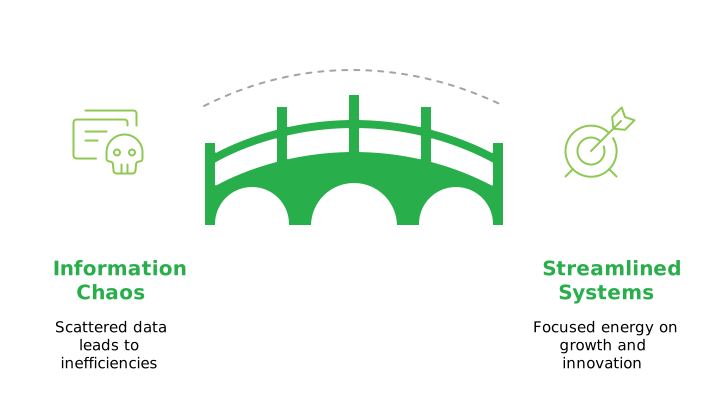
These aren’t dramatic failures—they’re quiet productivity drains that accumulate into significant competitive disadvantages. While your team manages information chaos, your competitors with streamlined systems are focusing that same energy on winning new clients, securing funding, and scaling operations.
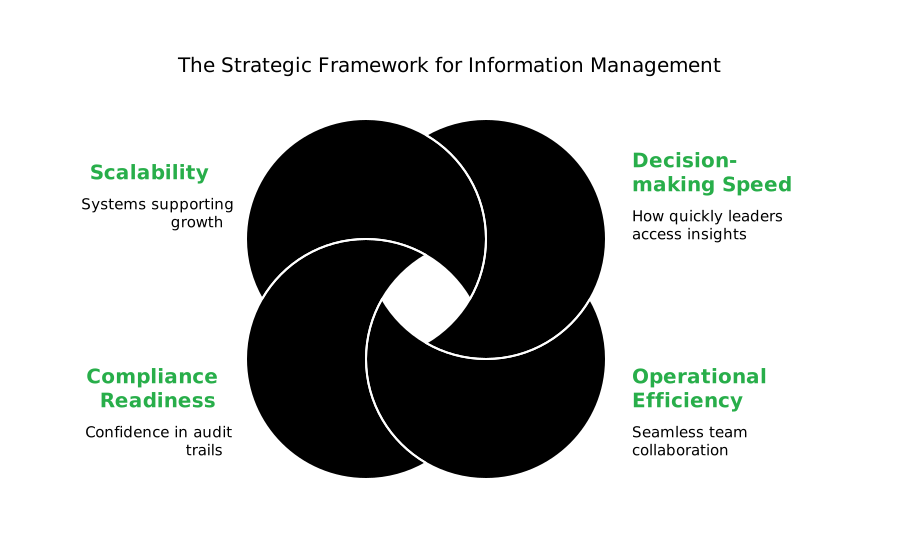
Smart business leaders approach information management the same way they approach any other critical business function: strategically. A well-designed information architecture directly influences:
Effective Collaboration Techniques:
Many growing businesses attempt to solve information chaos by adding more tools—another cloud storage service here, a project management app there. However, this approach often amplifies the problem by creating more disconnected systems.
The fundamental issue isn’t storage capacity or individual tool functionality. It’s the lack of a unified information ecosystem that grows with your business while maintaining security and simplicity.
Smart organisations recognise that effective information management requires three core capabilities:
Forward-thinking organisations recognise that their technology stack should amplify human capability, not complicate it. This is where strategic integration becomes crucial—and why Microsoft 365 with SharePoint provides a strong foundation for scalable businesses.
When your information management seamlessly connects with the communication and productivity tools your team already uses, several transformative things happen:
The most successful SharePoint implementations we’ve seen don’t just solve existing problems—they unlock new capabilities that weren’t previously possible:
The competitive advantage becomes clear when your organisation can respond to client requests immediately because all relevant information is instantly accessible. Strategic decisions improve when they’re based on complete, current data rather than incomplete snapshots. New team members become productive from day one because information is organised and findable. Most valuable for growing businesses: compliance readiness becomes instant rather than a scrambling exercise when auditors arrive.
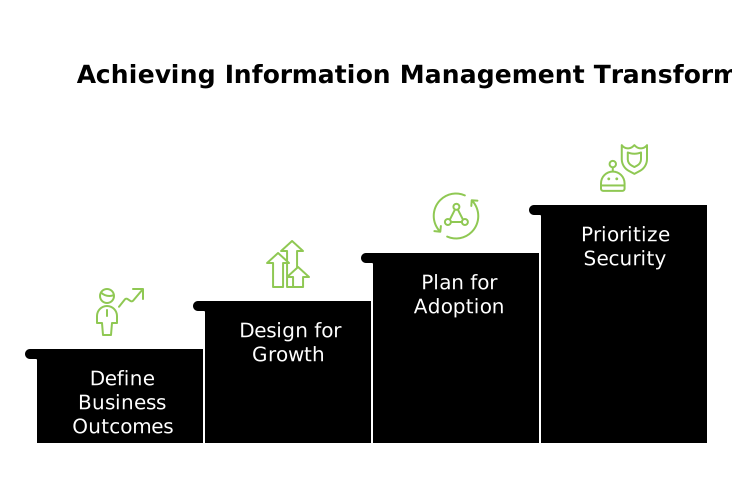
Successful information management transformation requires approaching the challenge strategically rather than tactically. This means starting with clear business outcomes—defining what success looks like in terms of reduced decision-making time, improved project delivery, or enhanced compliance readiness. Smart organisations design for growth from the beginning, ensuring their solution can adapt as teams double in size, expand to multiple locations, or develop more complex approval workflows.
Equally important is planning for adoption by leveraging existing tools and workflows rather than forcing dramatic changes that create resistance. Finally, security must be prioritised from day one, implementing enterprise-grade protections that maintain compliance requirements while actually improving accessibility for authorised users.
Every day your organisation operates with scattered information systems, you’re making an unconscious choice to accept inefficiency, security risks, and missed opportunities.
The question isn’t whether to address this challenge—it’s whether to approach it strategically or continue managing it reactively.
Smart business leaders recognise that information management isn’t an IT project—it’s a business transformation that directly impacts growth, efficiency, and competitive positioning.
The organisations that thrive in the coming years will be those that turn information chaos into strategic advantage. The technology exists. The question is whether you’ll use it strategically.
At Grassroots IT, we help growing businesses implement strategic Microsoft SharePoint solutions that scale with their ambitions. Our approach focuses on understanding your unique challenges and designing unified information management systems that enhance rather than complicate your operations.
Contact us today to discuss how strategic information management can accelerate your business objectives.
“Is this AI thing actually worth our time, energy and investment?” It’s a question we hear from business leaders when evaluating Microsoft Copilot. The answer isn’t about chasing the latest trend—it’s about identifying where Copilot delivers genuine business value.
When used strategically, Microsoft Copilot unlocks far more than productivity—it becomes a catalyst for innovation and growth.
As technology advisors, we’ve identified three practical ways to use Copilot that help teams work smarter, communicate better, and drive meaningful results.
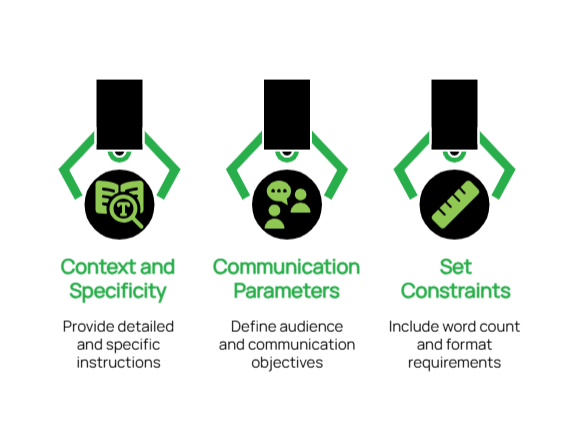
The foundation of effective Copilot utilisation lies in developing clear, purposeful instructions. When your prompts lack precision, the resulting output may fall short of your expectations.
Best Practices for Business-Focused Prompts:
Real-World Applications:
A Non-Profit Organisations: Prompt: “Use Microsoft Copilot to build a checklist in Microsoft 365 that automates thank-you emails to donors. Include steps to personalise messages based on donation amount, connect with our donor database (e.g., Excel or Dynamics 365), and add tracking to measure email engagement like open and click rates.“
Why it works:
This prompt clearly tells Copilot what to automate, how to personalise, and what metrics to track — all within tools non-profits already use.
An Engineering Firm: Prompt: “Write a procedure using Copilot to pull out key specifications from technical documents. Ask it to keep all measurements accurate, highlight any important compliance rules, and point out possible design issues.”
Why it works:
Engineers can quickly get the info they need without missing critical details, helping projects move faster and safer.”
A Medical Practices: Prompt: “Create a Copilot template that turns complex medical procedures into easy-to-read patient handouts. Ask it to keep all medical facts accurate but explain them in plain language that patients can understand.”
Why it works:
Patients feel more informed and confident, and staff spend less time rewriting the same explanations.
This foundation of precise, context-rich prompting transforms Copilot from a generic assistant into a strategic partner that understands your specific industry requirements and delivers consistently relevant results.
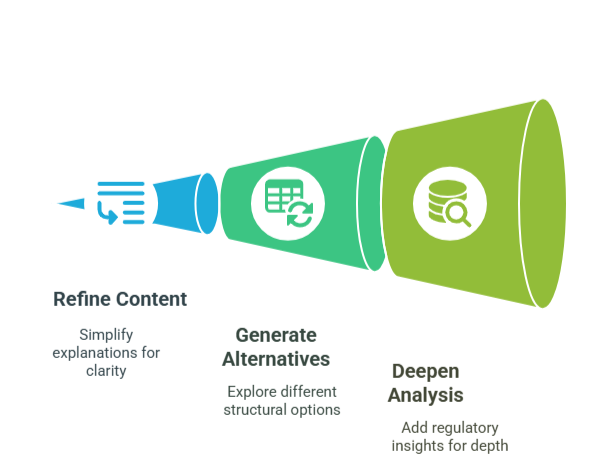
Think of Copilot as a collaborative partner rather than a one-time tool. By having back-and-forth conversations with it, you’ll refine your ideas and create better content.
Effective Collaboration Techniques:
Practical Examples:
Initial Request: “Draft an email template reminding clients about their upcoming appointments.”
Follow-up Refinement: “Revise the template to include a brief explanation of how coming prepared benefits them and what documents they should bring.”
Final Enhancement: “Add a friendly section about our rescheduling policy that emphasises flexibility while reducing last-minute cancellations.”
Initial Request: “Create an outline for our monthly project status report.”
Follow-up Refinement: “Expand the ‘Challenges’ section to include more thoughtful questions about resource allocation.”
Final Enhancement: “Add a forward-looking section that helps team members anticipate next month’s priorities based on current progress.”
This collaborative methodology ensures that your initial ideas evolve into polished, professional communications that align with your strategic objectives and resonate with your intended audience.
One of Copilot’s most valuable capabilities is its ability to optimise your existing content, ensuring clarity, consistency, and strategic alignment across all business communications.
Key Enhancement Applications:
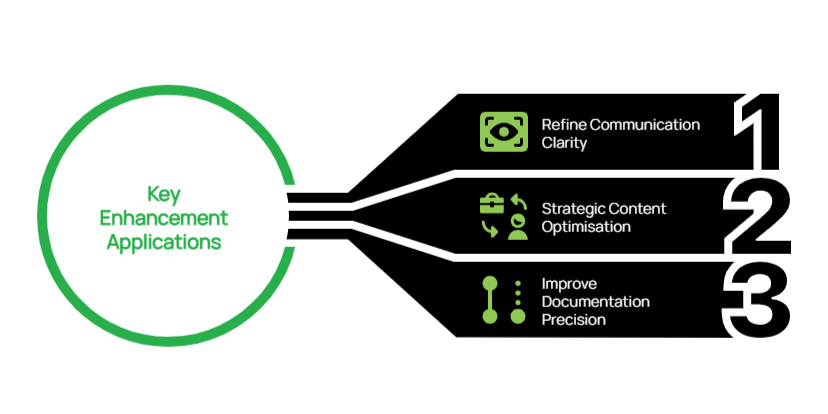
Demonstrated Value:
For Non-Profit Leadership: Original Content: “Here’s the volunteer schedule for next month.”
Enhancement Prompt: “Improve this schedule with a more engaging introduction paragraph that thanks our volunteers and explains how their time contributes to our mission.”
Enhanced Output: “Thank You for Your Dedication! This schedule represents more than just dates and times—it’s a roadmap for community impact. Each shift you serve directly supports our mission to improve literacy rates in underserved communities. We’ve highlighted key events where your participation will make an exceptional difference.”
For Project Management: Original Content: “Here’s the technical specification document for the project.”
Enhancement Prompt: “Add a brief executive summary at the beginning that explains the business benefits in non-technical language.”
Enhanced Output: “Executive Summary: This project aims to significantly decrease customer wait times while also reducing operational costs. The technical improvements outlined in this document directly address the key customer pain points identified in our recent satisfaction survey, without requiring additional staffing resources.”
By systematically enhancing existing content, you can leverage these assets more effectively, ensuring every document serves both immediate operational needs and broader strategic communication goals.
For forward-thinking organisations, Copilot represents more than just a productivity tool—it’s a strategic asset that can transform how you develop solutions, communicate with stakeholders, and scale your business operations:
Mastering these approaches to Copilot usage can significantly enhance your team’s productivity while ensuring consistent, high-quality output across all business activities.
If you’re interested in exploring how Copilot can be integrated into your broader technology strategy, our team is available to help you determine your Copilot readiness aligned with your business objectives and growth plans.
“Sorry, I was on mute!”
If this phrase has become part of your company’s unofficial vocabulary, you’re not alone.
Remote work has transformed from a temporary emergency response to a competitive advantage that attracts top talent worldwide. But there’s a stark difference between companies simply allowing remote work and those truly excelling at it.
The true challenge? Creating a seamless environment that enables productivity, fosters genuine human connection, and ensures secure access to critical systems—all without the physical office space.

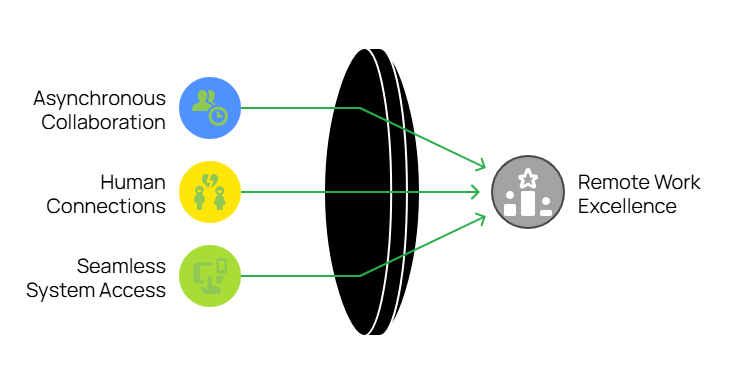
For dispersed teams, especially those spanning multiple time zones, asynchronous work is essential. It allows team members to contribute meaningfully without being online simultaneously.
Practical strategies you can implement today:
Microsoft Teams allows team members to record and share short video messages directly in chats—perfect for explaining complex concepts or demonstrating processes without coordinating schedules.
Pro tip: For more detailed screen recordings, consider Loom as a complementary tool for step-by-step process documentation.
Without the natural interactions of office life, remote teams risk becoming disconnected. Deliberate strategies to foster genuine connections are crucial to prevent your team from feeling like “faceless, task-based robots.”
Connection-building strategies that work:
Real-world insight: Don’t underestimate the power of embracing your unique team culture. Something as simple as an enthusiastically off-key “Happy Birthday” sing-along during team huddles can become a cherished tradition that strengthens bonds.
The foundation of productive remote work lies in ensuring equal and secure access to essential company resources. Without seamless access, frustration builds, communication falters, and workflows stall. By prioritising robust and user-friendly access solutions, companies empower their teams to remain connected, collaborative, and focused on their goals.
Tools for frictionless system access:
Success story: One of our financial clients uses Azure Virtual Desktop to enable their team in the Philippines to work with complex spreadsheets while keeping sensitive customer data stored securely in Australia—simultaneously addressing performance, compliance, and collaboration needs.
The shift to remote and hybrid work presents challenges, but with the right IT strategies, your business can create a collaborative environment that attracts top talent and drives growth regardless of geography.
By implementing these three pillars—asynchronous workflows, meaningful human connections, and seamless system access—you’ll build a remote work environment that empowers your team to perform at their best, wherever they are.
Ready to elevate your remote work strategy? The experts at Grassroots IT can help you implement these solutions tailored to your specific business needs. Contact us today to transform these insights into actionable plans that drive your business forward.
Looking for more guidance on optimising your remote work environment? Reach out to our team or explore our Microsoft 365 solutions designed specifically for the modern distributed workplace.
More and more Australian organisations are discovering the strategic advantage of ISO 27001 certification. It’s exciting to see businesses of all sizes embracing this globally recognised security standard, opening doors to new partnerships and market opportunities. What was traditionally the domain of enterprise organisations has evolved into a powerful business enabler for growing companies across the country.
Strip away the fancy language, and ISO 27001 is simply an internationally recognised way to prove you’re serious about protecting information. While it might sound complex, at its heart it’s about having a systematic approach to keeping customer data safe, protecting your business from cyber threats, managing access to information, and being prepared when things go wrong. Think of it like a driver’s licence for information security – it proves you know what you’re doing and can be trusted to handle sensitive information properly.
The good news is that Microsoft 365 already includes a range of features that can directly support your journey to ISO 27001 compliance. Let’s look at exactly how you can use Microsoft 365 features to meet specific ISO requirements. Here’s your practical guide to ticking those ISO boxes using tools you already have.

The standard demands formal processes for managing user access throughout the entire employee lifecycle. This control exists because inappropriate access rights are a major security risk – think ex-employees with active accounts, or staff with more system access than they need. ISO wants to see that you’re actively managing these risks through formal processes and regular reviews. You need a systematic way to grant, modify, and revoke access based on people’s roles, ensuring everyone has exactly what they need to do their job – nothing more, nothing less.
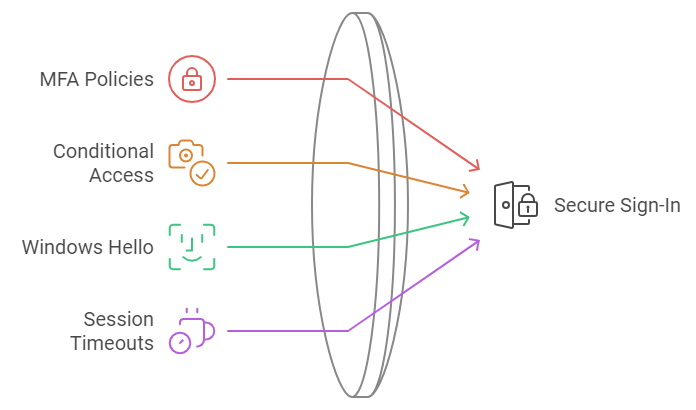
You need to prove you’re properly controlling system access. This requirement recognises that passwords alone aren’t enough anymore. ISO wants evidence that you’re using modern authentication methods to verify users’ identities, especially when accessing sensitive information or systems. It’s about making sure that even if someone gets hold of a password, they can’t automatically access your systems. The standard also emphasises the importance of protecting access information – like making sure password rules are strong enough and that you can detect and block suspicious login attempts.

You must show that sensitive information is properly identified and protected. This control recognises that not all information needs the same level of protection – your marketing brochure doesn’t need the same security as your customer credit card details. ISO requires you to think through what types of information you handle, how sensitive each type is, and what protection it needs. Then you need to show that you’ve got systems in place to consistently identify and protect information based on its sensitivity level.
Sensitive data must be properly encrypted. This requirement goes beyond just turning on encryption – ISO wants to see that you’ve thought through when and where encryption is needed, and that you’re managing it properly. This includes having formal policies about what needs to be encrypted, managing encryption keys securely, and making sure your encryption methods are strong enough for the sensitivity of the data you’re protecting. It’s about ensuring that if someone does get unauthorized access to your systems, they still can’t read your sensitive data.

ISO needs you to prove you’re actively monitoring your systems. This means having systems in place to detect, capture, and investigate security events and user activity. It’s not just about recording what happens – you need to show that you’re actively reviewing these records and can spot potential security incidents quickly. Think of it like CCTV for your IT systems – it needs to be recording, but someone also needs to be watching the monitors.
Information needs to be protected whenever it’s being shared or moved around. This control focuses on keeping data safe when it’s in transit between systems or being shared with external parties. It’s about making sure sensitive information can’t be intercepted or tampered with when it’s moving between point A and point B, whether that’s within your network or out to external partners.
Getting ISO 27001 certified doesn’t mean buying new security tools. Microsoft 365 includes powerful features that map directly to ISO requirements – you just need to know what to turn on and how to configure it.
Need help setting up these controls or mapping them to your ISO requirements? That’s what we do. Let’s talk about getting your Microsoft 365 environment ISO-ready.
For small to medium-sized businesses, Microsoft 365 Business Premium offers a robust suite of productivity tools coupled with advanced security features. However, many organisations are not taking full advantage of the security capabilities included in their subscription. In this post, we’ll explore the key security features of Microsoft 365 Business Premium and how you can leverage them to protect your business.
Microsoft 365 Business Premium is more than just a productivity suite—it’s a comprehensive solution that combines the familiar Office applications with advanced security and device management capabilities. This license tier is often considered the “sweet spot” for small to medium-sized businesses, offering enterprise-grade features at a fraction of the cost.
Let’s dive into the security features that come standard with your Business Premium license:
Microsoft Defender for Office 365 is a cloud-based email filtering service that helps protect your organisation against advanced threats like phishing and zero-day malware.
Key components include:
Pro Tip: These features aren’t necessarily enabled by default, so make sure to activate them to take full advantage of their capabilities.
Intune is Microsoft’s mobile device management (MDM) and mobile application management (MAM) platform. It allows you to manage both company-owned and personal devices used to access company data.
Key benefits include:
Pro Tip: Start with basic policies like requiring a device PIN and the ability to remotely wipe company data. Gradually introduce more advanced policies as your team becomes comfortable with the system.
AIP helps you classify, label, and protect sensitive information. It can automatically detect sensitive data types (like credit card numbers or health information) and apply appropriate protections.
Key features:
Pro Tip: Begin by identifying your most sensitive data types and creating policies to protect them. Educate your users on the importance of data classification and how to use the AIP tools effectively.
MFA is one of the most effective ways to protect against unauthorised access. It requires users to provide two or more verification factors to gain access to a resource, significantly reducing the risk of compromised accounts.
Pro Tip: Implement MFA for all users, starting with administrators and gradually rolling out to all staff. Consider using the Microsoft Authenticator app for a seamless user experience.
Conditional Access allows you to control access to your resources based on specific conditions. You can create policies that grant or restrict access based on factors like user location, device status, and detected risk level.
Key use cases:
Pro Tip: Start with a few critical policies and gradually expand. Always test new policies in a limited pilot before full deployment.
While primarily a compliance feature, Exchange Online Archiving contributes to security by helping you retain and protect important email data. It provides users with an archive mailbox for storing old email messages.
Key benefits:
Pro Tip: Set up retention policies that align with your industry regulations and business needs. Train users on how to access and use their archive mailboxes effectively.
One of our clients, a local mining company with 70 employees was struggling with security concerns, particularly around protecting client financial data. By implementing Microsoft 365 Business Premium and fully leveraging its robust security features, the company saw significant improvements:
The firm faced initial challenges with user adoption, particularly around MFA and Geo Location policies. However, with a comprehensive user training campaign, they achieved full adoption within three months.
Microsoft 365 Business Premium offers a wealth of security features that can significantly enhance your organisation’s cybersecurity posture. By fully leveraging these tools, you can protect your business against a wide range of threats while also improving productivity and compliance.
Remember, cybersecurity is not a one-time effort but an ongoing process. Regularly review and update your security measures to stay ahead of evolving threats.
At Grassroots IT, we specialise in helping businesses make the most of their Microsoft 365 investments. Our team of experts can:
Don’t leave your business vulnerable. Contact us today for a consultation, and let’s explore how we can enhance your cybersecurity with Microsoft 365 Business Premium.
Traditional security measures, while still important, are no longer sufficient to protect your organisation from sophisticated attacks. Enter Conditional Access Policies: a powerful tool in the Microsoft 365 suite that can significantly enhance your cybersecurity posture. In this post, we’ll explore how these policies work and why they are becoming an essential component of modern cybersecurity strategies.
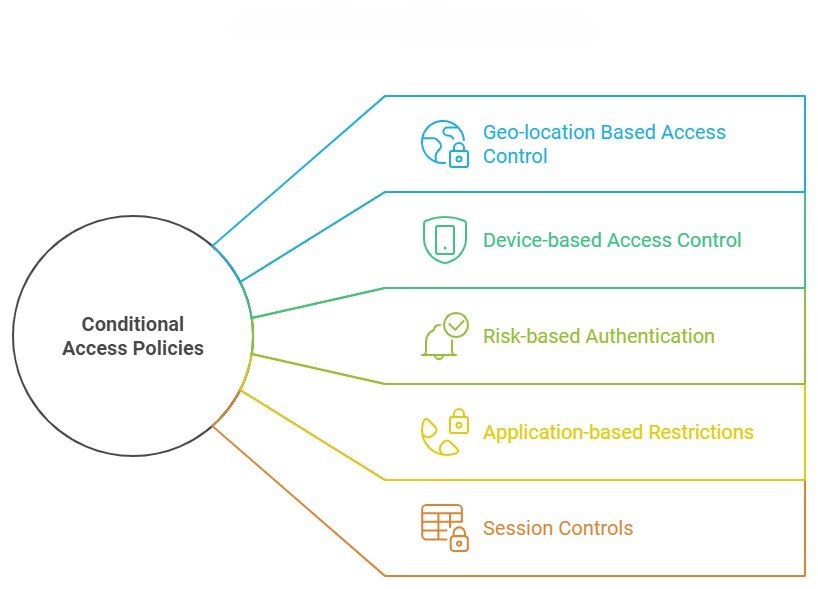
Conditional Access Policies are a feature of Microsoft 365 that allows you to control access to your organisation’s resources based on specific conditions. Think of them as smart gatekeepers for your digital assets. Instead of a simple “yes” or “no” to access requests, these policies consider various factors before granting access, such as:
By evaluating these factors in real-time, Conditional Access Policies can make nuanced decisions about whether to grant access, deny access, or require additional verification.
It’s not hyperbole to say that cybersecurity threats are growing exponentially, so before we dive deeper into Conditional Access Policies, let’s consider the current cybersecurity landscape.
In this environment, a static, one-size-fits-all approach to security is no longer adequate. Organisations need dynamic, context-aware security measures that can adapt to different situations and threat levels.

Let’s explore five keyways that Conditional Access Policies can dramatically improve your cybersecurity posture:
One of the most powerful features of Conditional Access Policies is the ability to restrict access based on geographic location.
How it works: You can set policies that only allow access from specific countries or regions where your business operates. Attempts to access your resources from other locations can be blocked or require additional verification.
Ensuring that only trusted devices can access your resources is another crucial aspect of cybersecurity.
How it works: Conditional Access Policies can be set to only allow access from devices that are managed by your organisation or that meet certain security requirements.
Why it matters: This prevents scenarios where an employee might access sensitive company data from a personal device that lacks proper security measures. It also mitigates risks associated with lost or stolen devices. This is particularly important in the context of your organisation’s BYOD policy.
Microsoft’s cloud intelligence can detect signs of suspicious activity, which Conditional Access Policies can use to adjust authentication requirements in real-time.
How it works: If a login attempt is flagged as high-risk (e.g., it’s from an unfamiliar location or shows signs of bot activity), the policy can require additional verification steps or block access entirely.
Why it’s powerful: This adaptive approach means that routine, low-risk activities aren’t disrupted, but potential threats are met with appropriate security measures.
Not all company resources are equally sensitive. Conditional Access Policies allow you to set different access requirements for different applications or data types.
How it works: You might set a policy that allows broad access to the company intranet but requires multi-factor authentication and a company-managed device to access financial systems.
Conditional Access doesn’t stop working after the initial authentication. It can also control what users can do during their sessions.
How it works: Policies can be set to limit activities like downloading, printing, or copying data from certain applications, even after a user has been granted access.
Why it matters: This can prevent data exfiltration attempts, where a bad actor who has gained access tries to download large amounts of sensitive data.

Let’s look at how one of our clients, a mid-sized financial services firm, leveraged Conditional Access Policies to enhance their security:
Before implementing these policies, Company X had experienced several minor security incidents, including a case where an employee’s credentials were used to access company data from overseas during a time when the employee wasn’t traveling.
We helped them implement a comprehensive set of Conditional Access Policies, including:
The result? In the six months following implementation:
While the IT team initially worried about user pushback, they found that most employees appreciated the additional security, especially once they understood how it protected both the company and their own personal information.
In an era where cyber threats are constantly evolving, static security measures are no longer enough. Conditional Access Policies provide a dynamic, intelligent approach to cybersecurity that can dramatically improve your organisation’s security posture.
By implementing these policies, you can:
Remember, cybersecurity is not a one-time effort, but an ongoing process. Regularly reviewing and updating your Conditional Access Policies should be a key part of your overall security strategy.
At Grassroots IT, we specialise in helping businesses leverage the full power of Microsoft 365, including advanced security features like Conditional Access Policies. Our team of experts can:
Don’t wait for a security incident to occur. Take proactive steps to protect your organisation today. Contact us for a consultation, and let’s explore how we can enhance your cybersecurity with Conditional Access Policies.
Data protection isn’t just a nice-to-have—it’s a critical business imperative. Australian businesses face an increasingly complex web of regulations designed to safeguard personal information. But here’s the good news: if you’re using Microsoft 365, you’ve already got a powerful ally in your corner.
Let’s dive into how Microsoft 365 can help you navigate the choppy waters of data protection regulations in Australia, and how you can leverage its features to not just comply but thrive.
Before we jump into the tech, let’s recap the regulatory landscape:
Sounds daunting, right? Don’t worry—Microsoft 365 has got your back. Let’s explore how.
Think of the Microsoft 365 Compliance Center as your control room for all things compliance. It gives you a bird’s-eye view of your compliance posture across your Microsoft 365 environment.
The Compliance Manager feature helps you track your progress towards meeting regulatory requirements. It provides a set of controls and improvement actions based on common regulations and standards. For each improvement action, you get step-by-step implementation guidance, which is incredibly helpful when you’re trying to navigate complex compliance requirements.
The Compliance Score, on the other hand, gives you a quantitative measure of your compliance efforts. It’s calculated based on the controls you’ve implemented and their relative importance. This score can be a great way to demonstrate your compliance efforts to stakeholders and identify areas for improvement.
One of the key requirements of APP 11 is ensuring the security of personal information. Microsoft 365’s sensitivity labels and Azure Information Protection allow you to classify and protect data based on its sensitivity.
Here’s how it works: You can create labels like “Confidential” or “Strictly Confidential” and define what happens when these labels are applied to documents or emails. For example, a “Strictly Confidential” label might automatically encrypt the document and restrict forwarding.
You can even use machine learning to automatically detect and label sensitive information like credit card numbers or health records. This means you can automatically apply protection actions like encryption or access restrictions to sensitive data, reducing the risk of unauthorised access.
Ever worried about sensitive information being shared accidentally? Microsoft 365’s DLP policies have got you covered. You can set up policies to prevent unauthorised sharing of sensitive information, aligning neatly with APP 6’s requirements around the use and disclosure of personal information.
For instance, you could create a policy that detects when a document contains multiple credit card numbers and blocks it from being shared outside your organisation. Or you could set up a policy that warns users when they’re about to send an email containing what looks like a tax file number.
These policies work across Microsoft 365, including in email, SharePoint, OneDrive, and Teams, providing comprehensive protection.
APP 11.2 requires the destruction or de-identification of personal information when it’s no longer needed. Microsoft 365’s retention and deletion policies allow you to automate this process, ensuring that data is retained only as long as necessary and then securely deleted.
You can create policies based on a variety of conditions. For example, you might set a policy to retain all emails for 7 years and then automatically delete them. Or you could create a policy that retains documents in a specific SharePoint site for 3 years after they were last modified.
These policies help ensure you’re not keeping data longer than necessary, which not only helps with compliance but can also reduce storage costs and minimise risk.
Many of the APPs require you to keep records of how personal information is handled. Microsoft 365’s comprehensive auditing capabilities and customisable reports make it easy to demonstrate compliance when needed.
The unified audit log records user and admin activities across many Microsoft 365 services. You can search this log to investigate potential security or compliance issues, or to respond to legal or regulatory requests.
You can also create custom reports to track specific activities or compliance metrics. These reports can be invaluable when you need to demonstrate your compliance efforts to auditors or regulators.
Azure Active Directory, part of the Microsoft 365 suite, provides robust identity and access management capabilities. Implementing features like multi-factor authentication can significantly enhance your data security, helping you meet the requirements of APP 11.
But it goes beyond just multi-factor authentication. Azure AD also offers features like:
The NDB scheme requires prompt notification of serious data breaches. Microsoft 365’s advanced threat protection features, including Insider Risk Management and Communication Compliance, can help you detect potential breaches early.
Insider Risk Management uses machine learning to identify potential insider risks, like data leaks or intellectual property theft. It analyses signals across Microsoft 365, spotting patterns that might indicate a problem.
Communication Compliance helps you detect, capture, and take remediation actions for inappropriate messages. For example, it can detect offensive language, sensitive information sharing, or conflicts of interest in communications.
These tools give you a head start in responding and notifying affected parties if necessary, helping you meet the tight timeframes required by the NDB scheme.
Microsoft 365 offers a comprehensive set of tools to help you meet Australian data protection regulations. But remember, these tools are only effective when properly configured and managed. It’s like having a high-performance car—it’s great, but you need to know how to drive it to get the most out of it.
That’s where we come in. At Grassroots IT, we’ve been helping businesses navigate the complexities of IT and compliance for almost two decades. We’re not just here to set up your tech—we’re here to help you use it strategically to drive your business forward.
Want to know how well your current setup measures up? We offer a comprehensive Business Technology Review that can help you identify gaps in your compliance posture and opportunities for improvement. Get in touch with us today, and let’s make sure your business isn’t just compliant, but thriving.
Remember, in the world of data protection, an ounce of prevention is worth a pound of cure. Don’t wait for a breach to start taking compliance seriously—your business (and your customers) will thank you for it. With the right tools and expertise, you can turn compliance from a burden into a competitive advantage. Let’s make it happen together.
Remote work has become more than just a trend – it’s now a fundamental part of how many Australian businesses operate. While this shift brings numerous benefits, it also presents new challenges in data security. With team members accessing sensitive information from various locations and devices, how can you ensure your data remains protected? This is where Data Loss Prevention (DLP) becomes crucial.
Remote work has expanded the traditional network perimeter, making it more difficult to control and monitor data access and movement. Your team members might be working from home in Brisbane, from a client’s office in Sydney or a cafe in Melbourne. They’re likely using a mix of company-issued and personal devices, connecting through various networks of varying security levels.
In this distributed environment, the risks of data leaks – both accidental and intentional – increase significantly. An employee might inadvertently send sensitive information to their personal email for easier access or to save confidential documents to an unsecured cloud storage service. Without proper safeguards, your valuable business data could be exposed to unauthorised access or breaches.
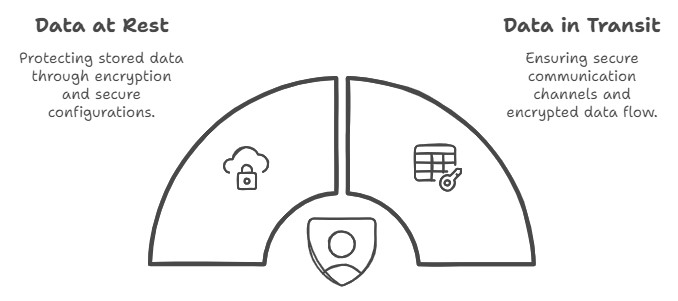
DLP is a set of tools and strategies designed to detect potential data breaches and prevent them by monitoring, detecting, and blocking sensitive data while in use, in motion, and at rest. In a remote work context, DLP becomes your virtual security guard, ensuring that your data is protected regardless of where your team members are located.
Let’s consider a mid-sized engineering firm based in Brisbane. With their team of 50 now working remotely, they implemented a DLP solution to secure their client data and creative assets. Here’s how they approached it:
The (hypothetical) result? In the first month alone, the agency prevented several potential data leaks, including an instance where a new employee almost sent a confidential client brief to their personal email. The system not only blocked the transfer but also educated the employee about the proper protocols for handling sensitive information.
As remote work continues to be a significant part of our business landscape, protecting your data has never been more crucial. DLP provides a powerful set of tools to secure your sensitive information, regardless of where your team members are working from. By implementing a well-thought-out DLP strategy, you can enjoy the benefits of remote work while maintaining the security of your valuable business data.
Are you unknowingly overspending on your Microsoft 365 licences? You’re not alone. But the impact of poor licence management goes far beyond just your bottom line.
As IT professionals, we’ve observed that licence management is often overlooked, despite its significant impact on a company’s operational efficiency, security posture, and overall productivity. Let’s explore why this matters and how proper management can benefit your business.
Here are 4 common ways businesses mismanage their Microsoft 365 licences:
It’s crucial to understand that effective licence management isn’t just about minimising costs. It’s about optimising your Microsoft 365 environment to align with your business needs and strategic goals. Here’s why it truly matters:
Proper licence management doesn’t need to be onerous, but it does require ongoing attention, expertise, and strategic planning. It’s about understanding your current needs, anticipating future requirements, and aligning your licensing strategy with your broader IT and business goals.
If you’re not actively managing your Microsoft 365 licences, you’re likely missing opportunities for cost savings, operational improvements, and enhanced security. More importantly, you may be compromising on tools that could drive your business forward in an increasingly digital world.
The first step towards improved licence management is to understand what licences you currently have in place. This is easily done from within Microsoft 365 Admin, or by asking your IT team to produce a report for you.
From there, you can review your current licence assignment against actual usage and business needs. This will help identify any discrepancies, such as overprovisioning or inactive licences still assigned to former employees.
At Grassroots IT, we believe that technology should be a strategic enabler for your business. Effective licence management is a key part of this strategy. It ensures you’re getting the most value from your Microsoft 365 investment, both in terms of cost-efficiency and operational capability.
Ready to stop overspending and start optimising your Microsoft 365 environment? Let’s have a conversation about how we can help you align your licences with your business needs and goals, ensuring you’re not just saving money, but setting your business up for future success.