
In September, a staff member at a family-owned furniture business in Melbourne’s Bayside area was working through a $118,000 order of outdoor furniture. The emails from the supplier were genuine. Then one arrived saying the supplier’s bank details had changed and the payment was urgent. She paid it.
The supplier hadn’t sent that email. Scammers had got into the thread and were impersonating them. Her bank flagged the transfer as possible fraud, she rang the supplier to check, and Victoria Police, working with the AFP-based Joint Policing Cybercrime Co-ordination Centre, blocked the transaction and returned the money.
SmartCompany reported this story in October, and it struck us as a timely reminder for any business that pays suppliers by bank transfer.
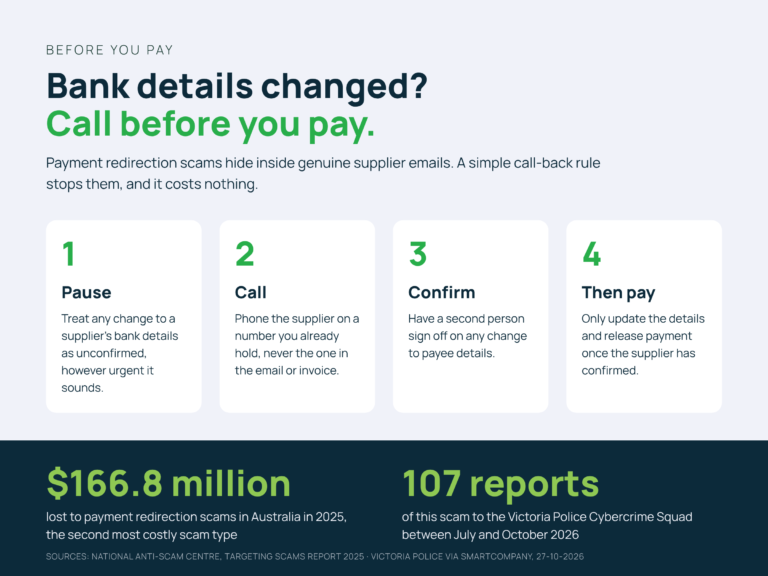
Victoria Police says its Cybercrime Squad has received 107 reports of this scam since July 2026, and the National Anti-Scam Centre puts payment redirection losses at $166.8 million in 2025, second only to investment scams.
Payment redirection is a form of business email compromise, sometimes called invoice fraud. Most scam advice assumes the email looks suspicious. Payment redirection scams work because it doesn’t. Often the scammer has access to a real mailbox, either the supplier’s or yours, and replies inside a real conversation about a real order. The amount is right, the tone is right, and the only thing that changes is the account number.
Then comes the pressure: the payment is overdue, the goods won’t ship, the change needs to happen today. The person processing it is doing what a good accounts team does, keeping a supplier happy and an order moving. That instinct is exactly what the scam relies on.
So training people to spot a dodgy email only goes so far here. You need a process that doesn’t depend on spotting anything.
The most effective control costs nothing: any change to a supplier’s bank details is confirmed by phone, on a number you already hold. That means the number in your supplier file or on their website, never the one in the email or the new invoice.
Two more steps make it stick:
This is the step that saved the Bayside business. A phone call to the supplier confirmed the fraud while there was still time to act.
We practise this ourselves. Our admin team calls to check payment details before we pay invoices, and several of our suppliers have told us they rarely get those calls from other businesses. It takes a couple of minutes, and it’s a habit any business can adopt.
Process catches the request. Technology makes it harder for scammers to get into the conversation in the first place. For most businesses on Microsoft 365, that means:
MFA is one of the Essential Eight strategies, and frameworks like SMB1001 give you a structured way to put these controls in place and show your clients you have.
If you’re not sure where your business stands, our post Cyber Security Action Month: Five Steps for Small Business covers the basics every business should have in place.
Speed matters. The Bayside business got its money back because the bank, the staff member and police all moved quickly.
The end of the year is when accounts teams are busiest, with suppliers chasing payment before the shutdown. That pressure is what these scams feed on. Detective Sergeant Dean Waters of the Victoria Police Cybercrime Squad put it simply: don’t “let a scammer rush you into making a costly mistake”.
If you make one change before the holidays, make it the call-back rule, and make sure everyone who pays invoices knows it applies to them.
For years, October has been Cyber Security Awareness Month. In 2026 the Australian Government renamed it Cyber Security Action Month. It’s a small change with a clear message: most small and medium businesses already know the risks. What’s missing is follow-through.
The month sits inside a wider Australian Signals Directorate program called Cyber Action Year 2026. It asks organisations to plan on the basis that a cyber compromise is a matter of “if, not when.” Insurers, auditors and larger clients already think about their suppliers this way, so it’s a useful lens for any business that wants to keep winning work.
Most business owners know they should have multi-factor authentication, and many already use it for email. More and more apps are making it a compulsory part of logging on to accounts these days. The gaps tend to be elsewhere: a shared admin login, an old accounting portal, a supplier system nobody has checked in years.
Those gaps are where incidents happen. The Australian Signals Directorate received over 84,700 cybercrime reports in 2024-25, roughly one every six minutes. The average self-reported cost was $56,600 for a small business, up 14%, and $97,200 for a medium business, up 55%.
Security work rarely feels urgent until something goes wrong. It competes with client deadlines, hiring and month-end, and it usually loses. A month named for action is a good reason to put two or three items in the calendar and see them through.
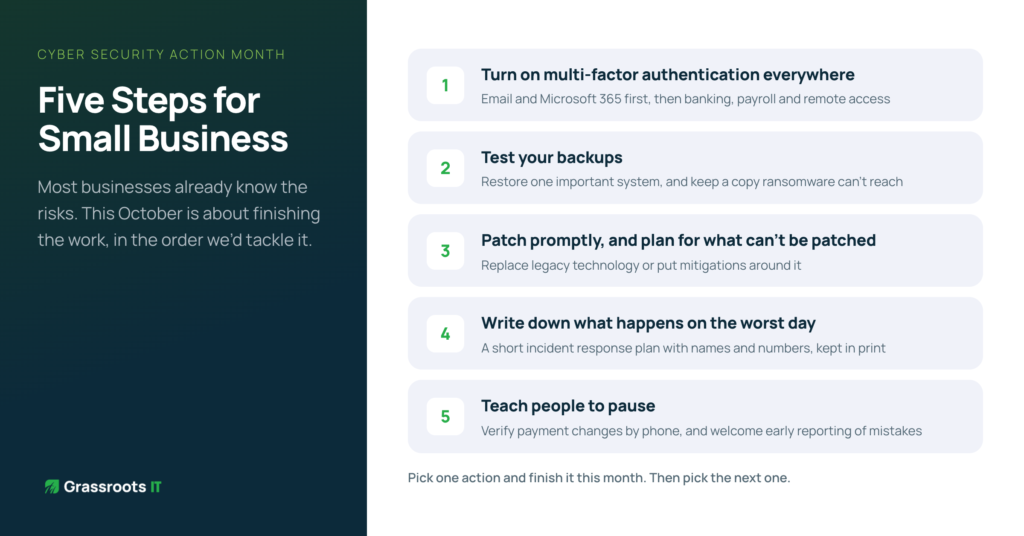
Here are five actions that line up with the basics the that the October campaign promotes, in the order we’d tackle them:
If you’re accountable for technology in your business, try this: if we were breached tomorrow, what would happen in the first hour? Who would you call? Could you still invoice, pay staff and talk to clients?
If the answers are vague, you’ve found your starting point. A tabletop exercise, where your leadership team walks through a realistic scenario together, surfaces gaps faster than almost anything else. It also turns an abstract risk into a set of decisions people have already practised.
It’s also worth checking your cyber insurance policy while you’re there. Many policies list conditions, such as multi-factor authentication or tested backups, that need to be in place for a claim to succeed. Knowing those conditions now is far better than discovering them mid-incident.
The five actions above make you safer. More and more, clients, insurers and tender panels also want you to prove it. Frameworks such as the Essential Eight and SMB1001 help here: they turn good intentions into a structured program with evidence you can show someone else.
We went through this ourselves when Grassroots IT achieved SMB1001 Gold certification. Over about six months, the biggest surprise was how much good practice we already had in place that simply wasn’t documented, so most of the work was writing it down and making it auditable.
Cyber Security Action Month runs until the end of October. It’s a great time to choose one action from this list and finish it before then. Then pick the next one.
SOURCES
