
Collaboration has always been a foundation for organisational growth and efficiency. To put it simply, when we share ideas, knowledge, passion and skills, the outcome is better than if we had have done it alone. Organisations with employees who feel connected to their team members and workplace are also more likely to have increased engagement and retention rates, which can lead to greater productivity and profit, so it’s well worth pursuing a culture that supports and celebrates collaboration. (Source: www.business.com) So, how can we make it easier for collaboration to occur in the workplace?
Historically, a team meeting was only possible if we were all located in the same office or if it was conducted over a telephone landline. Modern workplaces are becoming more mobile and geographically distributed, and also more diverse in terms of culture and age ranges represented in the workforce. Technology has made collaboration infinitely more possible, but it’s also changed the concept of what a ‘team’ can be. With the ability to give access to specific data elements, it’s now possible to collaborate with additional people who have a stake in the operation of a business, including suppliers, partners, outside specialists and even customers. Thankfully these days, there are a multitude of ways, and through various devices, that we can collaborate on a project regardless of our location.
But while collaboration is more accessible than ever, how do we provide more opportunities for collaboration in the workplace, especially if we have offices and teams across multiple locations? Some of the roadblocks to collaboration can include:
Over the years, Microsoft has attempted to find a solution to the drawbacks of existing collaboration mediums. First we had Microsoft Lync that later turned into Skype for Business, enabling video conference calls. Microsoft produced and purchased apps to alleviate the downsides of collaboration via email with apps such as SharePoint for file sharing and and Yammer for social networking within organisations. But, Microsoft’s productivity and collaboration tools to that point were all standalone applications.
In early 2017, Microsoft introduced one of its most powerful creations yet: a business messaging tool, with an aim to compete with the widely used messaging app called Slack. This messaging tool is what we know now as Microsoft Teams. Fast forward to today, less than three years after its release, and Teams has changed the way businesses and teams work together.
What started out as a messaging app for businesses became a single place for collaboration and team management within organisations. Since Teams was included in the Microsoft 365 suite and Skype for Business was rolled into Teams in 2018, Microsoft Teams now has more than 20 million users and has become a powerful virtual workspace within organisations.
One of the most powerful elements of Microsoft Teams is its integration with the rest of the Microsoft 365 platform. Together, they offer a solution to all of the roadblocks listed above and provides an ideal environment for communication and collaboration, including:
“Microsoft Teams was built with this holistic approach as the central guiding principle for developing meetings. We treat meetings as an ingredient of collaboration that relies on a series of connections until the project is complete. Teams keeps all the relevant meeting content and discussions in one place so that participants can spend less time hunting down information and stay focused and engaged before, during and after meetings.”
Teams is a powerful medium for collaboration and has become a central part of how Grassroots IT runs and how our team members communicate between offices in three countries. Microsoft is constantly updating the features and capabilities for Teams and, with the development of the app that we are witnessing, we are sure that Teams will have even more to offer in the future and continue to have a positive impact on collaboration in the workplace.
So many communications apps and collaboration tools are readily available these days, with more being developed daily. With an abundant amount of options to choose from, how do you pick out one that is perfect for your business needs? If you’re looking for the best option to choose as your organisation’s collaboration channel and wondering if Microsoft Teams is really worth the hype, here’s the lowdown based on our experience with Teams.
We think that Teams is one of Microsoft’s most brilliant brainchild to date, and it has evolved considerably over time. Teams is considered an ultimate communication and collaboration tool that integrates chat, file sharing, collaboration and virtual meeting into one convenient app. It’s a single channel for teams in the modern workplace and is a pretty powerful tool as part of the Office 365 suite, but it can also be used as a standalone app.
There’s a multitude of reasons why we at Grassroots IT love Teams (and why it’s a central part of the way we run our business). We’d like to share with you some of our team’s favourite features that have helped us collaborate remotely and consequently fall in love with this powerful app:
If you’re already experiencing the power of a Microsoft 365 or Office 365 subscription, the full potential of Microsoft Teams is at your fingertips. You can access all the awesome chat-based collaboration with colleagues and clients in a secure virtual environment with powerful administration tools to help you manage your organisation better. Plus you’ll have the backup of 24/7 support from the Microsoft team. All of the Office 365 tools are fully integrated in Teams so collaboration across your organisation on files and project management is easy. For example, from within your Teams app, you’ll be able to see your Outlook calendar, be able to collaborate on documents stored in Sharepoint, talk to team mates on a video call or via the chat channel, amongst other things.
Wherever you are, you can rely on Teams to connect with the rest of your peers in real time via group chats, virtual meetings, online calls and conferences. You can also integrate Sharepoint in your Teams Channel for faster file and folder sharing and collaboration. Teams is continually improving its platform to provide us a great experience collaborating in a virtual environment.
Where we rely on different devices for various tasks, it is important that we’re using tools that can adapt to our diverse needs. Microsoft Teams is a single collaboration tool that is accessible on any device. You can download and use the app on a Windows PC, Mac, mobile phone, tablet, laptop or access your Office 365 Online. There’s almost no limit to on-the-go Teams collaboration while still keeping your data accessible and secure.
Not only is it accessible from various device platforms but Teams offers a transfer from one device to another. Say you’re having a virtual meeting on your Macbook while seated in a café but you have to run to catch a plane so you have to do a quick switch to your mobile phone. That is possible! And all this without cutting you off of the call or interrupting the conversation. Too great, hey?
Living up to its on-the-go accessibility feature, Microsoft Teams has evolved to make more features compatible for mobile phones. There’s an amazing feature on Teams for mobile where you can share content or screenshare without leaving a Teams call, which historically was a desktop-app-only feature. Now that we’re using our mobile phones and tablets more often, Microsoft Teams decided to adapt and improve its capabilities so we can collaborate more efficiently.
Teams has communication channels that can be created and customised for various parts of your business. For example, as well as having a channel for our entire company, we have a specific channel for our tech team, as well as our Marketing crew. You can create group channels for specific members of your business, or perhaps for a special project, and integrate productivity tools that fit the purpose of the channel and the interest of the specific members. Roles between members of the team can also be managed so you can keep sight of who’s authorized to control access to certain files and tools within your team.
How many times have you missed an urgent email because it was buried down by newer emails, or had to scroll a long way down an email thread between a certain team just to find the message you were looking for? Wouldn’t it be more convenient if, for example, your Sales Team had its own virtual chat room where all urgent notes and topics are being discussed in real time? That is possible in Teams. If you’re an admin, you can just create a Teams Channel, add relevant members to it and chat with each other without risking an overflowing Mailbox.
So you’ve started utilising the power of Teams Channels, everyone is getting the hang of chatting and now the thread is a mile long, but you really want to find that GIF Jim sent a month ago along with a funny note. Stop scrolling through a month’s worth of chats and head to the search box, type in the words that you remember from the message and just like magic, you’ll find that part of the conversation as quick as a wink.
Just like social media, Microsoft Teams has a @ mentioning feature that allows you to notify the people you’d like your messages to be seen by. Chats can easily be missed if there are a lot of new messages coming in from different people in a Teams Channel but if you directly mention a certain recipient, and he receives an O365 notification and an email about it, it’s going to be pretty hard to miss (or ignore) the message. You can also use the tagging feature in comments on an Office 365 document you’re collaborating on.
Along with collaboration capabilities, Microsoft Teams offers top-of-the-line security features embedded in the core of Office 365. If we are going to get technical, Microsoft Teams includes standard licenses like SOC I & 2, HIPAA, EU Model Clauses and ISO 27001. But without even worrying about the technicalities of how it works, you can put your mind at ease knowing that your data is encrypted, stored and safely accessible within your Sharepoint page and your conversations and chat collaborations between devices are secure.
You can also double your defences with these easy yet, effective cybersecurity best practices.
These are just ten of our team’s favourite features. When you start using Microsoft Teams for your own, you’ll unlock and discover more amazing features from this collaboration tool and find that it’s definitely a practical solution for your organisation’s communication and collaboration needs. We found it a little hard to keep our list to only ten features, so here’s a few features that made it to the runner’s up list:
Send audio recorded messages within Teams chat. Nothing sounds more clear and personal than an audio message.
If you don’t like the default white and purple colour theme, you can always switch to the dark side. ( )
Share and let your team know where to find you or where you’re headed with a secure and precise Location tracking.
Shifts for Teams provide a more efficient schedule management tool for you and your firstline workers. Managers has the freedom to create, update and manage schedules for teams while firstline workers can see schedules, file requests and manage workdays. And all that can be performed easily from a mobile device.
Microsoft Teams has become a single place for collaboration between colleagues and clients across locations through the years. This collaboration tool has been providing a simpler, friendlier chat-based space where teams can more easily work together on projects, files and ideas. It has changed the way teams work in modern business environments. With the developments in Microsoft Teams, we can look forward to a more connected work environment in the future to come.
Outsourcing IT support to a Managed Service Provider (MSP) can help your business stay up-to-date with the latest technology and remain competitive. What’s more, it can do all this while cutting your in-house IT support costs and freeing up your technical staff for mission critical tasks.
Once you commit to outsourcing IT support you will need to plan ahead to make the transition as smooth as possible. While your chosen MSP will bring their own expertise to this transition, this is what you hire them for, after all, you can still help them help you.
Here are five suggestions on how to successfully outsource your business IT support.
Every business structure is unique: from your sales processes and supplier networks to your staff organisation and customer relations, and your IT support needs will reflect this. So, when you engage an MSP to outsource IT support, you should make sure that they know exactly how your business works and what your IT needs are. In order to ensure the best service possible, you will need to work closely with them and clearly communicate your goals.
This will mean sharing your business strategy, your plans for future growth, and any current IT weaknesses and competitive threats. Your MSP’s role is to provide you with the best IT support tailored to your business needs, as well as to proactively advise you on possible tech innovations that can help your business achieve its goals. They can only do this if you treat them as an integral partner in your business plans.
When looking for a Managed Service Provider to partner with, you should look for the most cost-effective service provider, but not necessarily the cheapest. This means an MSP that can provide you with the best service at the best possible price, and not simply the lowest-priced option.
You don’t need an MSP that provides the bare minimum of outsourced IT support, but rather one that proactively brings ongoing value to your business, and actively supports customer satisfaction and revenue growth. Keep this at the forefront of your mind when you select an MSP partner.
You should treat the transition from in-house to outsourced IT support as a mission-critical task. A poor implementation process could seriously disrupt your business operations, not to mention inconvenience your own clients.
With this in mind, it is important that you do not delegate the task of overseeing the transition to a junior office manager or receptionist, who will then have to act as a go-between to get the job done. This adds unnecessary links to the chain, and fosters miscommunication and error.
Instead, you need your Managed Service Provider to work directly with the key stakeholders within your business. These are the senior staff who fully understand your business strategy and IT needs, and are familiar with the day-to-day operation of your business. They will bring their own expertise and authority to the outsourcing transition, and will also help bring your entire staff on board. They’re busy people of course, but if you prioritise the transition, then they will ensure it runs as smoothly and as efficiently as possible.
As with any transition in business, one of the biggest challenges with outsourcing IT support can be in helping your staff manage the organisational change. This can be especially challenging where formerly in-house expertise is being outsourced.
You will probably have at least one member of staff who is involved in managing your IT services, and they should be one of your key stakeholders engaged in managing the outsourcing transition. One of the biggest difficulties in managing that transition can come about when your staff take a defencive position and start second-guessing and overruling the MSP team. This can be highly disruptive, leading to poor outcomes, and wasted time and resources.
As you’re paying for the professional services of an MSP, you should give them the trust to make the changes they deem necessary, obviously with input and final authority from your key stakeholders. This will provide the most cost effective and efficient IT support possible.
You should make clear to your staff that they need to listen to and trust the experts. This can be a difficult balancing act, as you will need to do this while still empowering your team. Change management is a delicate skill, but one certainly worth mastering.
Clear, productive, two-way communication is key to any successful business relationship, especially so when outsourcing IT support. A professional MSP will implement the appropriate channels to make sure any client and/or staff feedback reaches the right people in a transparent and timely manner. Reciprocal communication is essential here and you will need to keep all channels open and productive.
To start off on the right foot, you can agree a policy with your Managed Service Provider that sets out your communication expectations during the outsourcing transition, as well as outlining what information needs to be communicated in both directions. Your MSP may be offsite, but they still need to be integrated with your organisation.
A professionally-managed IT support service is much more than just an outsourced call centre. The main takeaway is to think of your MSP as an integral part of your own business structure. The key to successful integration is a productive and proactive attitude towards collaboration. With both your in-house team and your outsourcing partners working as a unified whole, and integrating their day-to-day working relations, you will be giving your business the best chance of success. Work as a team with your MSP and your business will see the benefits for years to come.
Cyberattacks aren’t slowing down, and the businesses getting hit aren’t only the big, obvious targets. According to the ACSC’s own threat reporting, malware, data breaches and intrusion attempts have all continued to rise, and small businesses carry a real cost when it happens to them. [STAT CHECK: average reported cybercrime cost currently cited at $46,000 per small business, a 14% increase on the prior year, needs a current source.]
The Australian Cyber Security Centre built the Essential Eight in 2017 specifically to give organisations a practical, prioritised answer to that problem, rather than a vague instruction to “take security seriously.” The Australian Signals Directorate treats it as one of the most effective baseline defences available, for organisations of any size. [STAT CHECK: “mitigates approximately 85% of targeted attacks” needs a current, correctly attributed source.]
We push Essential Eight with clients for the same reason we hold our own ISO 27001 certification: certifications and frameworks are how you prove a security posture rather than just claim one. Essential Eight isn’t a checklist you complete once. It’s a maturity model, and where you sit on it is something an auditor can actually verify.
The eight strategies split across three goals: stopping attacks before they land, limiting how far an attack spreads if one gets through, and making sure you can recover data and keep operating if the worst happens.
Stopping attacks starts with controlling what’s allowed to run on your systems at all. Application whitelisting means only approved software executes, full stop, which closes off a huge amount of the malware that relies on tricking someone into running something they shouldn’t. Alongside that sits patching: keeping every application, driver and piece of firmware current, because vendors stop supporting old versions and every unpatched gap is a known, documented way in. Microsoft Office macros get their own strategy, because a macro embedded in an unassuming document is still one of the more common ways malware gets a foothold, so unverified macros get blocked outright. Application hardening rounds this group out: turning off the features you don’t use, browser plugins, Flash, unnecessary Java, so there’s less surface area for something to go wrong.
Limiting the extent of an attack is mostly about who can do what. Administrative accounts are the prize attackers go looking for, so those accounts shouldn’t be used for email or everyday browsing, and access should be granted based on what someone’s job actually requires, reviewed regularly rather than left to accumulate. Multi-factor authentication sits alongside this: a password alone is one factor, and requiring a second, a one-time code, a biometric check, a prompt on a registered device, closes off the single most common way accounts get compromised. Patching your operating systems matters here too, for the same reason application patching does: unsupported, unpatched systems are a standing invitation.
The last goal is making sure a bad day doesn’t become a business-ending one. Daily backups, stored somewhere an attacker can’t reach and overwrite, and tested regularly rather than assumed to work, are what turn a ransomware incident into an inconvenience instead of a catastrophe.
The ACSC scores Essential Eight maturity from level 0 (little to no implementation) through to level 3 (fully implemented, consistently, across the organisation). Level 3 is the practical target for most businesses we work with, and getting an honest read on where you currently sit takes an actual audit, not a guess. This is still the current model as it stands, though see the note below on where it’s heading.
Essential Eight isn’t standing still. In June 2026, the Australian Signals Directorate opened consultation on an evolution of the framework: a new “Essentials series,” starting with a first chapter called Essentials for enterprise IT, that expands on Essential Eight rather than replacing it outright. ASD has been clear that organisations already working through Essential Eight should expect strong alignment with the controls and investment they’ve already made. Consultation closed in July 2026, and we’re watching for what ASD does with that feedback.
For now, the eight strategies above and the maturity model they sit inside are still exactly what auditors, insurers and boards are asking about. That won’t change overnight, and we’ll update this post (and our maturity self-assessment) once ASD actually publishes something rather than just consults on it.
Essential Eight started life as guidance for federal government agencies. That history sometimes leads businesses to assume it’s not meant for them. It is. The threats it defends against don’t check what sector you’re in first, and we work with plenty of mid-sized, mid-complexity organisations for whom Essential Eight is now the baseline their insurer, their biggest client, or their board is asking about directly.
If you’re trying to work out whether your organisation is closer to level 0 or level 3, that’s exactly what our Essential 8 maturity self-assessment is for, and it’s a faster starting point than trying to read the ACSC’s own documentation cold. [STAT CHECK: businesses that suffer a serious data breach carry real risk of not surviving it, though the specific “60% within six months” figure circulating widely needs a proper source before we repeat it.]
No single control on this list is the whole answer. It’s the combination, applied consistently and checked honestly, that gets you somewhere defensible. Essential Eight gives you a specific, achievable target instead of an open-ended anxiety about cybersecurity in general, and that’s worth something on its own.
Microsoft 365 has many security features and capabilities built in, however with a few simple steps you can improve your Microsoft 365 security and greatly increase your cybersecurity stance with some easy changes to system configuration and business practices.
Multi-Factor Authentication is by far one of the most effective ways to improve Microsoft 365 security and protect accounts from being hacked. When you have multi-factor authentication in place, your employees will be required to enter in a unique, constantly changing code along with their usual username and password in order to log on to their Microsoft 365 account. Even better, Microsoft 365 has some super clever features that mean you will not be constantly prompted for this code if you are connecting from a trusted location or device.
Using Multi-Factor Authentication ensures that your valuable data doesn’t get compromised should your employees use easy-to-guess passwords or leave the password written down out in the open. While it’s important to use strong passwords, this second step ensures that a malicious party won’t be able to gain access as they would need the employee’s phone as well.
Your admin accounts come with elevated privileges, options, and security features. The people who use these accounts can grant rights to other users, install software, and more. This makes them a prime target for cybercriminals and hackers. Each administrator should have their own account, and they should have a separate user account for non-admin tasks.
Every admin account should have multi-factor authentication equipped. You should also routinely monitor these admin accounts to ensure they’re not granting unauthorised privileges to users who don’t need them because this increases your security risks. When an admin leaves the business, immediately shut down their admin account so they can’t use it against the business.
The Harvard Kennedy School has an excellent handbook to assist you in training your staff on cybersecurity called the Cybersecurity Campaign Handbook. This book can help you set up a culture of cybersecurity awareness that your staff can use from the moment you hire them. You’ll train your users to identify phishing attacks through their emails to keep hackers out.
Your staff should know what a strong password is, and how to set them up, how to protect their devices and how to enable security features on Mac PCs and Windows 10. Giving your staff ongoing training allows them to keep up with the latest threats.
Ransomware is a program that restricts an infected computer’s access to data by locking the computer or encrypting the data. Once you get locked out of the computer, it usually asks for a “ransom” to extort money out of the victims. This money is typically cryptocurrency like Bitcoin, and the hackers claim they’ll give you access back to your computer once they get the money.
You can create mail flows that block any file extensions that cybercriminals commonly used for ransomware. You can either block all file types that could contain malicious code or ransomware, or you could set up a rule that warns your staff that they’re about to open an Office file attachment that has macros.
Malware is an umbrella term that covers many types of software that purposely damage a computer. Malware can be Trojans, viruses, spyware, ransomware, or worms. Malware is short for “malicious software,” and training your staff on avoiding it is critical.
Luckily, Microsoft 365 comes with built-in protection against this form of cyber attack. You can enhance this protection by automatically blocking file types or attachments that cybercriminals commonly use for malware.
Encryption adds another layer of protection to any messages you send both inside and outside of your organisation. This way, if a staff member accidentally types in the wrong email and sends it to an unintended party, they can’t pass it around. The encryption lets only the intended party see the email when they open it.
You can have your staff use the “Do not forward” or the “Encrypt” prompt each time they send an email. Encryption comes built into Office 365, and it works with Yahoo!, Outlook.com, Gmail and other email providers.
Your emails are a vulnerable point for your organisation, especially if your staff have a habit of forwarding them. Any hacker that gains access to your staff’s inboxes can configure the inbox to automatically forward mail. When they do, they can attach Malware to the email and spread it throughout the organisation.
The first step you take is to make sure your staff aren’t forwarding emails on their own. You can set up a mail flow rule that prevents auto-forwarding emails from external senders. This way, even if a hacker does get in, they won’t be able to infect the entire system.
Your staff will routinely receive, share, and send attachments like spreadsheets and presentations. It’s very difficult to tell which attachments are safe to open and which ones are infected with malware.
Some Microsoft 365 plans come equipped with Advanced Threat Protection built-in. This suite includes ATP Safe Attachment protection. You have to enable it and set up a new rule for it. However, it can protect your staff from spreading malicious software through attachments.
You can configure anti-phishing protection in both Office 365 or Microsoft 365. You can set up a policy to protect your custom domain and your staff. This software protects your organisation from general phishing attacks and malicious impersonation-based phishing attacks. Hackers won’t be able to send impersonation emails from any user you have listed in your custom domain.
Grassroots IT are the Microsoft Office 365 security experts, keeping our clients cyber safe in Brisbane and across Australia since 2005. One thing we understand about Microsoft 365 security and compliance is that unless you work with these tools every day, it can be hard to “know what you don’t know”. For that reason, we created our Microsoft 365 Security & Compliance Packs: simple, fixed-price packs to help you take advantage of all of the advanced security and compliance features in Microsoft 365, without the complication of drawn out project scoping and design. Contact us today to learn more.
In years gone by, we may have thought the chance of experiencing a cybersecurity breach was pretty low but, these days, the more aware business leaders talk not about the possibility but of when a cyberattack will happen. So let’s talk about how can we take preventative action to defend our computer systems and keep the risk of an attack to a minimum.
In this market where almost everything can be found online and in the cloud, malicious attackers have a much wider window of opportunity to conduct their mischievous agendas. Businesses are becoming more and more familiar with cyber security breaches and the associated damage and downtime which impacts those attacked.
For the first half of 2019 alone, over forty organisations in Australia reported data breaches (source: webberinsurance.com.au) and they are just the cases officially reported. One report gathered from the quarterly statistics report of the Office of the Australian Information Commissioner (OAIC) showed a staggering ten million people affected by a single data breach incident that happened this year. On average, the OAIC received around 72 notifications of data breach reports per month from January to March 2019. That is contact information, financial details, personal identification, health information and more sensitive data being passed around the dark web unbeknownst to its users.
Many cyber security defences set up for businesses are primarily focused on protecting high profile accounts, but what is often overlooked is that cyber attacks have evolved over the years and the attackers have become more patient and strategic with their actions. Often they begin by targeting the more vulnerable and least protected profiles. From there, they penetrate upward into the organisation’s core data and before you know it, you’ve lost vital information just by leaving the backdoor open.
With the advancement in technology and the evolution of cyber attacks, cyber security is no longer optional. It is now a necessary part of building and maintaining a long-running, secure business.
One of the primary ways of defending our computer systems is through the use of firewalls.
What is a firewall? In order to use programs and apps that connect to the cloud, we need to be able to access the public internet from our private network. Firewalls block access to or from our private networks from unauthorised web users or illicit software while we’re connected to the Internet. A firewall may be implemented using hardware, software, or a combination of both.
Routers can provide some basic firewall services, but only offer minimal defence. As cyber criminals improve their strategies in conducting their attacks, the development and usage of firewalls has also needed to evolve. Enter the intelligent unified threat management firewall.
An intelligent firewall is similar to an ordinary router but it does more than basic firewalling. It works through your Internet traffic to filter, scan and look for potentially malicious activities going on in the background and sends out alerts to let you know about threats coming into your network so you can immediately diagnose the problem.
It also has the ability to enforce internal policies like preventing your staff from browsing and accessing potentially harmful or inappropriate websites at work. With the evolution of AI, some manufacturers are even using deep learning in their machines to track historical attacks to automatically prevent similar actions in the future.
The simplest way to learn if you do have an intelligent firewall in place is to ask your IT partner.
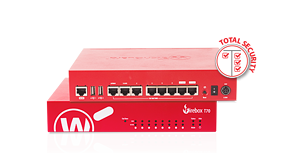
You can also look for some of the most trusted names when it comes to intelligent firewall devices. Here are some of the vendors that are known to do an extremely great job of securing your business network through the use of intelligent firewall appliances:
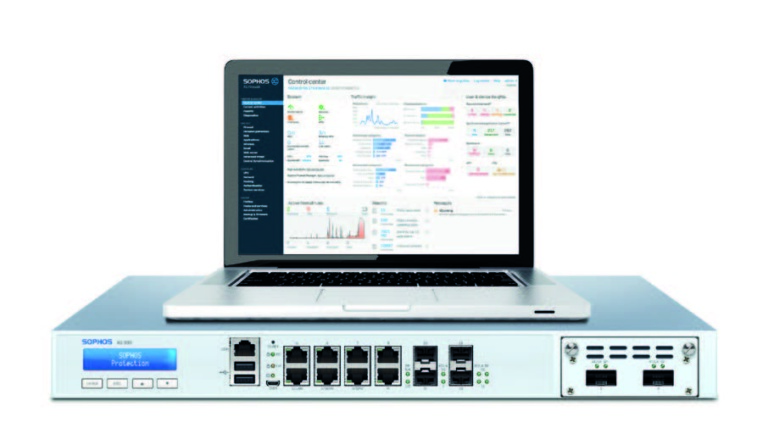
One of the top picks when it comes to endpoint protection. This award-winning vendor incorporates artificial intelligence and Endpoint Detection Response (EDR) technologies to provide a smart and reliable defence line for your network.

Created by the leading network device manufacturer Cisco, Meraki pushes simplicity and Cisco technologies forward to provide a rich and experience to newer generations. By utilising the cloud with wireless connections, Meraki promotes a more convenient approach to network management while ensuring the security of data within a wireless network.

Sonicwall has a broad range of products from hardware to other services to provide effective network security, control and visibility. It also integrates deep learning to be able to prevent repetitive intrusions to the network.
Costs and Benefits
Having an intelligent firewall will involve more costs than relying on a basic router, but also provides significantly more protection. An intelligent firewall is more than just a physical device. With the constant evolution and increasing sophistication of cyber attacks, an intelligent firewall needs to be connected to its vendor platform to deliver the latest updates, AI rules and knowledge in order to keep up and continuously provide you reliable security services.
Having a strong firewall protecting your network should not be considered optional in this day and age. With technology progressing so quickly and as we become more and more reliant on the internet to access our business systems, it’s imperative to have a solid layer of defence protecting your business data.
Now that you understand what an intelligent firewall is and its importance, start talking to your trusted IT partner to discuss the right firewall options for your business network. Seek the help of someone who can help you align your business goals and IT budget with your network security plan to ensure your business is well defended from cyberattacks.
This article is part of a cyber security series by Grassroots IT and The Power Up Project podcast.
Back to more news, updates and resources or learn more about Cybersecurity
Phishing is a form of cyberattack whereby fake emails are sent to your staff with the intention of tricking them into sharing password details, granting access to a secure system, or otherwise taking some action to benefit the cybercriminal. Of the various types of cyberthreat that your organisation is likely to experience, phishing will be the most common, making it vital that you can quickly identify a phishing email.
Ideally you will have security systems in place, such as good email filtering, to ensure that phishing emails are blocked before even reaching your inbox. Unfortunately, even with good security systems in place, it’s not uncommon for the occasional phishing email to slip through.
With the average cost of a data breach in Australian now at $4.4 million, and over 82% of all data breaches involving some form of ‘human element’ (such as accidentally engaging with a phishing email), you can see why it’s important to be able to identify a phishing email, and to know how to respond safely.
Over the last few years several distinct types of phishing attack have emerged. They all have the same ultimate intent but take slightly different approaches to achieving it.
The most common form of phishing attack involves the cybercriminals casting a wide net, with fake emails sent indiscriminately and often in huge numbers. These emails are generally not targeted to their recipients in any meaningful way, apart from pretending to be from well-known brands that the recipient is likely to have some level of trust in, such as Commonwealth Bank or Microsoft. Phishing emails seek to trick the recipient into either sharing personal data or installing malicious software onto their computer to enable further attack.
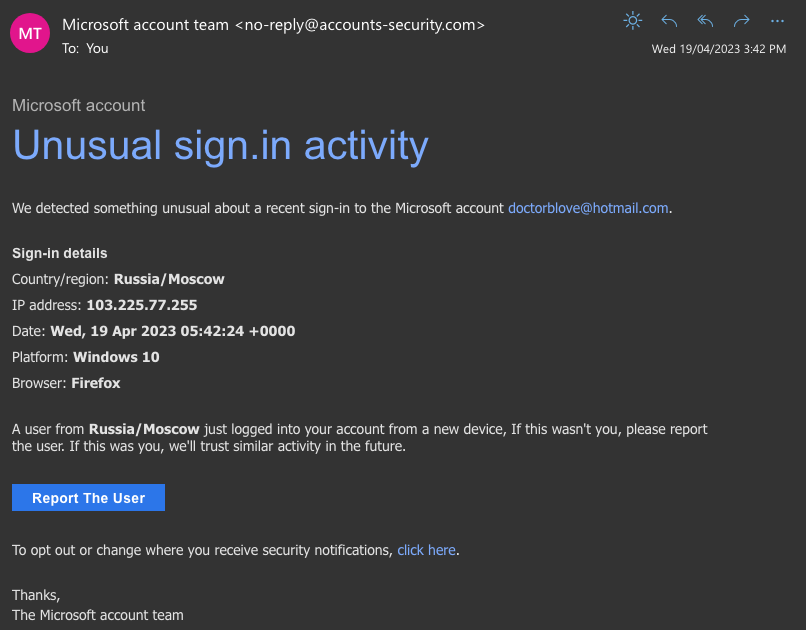
Spear phishing is similar to standard phishing, with the one difference being that spear phishing is targeted at and personalised for specific individuals. This requires the attackers to have some personally identifiable information on their victims, such as email address, first and last names and job title.
This slightly more sophisticated form of attack takes more time to craft and will therefore generally target victims with a higher perceived value, such as more senior staff or those likely to have access to higher value systems.
Whaling is a further evolution of spear phishing, targeting senior executives and others in privileged positions. Whaling emails are individually crafted based on specific knowledge of the target organisation and key individuals, and often play on the pretext of a busy executive asking for some information or action to be taken urgently (such as the transfer of funds to a specific bank account).
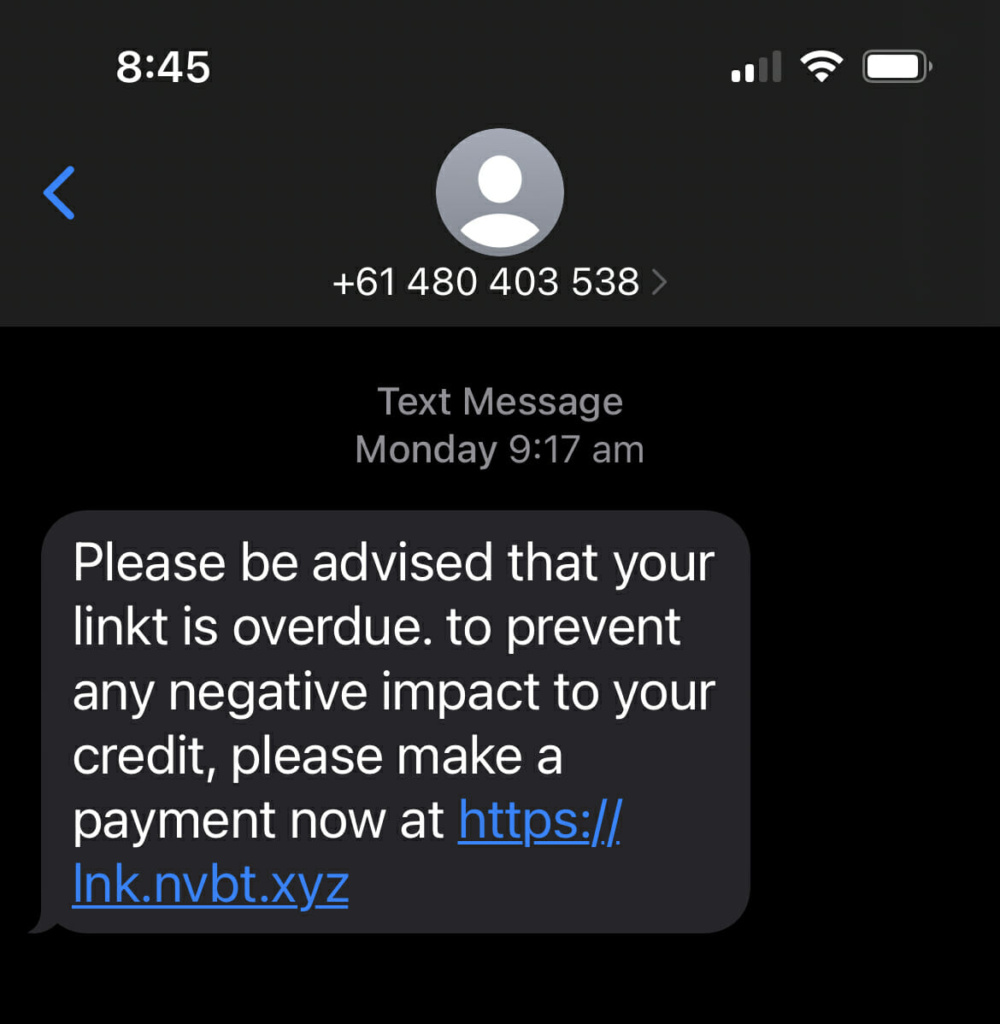
Smishing is a variant of phishing that uses SMS messages rather than emails to trick the recipient into clicking on a fake link and sharing personal data. Common examples in Australia may pretend to be from familiar brands such as Australia Post and Linkt.
Of all the different types of cyberattack, why is phishing so prevalent? First is the fact that phishing attacks can be extremely cheap and easy to execute. Email use is extremely commonplace, providing a vast audience of potential targets, while the tools required to execute an attack can be obtained cheaply and easily on the dark web.
The second key point is that humans are, well, human. We can be extremely susceptible to influence through common psychological techniques, such as our tendency to follow rules. We also tend to make mistakes, many of which pass without consequence, but some (such as clicking on the wrong email link) may not.
We can also add that at an organisational level there is often a lack of cybersecurity awareness, meaning staff simply do not recognise a phishing email, nor do they know how to safely respond when they do
Read more: Building a culture of cybersecurity awareness in your business
To protect against a phishing attack, it’s extremely important that you be able to identify a phishing email so that you can delete it safely, and not accidentally fall prey. The good news is that there are some common identifiers that you can look out for. After just a little bit of practice you will quickly recognise a malicious phishing email without a second thought.
Phishing emails will often purport to come from either a generic corporate sender, or a person that you are unfamiliar with. This isn’t to say that you won’t ever receive legitimate email from an unfamiliar sender, but when you do, be cautious to validate it carefully.
Given that most attackers will not have any personal information about you beyond your email address, phishing emails are likely to use generic greetings such as “Dear Sir”, rather than identifying you by name.
Phishing emails often convey a sense of urgency, encouraging you to ‘click now’ to claim a reward or avoid a penalty.
Phishing emails may contain an offer that’s too good to be true. How likely is it that your long lost (and forgotten) great-aunt has died and left you a million dollars?

Phishing emails often contain bad spelling and grammar, something you’re unlikely to see from a legitimate, professional organisation. This poor use of language may be due to an amateur translation from a foreign language, or it may be intentional in an attempt to avoid email filters.
Many phishing attacks will try to get personal information from you, such as passwords or credit card details. Legitimate organisations will never ask for such information via email.
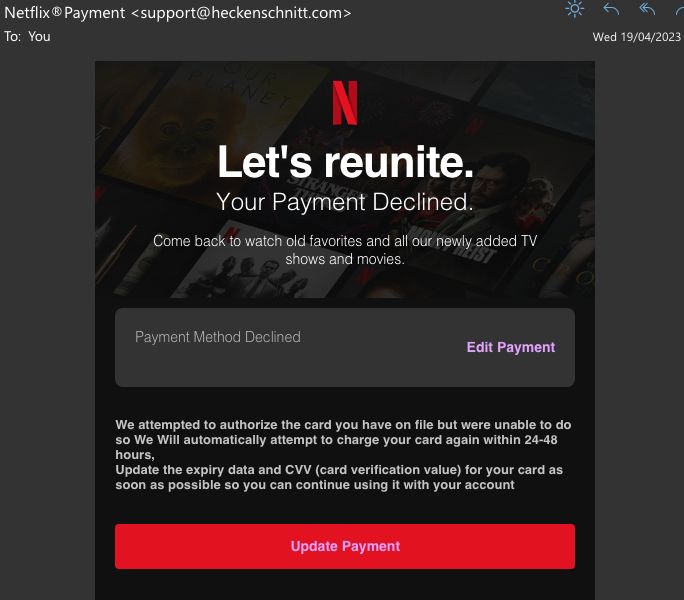
All legitimate organisations have their own domain name, such as “grassrootsit.com.au” which they will use for their website and their email addresses. Capitalisation of domain names isn’t important; however, all other spelling and punctuation is. Phishing email will often come from email addresses that clearly don’t use the purported organisation’s domain name, or in some more sophisticated phishing attacks may use a domain name that closely matches the legitimate one, but with a sneaky minor change.
As with email addresses, any links offered in a legitimate email should use the sending organisation’s proper domain name. Check all links carefully before clicking them to ensure that they do in fact use the correct and legitimate domain name. You can check the link address by hovering your mouse curser over the link without clicking.
Always be suspicious of attachments on emails that you weren’t expecting, especially when the email is from an unfamiliar sender. Email attachments are an effective way for attackers to infect your computer with malicious software, but that can only happen if you open the attachment.
Once you’re familiar with the common tell-tale signs of a phishing email, it will be clear as day when you next receive one. What you do next is crucially important.
The most important thing to remember is to not click on any links or attachments in the email, and to immediately delete the email. Some organisations may ask staff to report any phishing emails to their IT department, in which case you should follow the process provided and do so.
If you do accidentally click on either a link or an attachment in a phishing email, notify your IT department immediately and follow their instructions. There is a good chance that no harm has been done, but it is better to be safe than sorry.
Phishing is the most common form of cyberattack that you are likely to experience, but with a little knowledge it’s easy to identify a phishing email and take appropriate steps to avoid a security incident.
Most people are familiar with the Microsoft Office Suite, which has evolved from CDs to cloud-based productivity solutions. Today, services like Office 365 offer a subscription-based model, providing access to a wide range of office apps accessible across devices, including mobile phones.
Of course, these days, we are all used to a much more convenient and powerful way to create, collaborate and generally get stuff done in the modern workplace through Office 365. For a simple and predictable monthly subscription, we enjoy access to a wide range of productivity software, accessible even from a mobile phone. There is so much more to Office 365 than Outlook, Word and Excel. Watch this webinar replay to see some real-life case studies on how other local businesses are using office 365 to kick goals.
You may have heard about Microsoft 365?
A lot of people hear about Microsoft 365 and get it confused with Office 365 and to be fair, it’s an easy mistake to make. The naming is a little bit confusing (as often happens with Microsoft), but Office 365 is one part of what is on offer with a Microsoft 365 subscription, in addition to the operating system and advanced security tools.
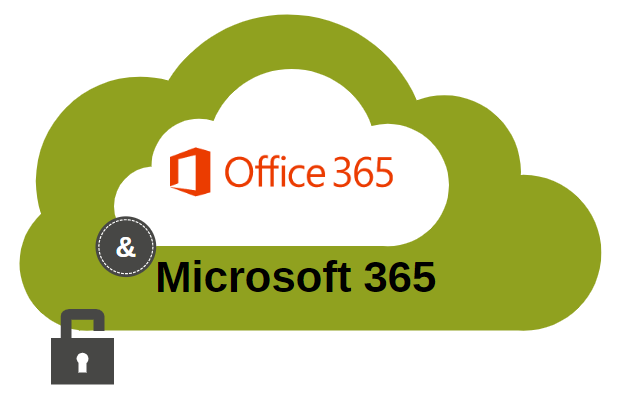
Microsoft 365 is an integrated platform that brings together the productivity of Office 365, the stability of Windows 10 and Enterprise mobility & Security.
Like Office 365, Microsoft 365 a subscription-based service designed specifically for small and medium-sized businesses like yours. As well as all the goodness that comes with your Office 365 subscription that you know and love, the Microsoft 365 offering also incorporates strong data security features. Microsoft 365 is designed as a complete package when it comes to workplace productivity and security. Instead of having to design and purchase subscriptions piecemeal, everything is incorporated from the get-go.
Office 365 Business Premium and Microsoft 365 Business are two of the best plans to compare in terms of what’s on offer to understand the differences between these two products.
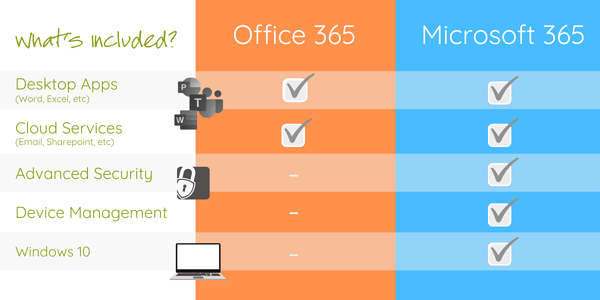
Both products come with web browser versions of the Office Suite as well as the ability to have fully installed Office applications on tablets and smartphones and, of course, your PC if you like. You get 1TB of personal file storage as well as business class email and calendars. You have all the trimmings with Microsoft Teams for collaboration and all the additional business applications such as Delve and Planner.
Basically, both products have the full Office Business Premium Package.
The differences start with security and device management. Microsoft 365 comes with Enterprise Mobility and Security. This aligns with the vision of IT that focusses on the person, and not just a device. In the modern workplace, employees expect to be able to have access their information in a flexible way, across multiple devices. Microsoft 365’s cloud-based enterprise mobility management tool included with the subscription aims to help organisations manage the mobile devices employees use to access corporate data and applications.
The BIGGEST difference between Office 365 and Microsoft 365 is that the Windows 10 professional operating system is included in your Microsoft 365 subscription.
For organisations that still maintain a large fleet of Windows 7 systems, the Microsoft 365 subscription is very attractive.
It’s not uncommon to see businesses still operating on a fleet of computers running Windows 7. In fact, it’s estimated that approximately 40% of all computer users are still running Windows 7.
Microsoft ended mainstream support for Windows 7 way back on January 13, 2015. Time flies! Extended support won’t end until January 2020 but at our current speed of business, this is just around the corner.
Introducing Microsoft 365 Copilot
As of January 2025, Microsoft has enhanced its offerings by integrating Microsoft 365 Copilot, an AI-powered assistant, into Microsoft 365 Personal and Family subscriptions. Copilot assists users in applications such as Word, Excel, PowerPoint, Outlook, and OneNote, helping to draft content, suggest rewording, and create presentations. Subscribers receive a monthly allotment of AI credits to utilise these features, with options to upgrade for increased access.
Microsoft 365 Personal and Family Plans
For individual users and families, Microsoft offers tailored plans:
These plans ensure that both individuals and families have the tools needed for effective cloud-based productivity.
The risk of not upgrading once extended support ends is that systems still running Windows 7 may be vulnerable to un-patched security risks as Microsoft no longer rolls out security updates to keep systems secure.
If you are looking to upgrade the operating system across your fleet to remain secure, then it makes a lot of sense to look at a subscription model for your operating system instead of the traditional approach of purchasing new perpetual licenses for all your applicable devices.
For organisations that are yet to make the move to Office 365, Microsoft 365 makes a lot of sense especially if their current fleet of computers is still running Windows 7.
Any business looking to establish a secure, collaborative working environment that integrates traditional desktop workstations and mobile devices with a dispersed workforce will benefit from this integrated solution provided by Microsoft 365. It combines the Operating System (Windows 10), the Productivity Suite (Office 365) and the authentication system (Enterprise Mobility and Security).
“What sort of costs am I looking at?”
With both Office 365 and Microsoft 365, there are multiple plans to choose from depending on your needs and both would involve a process of setup and migration. Unless you’re particularly IT savvy, we would highly recommend the project is properly scoped and managed by a professional IT service provider to have the best outcome and minimal disruption to your business. You can view more information about Microsoft 365 Business here and compare the Microsoft 365 Enterprise plans here.
“I’m still not sure whether Office 365 or Microsoft 365 is the best option for my organisation.”
That’s okay, we totally get it! Make a time to catch up with us and we’ll help you work out which would be the best fit for your organisation’s needs and business goals.
Are you ready to get solutions that drive positive change to your business? Reach out to us to know more about how we can build these solutions together.
Back to more news, updates and resources or learn more about Office 365
If you are using one of the major Software as a Service Offerings (SAAS), such as Office 365 or public cloud file storage, then you are benefitting from incredible economies of scale. Your data is highly available and accessible from almost anywhere securely.
So, you may be thinking…
But the thing is, this doesn’t necessarily mean that your data is backed up in such a way that you can recover it on-demand.
It’s a common misconception that your data in SaaS applications is fully backed up. For a service to be highly available and resilient, as guaranteed in service levels and expected by the modern workplace, Cloud vendors layer on security and redundancy. Your data is almost definitely backed up by the vendor in the sense that it lives in different parts of the data centre, possibly even in different states, and this makes it highly resilient. But, this is for their benefit. It doesn’t necessarily mean that you are able to roll back and recover data that is lost for whatever reason.
Here are three ways that the unthinkable might just happen:
Data loss can be the result of human interaction pre-caffeination. Quite simply, it can be caused by human error as simple as someone accidentally hitting that big dirty delete button. Human error is by far the most common cause for data deletion and also potentially the most dangerous because it may not be discovered for some time: longer than many traditional backup regimes accommodate for.
As well as files being accidentally deleted, information can also be unknowingly overwritten by both users and third-party applications. Many systems hold large volumes of data. Living data that is constantly added to and updated. Bulk uploads, mass importation of large data sets by integrated third-party applications which manage the data inside your applications. Not everything is always operating as it should.
International espionage may seem far-fetched for your company’s cloud data so let’s leave aside the black hoody wearing hacker boogey man, surpassing security systems to delete and corrupt your data complete with retro 90s soundtrack. One of the benefits of having data stored in a cloud system is the increased levels of security that the sheer scale of resources permits. If a nefarious user were able to break through the significant defences in Microsoft world, it would make more than a ripple in the news.
A far more likely scenario would be the disgruntled employee. When employees leave, be it under a less than ideal circumstance or not, they may delete important information. You want a solution that enables you to easily restore deleted data.
Additionally, you want a system that lets you easily access the information that former employees have left behind in their inbox and My Documents folder without having to pay for their seat license. Many organisations are still retaining the accounts of departed employees in order to ensure that critical data, mail and documents are safely retained and not lost. This is obviously not the best use of scarce resources.
Regardless of how data is lost, it can happen. It’s important that you know that Office 365 doesn’t back up anything long term. If you delete something, after a 30-day period it is gone forever.
Microsoft 365 backup solutions can fill a gap in the Office 365 offering by backing up the data in your mailboxes, One Drive and SharePoint sites.
Cloud Backup Solutions can offer unlimited retention and could be an effective way to not only insure your business against the risk of data loss but also provide you with some very useful features. They allow you to restore your data at a granular level. Individual files or emails can be recovered directly to your computer. This is a unique and very handy capability not available in other products.
An easy-to-use dashboard gives you the ability to view and manage your backups, use search capabilities to target specific emails or files and either restore them to a user’s account or, as a very handy bonus feature, download them directly to your computer.
Whether you have a rogue employee deleting files, accidental user error or ransomware attacks, it’s important to know that there are solutions available to protect you from these risks and keep your data safe.
Talk to us today about the data-saving solution that is right for your business.
