
October is Cyber Security Action Month, and this year the Australian Government’s message is short: “Take a second. Stay secure.” The idea is that a small pause before you click, share or respond prevents most of the damage.
When it comes to AI and cybersecurity, we think that pause matters most in one particular moment: when someone in your team opens an AI tool.
In most businesses, AI arrives well before an AI policy does. A project manager summarises meeting notes in a free chatbot. Someone in accounts drafts a tricky supplier email. A team leader pastes a spreadsheet in to tidy it up. None of this is malicious. People are trying to get through the day faster, and AI is good at helping them do that.
The risk sits in what gets pasted. The Office of the Australian Information Commissioner recommends that organisations “do not enter personal information, and particularly sensitive information, into publicly available generative AI tools”. Client details, staff records and customer lists often contain exactly that kind of information, and it is easy to paste them without thinking twice.
AI tools handle your data in different ways. Free consumer tools are built for individuals, and their terms on storing and using prompts vary. Microsoft 365 Copilot works inside your Microsoft 365 environment. Microsoft states that Copilot prompts, responses and the data it accesses “aren’t used to train foundation models”, and that Copilot respects your existing permissions, sensitivity labels and retention policies.
That second point cuts both ways. Copilot can see whatever each user can already see. If your SharePoint permissions are loose, Copilot will happily surface the salary spreadsheet someone saved to the wrong folder years ago. Tidy permissions come before new licences (we cover this in more detail in getting your business ready for Microsoft Copilot).
Our view is that the safest path for most businesses is to give staff an approved tool that works inside your Microsoft 365 tenant, and be clear about what never goes into anything else. Banning AI outright tends to push it underground, where you can’t see it at all.
AI has also made scammers more convincing. Phishing emails used to give themselves away with clumsy grammar and odd formatting. AI tools now write clean, well-targeted messages in seconds, in whatever tone the attacker needs.
Email is still the main way in. In the Australian Signals Directorate’s Annual Cyber Threat Report 2024-25, business email compromise fraud with a financial loss made up 15% of cybercrime reported by businesses. The average self-reported cost of cybercrime rose 14% to $56,600 for small businesses, and 55% to $97,200 for medium businesses.
The same technology can mimic a familiar voice or build a convincing copy of a supplier’s website. An “urgent” call from the boss asking for a quick transfer is easier to fake than it used to be.
This is where the campaign’s message earns its place. A short pause catches most of these attempts.
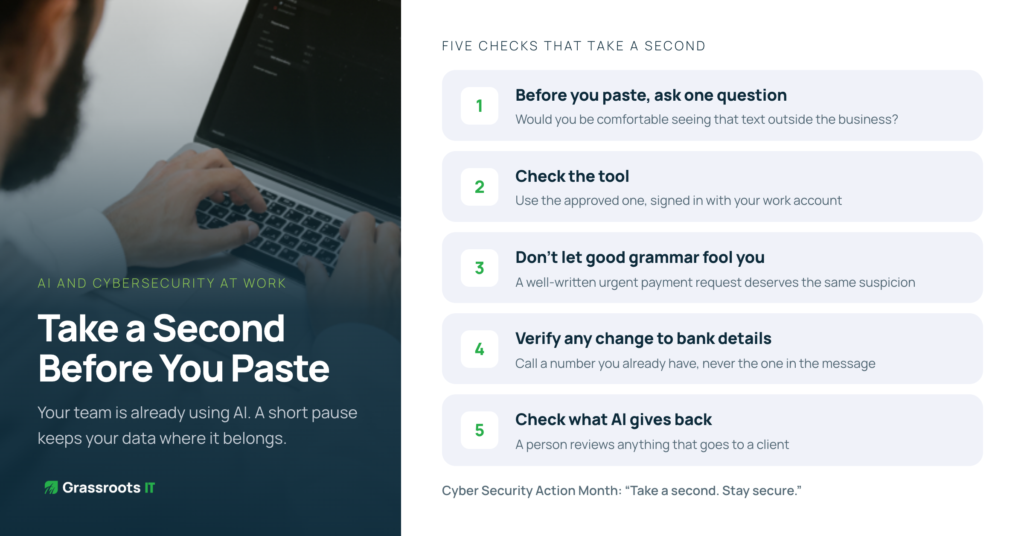
You don’t need a 40-page AI policy. A one-page guideline covering approved tools, what never gets pasted and who to ask is a strong first step. Add a permissions review in Microsoft 365 and a short staff session on AI-assisted scams, and you have covered the biggest gaps.
We saw this with a not-for-profit client that wanted an HR assistant built on Copilot. Before building anything, we talked through where data goes in the free and paid versions of Copilot. We then gave the agent access to just one SharePoint library (policies and procedures), set it to answer only from that content, and tested it with a small group of staff before a wider rollout.
So take a second this October. Ask your team which AI tools they used this week. Their answers will tell you where to start.
SOURCES
For years, October has been Cyber Security Awareness Month. In 2026 the Australian Government renamed it Cyber Security Action Month. It’s a small change with a clear message: most small and medium businesses already know the risks. What’s missing is follow-through.
The month sits inside a wider Australian Signals Directorate program called Cyber Action Year 2026. It asks organisations to plan on the basis that a cyber compromise is a matter of “if, not when.” Insurers, auditors and larger clients already think about their suppliers this way, so it’s a useful lens for any business that wants to keep winning work.
Most business owners know they should have multi-factor authentication, and many already use it for email. More and more apps are making it a compulsory part of logging on to accounts these days. The gaps tend to be elsewhere: a shared admin login, an old accounting portal, a supplier system nobody has checked in years.
Those gaps are where incidents happen. The Australian Signals Directorate received over 84,700 cybercrime reports in 2024-25, roughly one every six minutes. The average self-reported cost was $56,600 for a small business, up 14%, and $97,200 for a medium business, up 55%.
Security work rarely feels urgent until something goes wrong. It competes with client deadlines, hiring and month-end, and it usually loses. A month named for action is a good reason to put two or three items in the calendar and see them through.
Here are five actions that line up with the basics the that the October campaign promotes, in the order we’d tackle them:
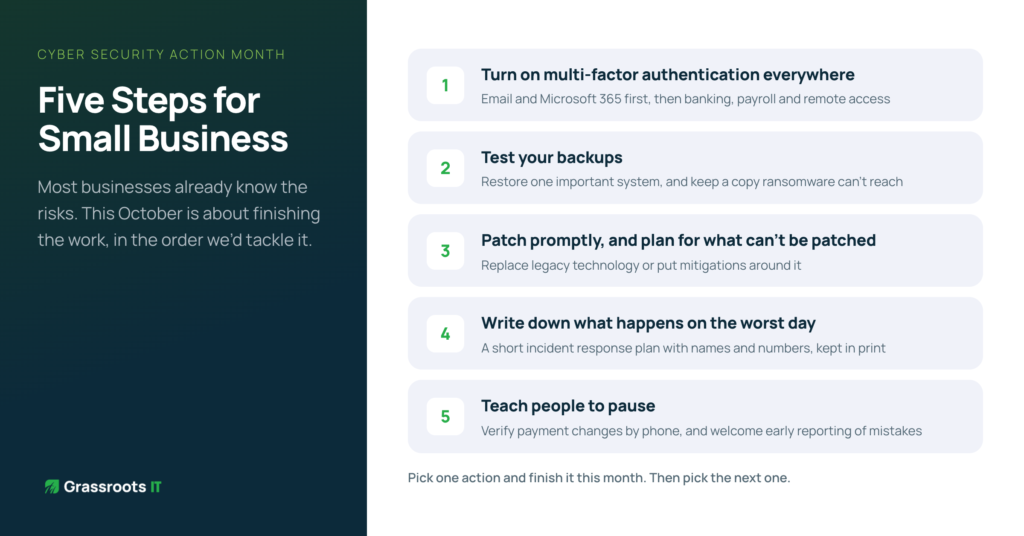
If you’re accountable for technology in your business, try this: if we were breached tomorrow, what would happen in the first hour? Who would you call? Could you still invoice, pay staff and talk to clients?
If the answers are vague, you’ve found your starting point. A tabletop exercise, where your leadership team walks through a realistic scenario together, surfaces gaps faster than almost anything else. It also turns an abstract risk into a set of decisions people have already practised.
It’s also worth checking your cyber insurance policy while you’re there. Many policies list conditions, such as multi-factor authentication or tested backups, that need to be in place for a claim to succeed. Knowing those conditions now is far better than discovering them mid-incident.
The five actions above make you safer. More and more, clients, insurers and tender panels also want you to prove it. Frameworks such as the Essential Eight and SMB1001 help here: they turn good intentions into a structured program with evidence you can show someone else.
We went through this ourselves when Grassroots IT achieved SMB1001 Gold certification. Over about six months, the biggest surprise was how much good practice we already had in place that simply wasn’t documented, so most of the work was writing it down and making it auditable.
Cyber Security Action Month runs until the end of October. It’s a great time to choose one action from this list and finish it before then. Then pick the next one.
SOURCES
