The Hidden IT Cost of Growing Past One Site
Most engineering and technical firms do not notice their IT setup was built for one office until they open a second.
At 15 or 20 staff under one roof, almost anything works. Files sit on a local server or a shared drive everyone can see. The office network is fast and reliable. If something breaks, someone walks over and looks at it. None of that survives the move to a second site, a remote project office, or a growing field team, and the firms that feel this hardest are the ones whose work depends on real operational complexity: multiple projects, multiple locations, and people who need the same information whether they are at head office or three hours up the highway.
This is a growth story more than an IT one. IT is usually just where it shows up first.
Why this catches firms off guard
The systems that felt effortless in one office were never actually simple, they just had the benefit of everyone being in the same building. A shared drive works because someone can walk over and ask who has a file open. Support works because a problem can be seen and touched. None of that was ever written down as a plan, so nobody notices it was a plan at all, until a second office removes the thing that was quietly holding it together: proximity.
One site versus several: where it actually breaks
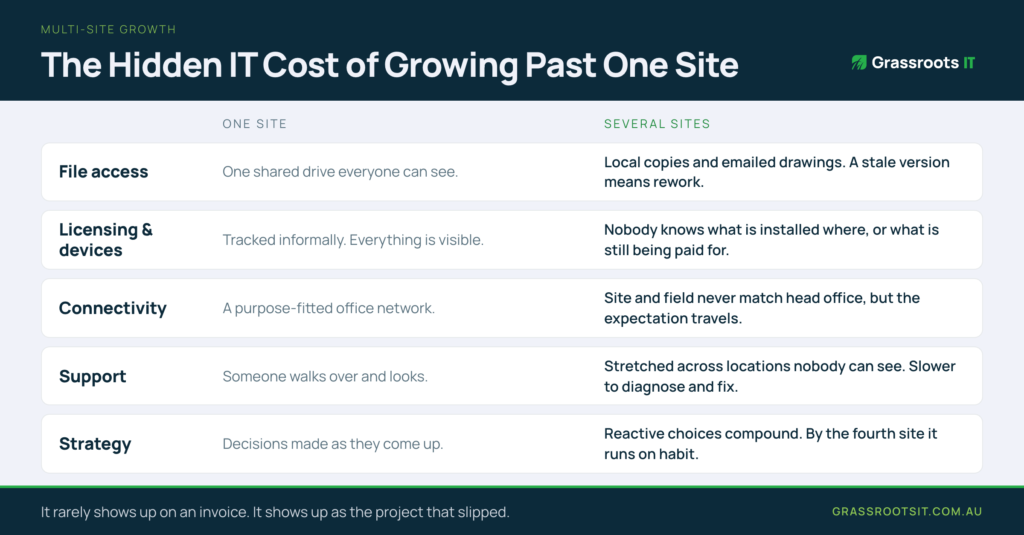
File access and version control.
One site: a shared drive or local server that everyone can see and everyone understands. Several sites: staff end up working from local copies, emailing drawings back and forth, or losing time waiting for a connection back to head office just to open a file. On a technical project, a stale version of a drawing is not a minor inconvenience: it means rework, and sometimes a mistake that reaches a client.
Licensing and device management.
One site: software licences tracked informally, because everyone and everything is visible. Several sites: nobody quite knows what is installed where, what is still being paid for, or what is out of date on a laptop that has not been back to head office in months. The cost is never dramatic on any single machine; it accumulates quietly across dozens of them.
Connectivity.
One site: a purpose-fitted office network that just works. Several sites: site offices and field locations rarely get the same reliability, but the expectation that systems “just work” travels with the team anyway, and every dropped connection becomes a support call.
Support.
One site: an informal arrangement, internal or outsourced, sized for one location and one set of problems. Several sites: the same person or provider is now stretched across locations they cannot see, with issues that take longer to diagnose and longer again to fix, because half the job used to be walking over and looking.
Strategy.
One site: infrastructure decisions made as they come up, because the stakes of getting one thing wrong are low. Several sites: those same reactive, site-by-site decisions compound. Each new site adds a bit more complexity to a setup that was never designed to scale, and by the third or fourth site the whole thing is being held together by habit rather than design.
What good looks like
Hardware is beside the point. What matters is whether your systems were designed to support one site or several. A setup built for growth typically has a few things in common: a centralised, cloud-based environment that any authorised person can reach securely from any location, standardised device management so every laptop and site machine meets the same baseline regardless of where it sits, connectivity planned for field and site conditions rather than assumed to match head office, and an IT partner who is thinking about your next site before you open it, not reacting once it is already causing problems.
Getting ahead of the curve
The firms that get ahead of this treat IT as part of the growth plan itself, rather than something to patch once the second office is already open and struggling. It is a small mindset shift with an outsized payoff: the same investment made a year earlier costs roughly the same, but made a year later it is competing with lost hours, duplicated work, and frustrated staff who have already worked around the problem in their own, less reliable ways.
A simple test is whether your current setup would survive being copied and dropped into a second location tomorrow. If the honest answer involves a password taped to a monitor, a folder structure only one person really understands, or a support arrangement that quietly assumes someone can walk over and look, that is where the real cost is hiding. It rarely shows up on an invoice. It shows up as the project that slipped, the drawing that was a version behind, or the new hire at the second site who spent their first week unable to access half of what they needed.
Talk to us before the next expansion
If you are looking at a new site, a growing field team, or you have already opened one and are feeling the strain, it is worth having that conversation before the next expansion rather than after. We have spent two decades working with engineering and technical firms across South East Queensland through exactly this kind of growth, and the pattern is consistent: the cost of fixing this properly barely changes with time, but the cost of leaving it keeps climbing the longer it sits.
Grassroots IT is a Brisbane-based managed IT services provider specialising in Microsoft solutions for engineering and technical firms across South East Queensland. Learn more about our Cloud Services or IT Support.