
Updated 27 May 2026 with new licensing details.
Every few months we speak with a business owner or operations manager who tried Microsoft Copilot, found it underwhelming, and quietly switched it off. Sometimes they blame the technology. Sometimes they blame themselves for expecting too much. Usually, the real issue is neither.
Copilot is a capable tool. But it operates entirely within the environment you give it, and if that environment isn’t set up properly, even a sophisticated AI assistant will produce mediocre results. The gap between expectation and reality almost always comes down to a handful of predictable problems. Here’s what we see most often.
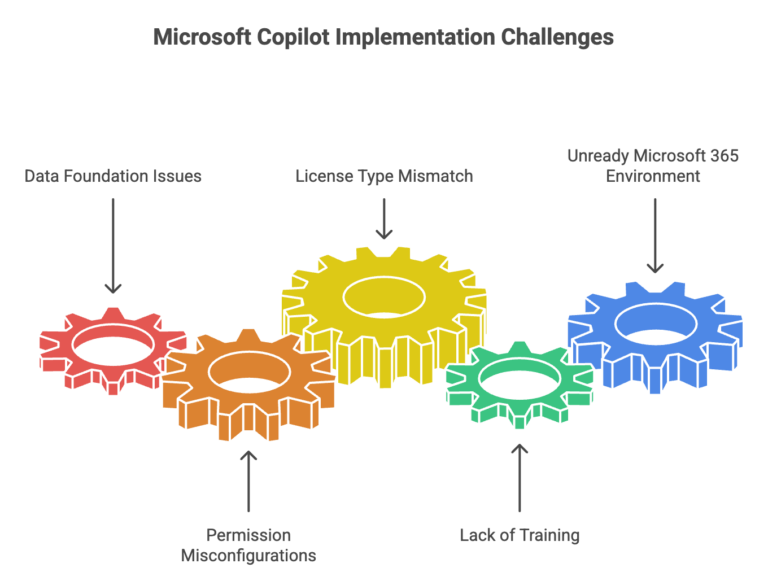
The data foundation isn’t there
Copilot draws on the information it can access within your Microsoft 365 environment: SharePoint files, emails, Teams conversations, and documents. This is what distinguishes it from generic AI tools: it can work with your actual business information, not just publicly available knowledge.
But that also means it reflects whatever your data looks like. Ask Copilot to summarise your organisation’s approach to a particular process, and it might surface a policy document from 2019 that nobody has opened since. Ask it to help draft a proposal, and it might pull context from the wrong project because files aren’t clearly named or consistently stored.
This isn’t a Copilot failure. It’s a data problem that Copilot makes visible. In our experience, businesses with well-organised SharePoint environments and consistent file management practices see noticeably better results from day one. Those with digital clutter accumulated over years find that Copilot is essentially trying to help you from inside a disorganised filing cabinet.
The fix isn’t an overnight overhaul. It is identifying where your actual sources of truth sit for the work your team does most often, making sure they’re in SharePoint or OneDrive, and ensuring they’re current. That foundation makes everything downstream work better.
Copilot respects the same access controls as your staff. If a user has access to a file, Copilot can use it. If they don’t, it can’t.
This is by design. It is good for security. But it also means that whatever your permission structure looks like today, Copilot inherits it. We regularly see two failure modes that cause problems.
The first is overly permissive environments. Broad, undifferentiated access means Copilot can surface sensitive information to users who shouldn’t see it: financial data, HR records, or confidential client information shared with staff who have no business reason to access it. This is a genuine risk, and businesses often don’t realise how open their SharePoint permissions actually are until they start thinking about AI.
The second is overly restrictive environments. Permissions so locked down that Copilot has almost nothing useful to work with, making it barely functional for the people trying to use it.
A permission review before rolling out Copilot is time well spent, not just for Copilot’s sake, but because it’s often the first honest look businesses have had at who can access what in years.
There’s currently more than one version of Copilot available to Microsoft 365 users, and the differences are significant.
Copilot Chat is now included at no extra cost across most Microsoft 365 business plans. It provides AI-powered chat functionality and is useful for web-grounded queries and basic assistance, but it doesn’t integrate into your Microsoft 365 apps, and it doesn’t have access to your organisational data.
Microsoft 365 Copilot is the full offering. It’s a separate paid add-on licence that integrates Copilot directly into Word, Excel, PowerPoint, Outlook, Teams, and other apps, and it can draw on your Microsoft 365 data. This is what most businesses mean when they talk about ‘getting Copilot.’
The reason this matters: some businesses believe they have Copilot when they’re actually using Copilot Chat. They’ve set expectations based on what the full product can do, tested it, found it lacking, and concluded Copilot doesn’t work. In reality, they’ve never had access to the product they were evaluating.
Rolling out Copilot and expecting staff to figure it out on top of their existing workload is one of the most common reasons it fails to take hold. People try it a few times, don’t find the output particularly impressive, and quietly stop using it. The tool gets a reputation as overhyped.
The problem usually isn’t Copilot. It is that nobody was given realistic time and space to develop prompting skills. Getting genuinely useful output from Copilot requires knowing how to ask the right questions, with the right context, at the right level of specificity. That’s a learnable skill, but it takes practice, and it doesn’t happen in stolen minutes between meetings.
The businesses we see getting consistent value from Copilot treated the rollout like any other tool adoption: dedicated time for learning, realistic expectations upfront, and a mechanism for sharing what’s working across the team. The investment is modest, but skipping it almost always leads to the ‘we tried it and it wasn’t worth it’ conclusion.
Copilot sits on top of your existing Microsoft 365 setup. If that setup has drifted over time: inconsistent security configurations, apps deployed but not properly adopted, licences that don’t reflect actual usage: those issues become more visible when you try to layer something like Copilot on top.
Multi-factor authentication needs to be enabled and consistently enforced. The current M365 desktop apps need to be deployed and in active use. Security policies need to be configured in ways that are appropriate for AI tools accessing organisational data. None of these are unusual requirements. They’re good IT hygiene that should be in place regardless. But they matter more once AI is in the picture.
For businesses with the right foundations in place, yes. We’ve seen genuinely meaningful productivity improvements across a range of functions: from drafting and summarising to meeting follow-up and data analysis. The businesses getting the most from it aren’t necessarily the most sophisticated technology users; they’re the ones who took the time to prepare properly.
If Copilot underwhelmed for you, or if you’re thinking about deploying it and want to understand what’s actually needed, a readiness assessment is a practical starting point. It looks at your data environment, permission structures, M365 configuration, and adoption approach, and gives you an honest picture of where you stand before you invest further.
Grassroots IT is a Brisbane-based managed IT services provider specialising in Microsoft solutions for businesses. Learn more about Copilot implementation and readiness assessments at grassrootsit.com.au/microsoft-copilot/
Updated 21 April 2026 with new licensing details.
Most businesses we speak with aren’t choosing between using AI and not using it. Their staff are already using AI tools in some form: whether that be ChatGPT, Google Gemini, Claude, or something else. The question that actually matters is whether those tools are the right ones for a business environment, and whether they’re being used in a way that’s safe and appropriate.
This distinction is where Microsoft Copilot sits in a different category from most of the AI tools your team might be reaching for on their own. Understanding the difference helps you make a more informed decision about where to invest and how to structure AI use across your business.
ChatGPT, Claude, Google Gemini, Microsoft Copilot, and similar tools are all built on large language models: AI trained on enormous amounts of text that can generate, summarise, translate, and reason through language-based tasks. At a basic level, they all do similar things: help you write faster, summarise information, answer questions, and work through complex problems.
For simple tasks, drafting a quick email, brainstorming ideas, explaining a concept in plain language, most of these tools perform well. The differences become significant when you move into business-critical work, when you need the AI to work with your actual company information, and when data security matters.
This is the distinction that matters most for businesses, and it’s the one most often overlooked.
Consumer AI tools like ChatGPT and Google Gemini (in their standard free or subscription forms) are general-purpose assistants. They work from publicly available knowledge and whatever information you type or paste into them. They don’t know anything about your business unless you tell them. And when you do tell them, by pasting in a client email, an internal report, or a proposal you’re working on, that information is going into an external system that isn’t governed by your security policies.
This is a risk most businesses haven’t fully reckoned with. We regularly work with organisations where staff have been using ChatGPT or similar tools productively for months, and where nobody has stopped to ask what data is being pasted in. Confidential client information. Internal financial data. Sensitive HR content. Once it’s in an external AI tool, you’ve lost control of it in ways that can have serious consequences.
Microsoft 365 Copilot operates entirely within your Microsoft 365 environment. It can draw on your SharePoint files, your emails, your Teams conversations, and your documents, but all of that stays inside your Microsoft tenant, subject to your existing security policies and access controls. Nothing goes to an external system. Microsoft’s enterprise data protection commitments apply. This is what makes Copilot fundamentally different from general-purpose AI tools when it comes to business use.
General AI tools: No. You have to manually provide context in every conversation, and providing it means sending data externally.
Microsoft 365 Copilot: Yes. It can draw on your documents, emails, Teams threads, and files: securely within your Microsoft environment.
General AI tools: Limited. You can copy content in and out, but there’s no native connection to Outlook, Word, Teams, or the other tools your team uses every day.
Microsoft 365 Copilot: Deep. Copilot is built directly into the apps your team already uses. In Outlook, it can summarise long email threads. In Teams, it can recap meetings you missed. In Word, it can draft from scratch or improve existing content. In Excel, it can analyse data and surface insights.
General AI tools: Variable, and often inappropriate for business use. Consumer AI terms of service are not designed for organisational data. Enterprise tiers of some tools offer better protections, but require separate evaluation.
Microsoft 365 Copilot: Built on Microsoft’s enterprise security framework. Data stays within your Microsoft 365 tenant. Existing permissions and access controls apply. Compliant with Australian data residency requirements when configured correctly.
General AI tools: Minimal. Most are consumer products that individuals sign up for and use independently. This is also part of the risk: there’s no central visibility into what your team is using them for.
Microsoft 365 Copilot: Requires proper deployment and configuration. This is not a plug-and-play product: it requires your Microsoft 365 environment to be in good shape, permissions to be configured appropriately, and adoption to be managed deliberately. This is additional effort, but it’s also what makes it appropriate for a business environment.
General AI tools: Free or low-cost consumer tiers are widely available. Enterprise tiers with better security controls cost more.
Microsoft 365 Copilot: AU$26.91 per user per month (excluding GST, current promotional pricing) as an add-on to a qualifying Microsoft 365 subscription. This is a meaningful investment, and the return depends on proper implementation.
For individual, low-stakes tasks where no company information is involved, general AI tools are useful and many of your staff are probably already using them. That’s not necessarily a problem.
For any work involving your company’s own information: client data, internal documents, financial information, or anything that could be sensitive: Microsoft 365 Copilot is the appropriate choice. It’s the tool that was designed for a business environment, with the security architecture to match.
The honest recommendation for most Brisbane businesses: start by getting clear on what your staff are already doing with AI tools. That conversation often reveals both the risk exposure and the productivity opportunity more clearly than any comparison article can. Then assess whether your Microsoft 365 environment is ready for Copilot, because the quality of deployment determines the quality of results.
We’ve seen businesses get meaningful value from Copilot and we’ve seen businesses find it underwhelming, and the difference is almost always in how it was set up and adopted, not in the underlying technology. If you’re considering it, a readiness assessment is the sensible first step.
Grassroots IT is a Brisbane-based managed IT services provider specialising in Microsoft solutions for businesses. Learn more about Microsoft Copilot implementation at grassrootsit.com.au/microsoft-copilot/
Every business owner we speak with is asking about AI. And fair enough: the potential is real.
But here’s what we’re seeing: most businesses are diving into AI tools without checking whether they’re actually ready to get value from them.
The good news? You don’t need a comprehensive AI strategy or a transformation roadmap. Most organisations are finding their way with AI one step at a time: trying Copilot here, experimenting with automation there, learning as they go.
But there are three fundamental questions that determine whether those experiments will succeed or flounder. Get these Copilot readiness fundamentals right, and you’re set up to learn and adapt. Get them wrong, and you’ll waste time and money on AI tools that don’t deliver.
This is the foundation everything else is built on. AI is only as good as the data it can access and understand. Yet this is where we see the biggest gap between expectation and reality.
Ask yourself three things:
Is your data accessible? If your critical business information lives in local drives, personal folders, or filing cabinets, AI can’t help you. For AI to be useful, your data needs to be in connected systems: SharePoint, OneDrive, your line-of-business applications. Not everything needs to be perfect, but the information your team actually uses daily should be digitally accessible. (Learn how SharePoint can transform your information management.)
Is your data current and clean? Most organisations have years of digital clutter. Old versions of documents. Outdated information no one’s touched since 2015. Duplicate files scattered across different locations. When AI tools search through that mess, they can’t tell what’s current and what’s obsolete. You don’t need to clean everything overnight, but you do need to know where your source of truth sits for important information.
Is your data properly governed? Here’s the kicker: AI respects the same permissions your people do. If your SharePoint permissions are a mess, where anyone can access anything, or critical information is locked down so tightly that no one can find it: those same problems will plague your AI tools like Copilot. Good AI outcomes require good information governance.
Good information governance means having clear ownership of information, consistent permission structures, and documented policies about who should access what. For example, your finance team should be able to access budget documents while keeping them restricted from general staff, and those same boundaries will guide what Copilot can surface for different users.
The reality check: If someone new joined your team today, could they find the information they need within your digital environment? If the answer is “not really,” then AI won’t fare much better.
Once your data foundation is solid, the next question is whether your technology environment can support safe experimentation.
You don’t need advanced infrastructure to benefit from AI. But you do need an environment that’s stable and secure enough to turn on AI features without creating new risks. Copilot readiness starts with your technology foundation.
Is your Microsoft 365 environment in good shape? For most businesses, AI adoption starts with the Microsoft ecosystem: Copilot in Word, Teams, Outlook. But if your M365 environment has security gaps, inconsistent configurations, or systems that don’t talk to each other properly, you’re building on shaky ground. Basic hygiene matters: multi-factor authentication, proper licensing, security policies that actually work.
(For detailed guidance: Discover which M365 security features you should be using to protect your Copilot deployment)
Can you pilot safely? The beauty of modern AI tools is that you can test small before committing big. But that requires an environment where you can trial features with a subset of users, measure what happens, and roll back if needed. If your systems are so fragile that any change creates chaos, you can’t learn effectively.
Do you have the right guardrails? AI amplifies everything, including security risks. Before you enable AI tools like Copilot across your organisation, you need basic data protection and compliance frameworks in place. Not perfect, just appropriate for your business. What information can AI tools access? What can they do with it? Who’s responsible for monitoring usage?
The goal isn’t perfection. It’s having a solid enough foundation that you can experiment, learn, and scale what works without creating new problems.
With your data and technology foundation in place, success ultimately depends on whether your people can actually use these tools effectively.
Technology is only half the equation. The other half is whether your team can realistically learn, use, and benefit from AI tools.
Do people have time and permission to experiment? Here’s what doesn’t work: rolling out Copilot or other AI tools and expecting people to figure them out on top of their already-full workload. Successful AI adoption requires some dedicated time for learning, testing, and adjusting workflows. Not months, but enough space to properly onboard.
Are expectations realistic? AI isn’t magic. It won’t solve problems that are actually people or process issues. It won’t replace thinking. And it definitely won’t deliver value overnight. Teams need to understand what AI can genuinely help with (automating repetitive tasks, surfacing information faster, drafting routine content) versus what it can’t (strategic thinking, relationship building, complex decision-making).
Is there a culture of learning? The organisations getting value from AI are the ones that treat it as an ongoing learning process, not a one-and-done implementation. That means being comfortable with trial and error. Sharing what works and what doesn’t. Adjusting approach based on real experience. If your culture punishes mistakes or resists change, AI adoption will be an uphill battle.
Can you build capability over time? You don’t need everyone to become an AI expert. But you do need some internal capability to assess tools, guide usage, and help people improve their skills progressively over time. Whether that’s upskilling existing staff or bringing in external support, there needs to be a path for building competence.
And remember: not everyone will embrace AI at the same pace. Some team members will dive in immediately while others need more time and support. Both approaches are valid.
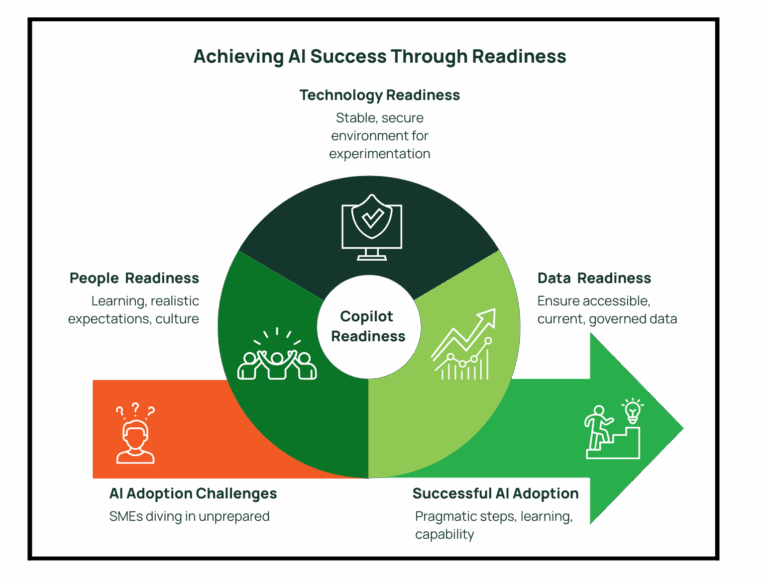
If you’re reading these three questions and thinking “we’ve got some work to do”. That is completely normal. Very few businesses tick all these boxes today.
The key is knowing where you stand so you can make informed decisions about where to invest your time and budget. Maybe you need to clean up your data environment before deploying AI tools. Maybe your technology foundation is solid but your team needs more support. Maybe you’re actually in better shape than you thought and just need confidence to start experimenting.
AI readiness isn’t about having everything perfect. It’s about having the fundamentals right so you can explore opportunities as they emerge, learn from what works, and build capability over time.
That’s how successful AI adoption actually happens in the real world: one pragmatic step at a time.
“Is this AI thing actually worth our time, energy and investment?” It’s a question we hear from business leaders when evaluating Microsoft Copilot. The answer isn’t about chasing the latest trend. It is about identifying where Copilot delivers genuine business value.
When used strategically, Microsoft Copilot unlocks far more than productivity: it becomes a catalyst for innovation and growth.
As technology advisors, we’ve identified three practical ways to use Copilot that help teams work smarter, communicate better, and drive meaningful results.
The foundation of effective Copilot utilisation lies in developing clear, purposeful instructions. When your prompts lack precision, the resulting output may fall short of your expectations.
Best Practices for Business-Focused Prompts:
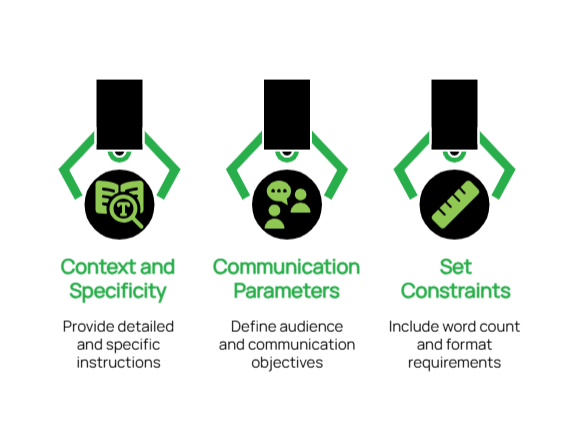
Real-World Applications:
A Non-Profit Organisation: Prompt: “Use Microsoft Copilot to build a checklist in Microsoft 365 that automates thank-you emails to donors. Include steps to personalise messages based on donation amount, connect with our donor database (e.g., Excel or Dynamics 365), and add tracking to measure email engagement like open and click rates.”
Why it works:
This prompt clearly tells Copilot what to automate, how to personalise, and what metrics to track: all within tools non-profits already use.
An Engineering Firm: Prompt: “Write a procedure using Copilot to pull out key specifications from technical documents. Ask it to keep all measurements accurate, highlight any important compliance rules, and point out possible design issues.”
Why it works:
Engineers can quickly get the info they need without missing critical details, helping projects move faster and safer.
A Medical Practice: Prompt: “Create a Copilot template that turns complex medical procedures into easy-to-read patient handouts. Ask it to keep all medical facts accurate but explain them in plain language that patients can understand.”
Why it works:
Patients feel more informed and confident, and staff spend less time rewriting the same explanations.
This foundation of precise, context-rich prompting transforms Copilot from a generic assistant into a strategic partner that understands your specific industry requirements and delivers consistently relevant results.
Think of Copilot as a collaborative partner rather than a one-time tool. By having back-and-forth conversations with it, you’ll refine your ideas and create better content.
Effective Collaboration Techniques:
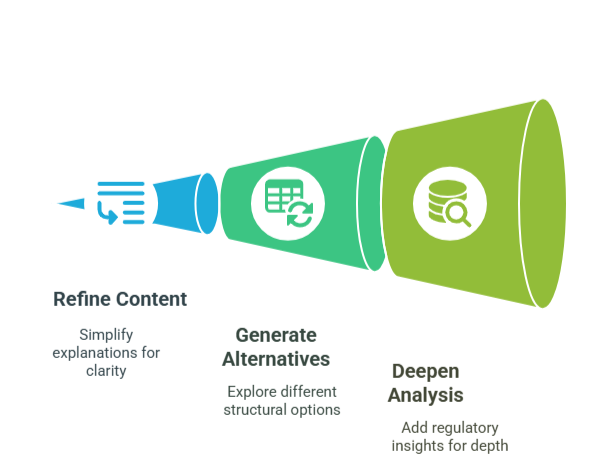
Practical Examples:
Initial Request: “Draft an email template reminding clients about their upcoming appointments.”
Follow-up Refinement: “Revise the template to include a brief explanation of how coming prepared benefits them and what documents they should bring.”
Final Enhancement: “Add a friendly section about our rescheduling policy that emphasises flexibility while reducing last-minute cancellations.”
Initial Request: “Create an outline for our monthly project status report.”
Follow-up Refinement: “Expand the ‘Challenges’ section to include more thoughtful questions about resource allocation.”
Final Enhancement: “Add a forward-looking section that helps team members anticipate next month’s priorities based on current progress.”
This collaborative methodology ensures that your initial ideas evolve into polished, professional communications that align with your strategic objectives and resonate with your intended audience.
One of Copilot’s most valuable capabilities is its ability to optimise your existing content, ensuring clarity, consistency, and strategic alignment across all business communications.
Key Enhancement Applications:
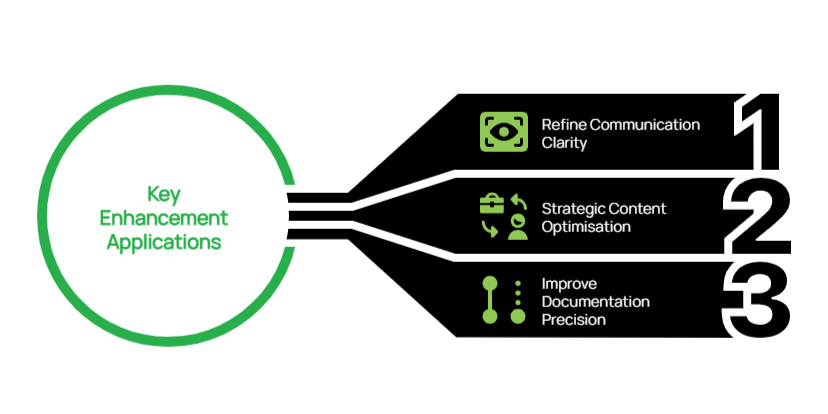
Demonstrated Value:
For Non-Profit Leadership: Original Content: “Here’s the volunteer schedule for next month.”
Enhancement Prompt: “Improve this schedule with a more engaging introduction paragraph that thanks our volunteers and explains how their time contributes to our mission.”
Enhanced Output: “Thank You for Your Dedication! This schedule represents more than just dates and times. It is a roadmap for community impact. Each shift you serve directly supports our mission to improve literacy rates in underserved communities. We’ve highlighted key events where your participation will make an exceptional difference.”
For Project Management: Original Content: “Here’s the technical specification document for the project.”
Enhancement Prompt: “Add a brief executive summary at the beginning that explains the business benefits in non-technical language.”
Enhanced Output: “Executive Summary: This project aims to significantly decrease customer wait times while also reducing operational costs. The technical improvements outlined in this document directly address the key customer pain points identified in our recent satisfaction survey, without requiring additional staffing resources.”
By systematically enhancing existing content, you can leverage these assets more effectively, ensuring every document serves both immediate operational needs and broader strategic communication goals.
For forward-thinking organisations, Copilot represents more than just a productivity tool. It is a strategic asset that can transform how you develop solutions, communicate with stakeholders, and scale your business operations:
Mastering these approaches to Copilot usage can significantly enhance your team’s productivity while ensuring consistent, high-quality output across all business activities.
If you’re interested in exploring how Copilot can be integrated into your broader technology strategy, our team is available to help you determine your Copilot readiness aligned with your business objectives and growth plans.
When efficiency and impact are paramount, non-profit organisations are increasingly turning to advanced technologies to streamline their operations and amplify their reach. According to The Institute of Community Directors Australia “Our data shows that not-for-profits are moving quickly to embrace these new tools and the promise of increased productivity in a resource-constrained sector.”
Two technologies at the forefront of this transformation are Artificial Intelligence (AI) and Robotic Process Automation (RPA). These powerful tools have the potential to change how non-profits operate, allowing them to do more with less and focus more on their core missions.
Before we dive into specific applications, let’s clarify what we mean by AI and RPA:
While distinct, AI and RPA often work together extremely effectively. RPA handles routine tasks, while AI can be applied to more complex, decision-making processes.
AI-powered chatbots can change how your non-profit interacts with stakeholders, providing immediate assistance around the clock:
Implementing AI chatbots can lead to increased engagement, improved response times, and more efficient use of human resources. While custom-built chatbots are an option, in many cases you can also leverage existing AI platforms. For instance, Microsoft Copilot, integrated with Microsoft 365, can be used to create chatbots that interact with donors or volunteers through Teams or other Microsoft platforms.
Grant writing is a critical but often time-consuming task for non-profits. AI, specifically Natural Language Processing (NLP), can provide valuable assistance:
By leveraging AI in grant writing, you can potentially increase your success rates and efficiency in securing crucial funding. Tools like Claude, an AI assistant developed by Anthropic, can be particularly useful in this context. Claude can help analyse past successful grants, suggest improvements to current drafts, and even assist in generating initial content for grant proposals.
Understanding public perception is crucial. AI-powered sentiment analysis can provide valuable insights from social media:
Sentiment analysis can help you stay tuned to your audience, adapt your messaging effectively, and manage online reputation proactively.
Robotic Process Automation (RPA) offers significant potential for non-profits to streamline operations, reduce errors, and free up staff time for more strategic work. Here’s a deeper look at how you can apply RPA in your organisation:
RPA can significantly reduce the time spent on manual data entry tasks, improving accuracy and efficiency:
RPA can assist with the often-time-consuming task of creating reports, ensuring accuracy and timeliness:
If you’re considering implementing AI or RPA in your non-profit, here are some steps to get started:
AI and RPA offer exciting possibilities for non-profits to increase their efficiency and impact. By automating routine tasks and leveraging data for better decision-making, these technologies allow organisations to focus more on their core missions and less on administrative burdens.
However, it’s important to approach these technologies thoughtfully. They are tools to augment and support your team, not replace them. The goal is to free up your staff to focus on the high-value, human-centric work that is at the heart of what non-profits do.
If you’re interested in exploring how AI and RPA could benefit your organisation, we’d be happy to discuss your specific needs and help you chart a path forward. Together, we can use technology to create meaningful change in the world.
At the heart of every successful enterprise lies the customer journey, and to genuinely boost customer engagement, it’s essential to identify and address pain points to make this journey as as possible. This process requires a deep understanding of the customer journey and an ability to anticipate potential bottlenecks.
The strategic application of technology in this process is crucial for delivering exceptional customer experiences. By optimising business operations and facilitating interactions, the right technology can give your business a substantial competitive edge.
There are numerous pathways for businesses to enrich customer interactions, two of which have become particularly attractive due to recent advances, namely Artificial Intelligence (AI) and Business Process Automation (BPA).
AI is a technology that can help businesses tackle various customer experience challenges. It enables personalised messaging, intelligent decision-making in real-time, and predictive analytics for anticipating customer needs.
Some key opportunities include:
BPA involves automating business processes to streamline operations, reduce errors and improve efficiency. It is a valuable tool for businesses looking to enhance the customer experience by improving internal processes.
Some key opportunities include:
To streamline the experience for their internal clients, the IT team at a large non-profit organisation leveraged SharePoint, Power Automate and Entra ID to automate the creation of user accounts for new employees.
This solution not only reduced the time required to provision a new user it also improved the quality and consistency of the end-result, reducing the number of follow-up interactions required for the new employee to be fully provisioned.
During the Covid-19 Pandemic, many companies’ customer contact centres faced overwhelming challenges due to shutdowns and resource constraints.
To address this, a Financial Firm worked with a Microsoft engineer to implement Azure Bot Service, hosted on a customer: facing website. These bots were designed to handle routine inquiries and processes, thereby freeing call centre capacity. By automating self-service interactions, contact centres could refocus staff on more complex enquiries, improving overall efficiency and customer experience.
An engineering firm specialising in large-scale infrastructure projects faced several challenges related to project management and their legacy project management platform. Existing spreadsheet-based processes were no longer able to cope with the complexity and volume of client projects.
To tackle these challenges, the Grassroots IT team leveraged the Microsoft Power Platform to provide users with enhanced functionality around project reporting and bid tracking. This strategic application of Business Process Automation streamlined project management and improved communication channels, resulting in reduced project delays and increased client satisfaction.
When evaluating and implementing new technologies within a business setting it is critical to ensure that investments enhance capabilities and align with long-term goals. Our tip: This should involve a multi-step approach, starting with three important tasks:
Below are key considerations and steps organisations should undertake in this process:
Related: The Benefits of Automating Business Processes (and how to spot opportunities)
Advancements in technology such as AI and BPA offer numerous opportunities to enhance the customer experience. From automating routine tasks to providing personalised recommendations, these technologies can significantly improve efficiency, reduce costs, and foster loyalty among customers.
However, it is crucial for organisations to carefully evaluate and select the right technologies that align with their long-term goals and provide adequate training and support for employees to fully utilise them. By implementing these technologies effectively, businesses can not only improve the customer experience but also gain a competitive advantage.
Grassroots IT offer a range of services to improve business operations to fortify the customer journey. Contact our friendly team today to talk about your IT strategy and improved customer interactions.
Updated 21 April 2026 with new licensing details.
Most of the conversations we have with Brisbane business owners about Microsoft Copilot start the same way. They’ve heard the pitch. They know AI is changing how businesses work. They want to know if it’s worth the investment.
That’s the wrong question to start with.
The better question is whether your business is set up to get value from Copilot once you turn it on. Because Copilot doesn’t transform a chaotic Microsoft 365 environment into an organised one: it operates within whatever environment you give it. Get the foundations right, and Copilot can be a genuine productivity accelerator. Skip them, and you’ll find it underwhelming, or worse, create new problems you didn’t have before.
After two decades working with Brisbane businesses on their Microsoft environments, here’s what we know actually needs to be in place.
Copilot draws on the information it can access within your Microsoft 365 environment: your SharePoint files, emails, Teams conversations, and documents. This is what makes it more powerful than generic AI tools like ChatGPT: it can work with your actual business information, not just publicly available knowledge.
But that’s also what makes preparation critical. If your business information is scattered across local drives, email attachments, and shared folders with no clear structure, Copilot will reflect that back to you. It might surface a document from 2018 that nobody’s looked at since. It might pull context from the wrong project. It will make the state of your information visible in ways that can be uncomfortable.
What does ‘ready’ look like? Your critical business information, the documents, processes, and data your team actually relies on, should be stored in SharePoint or OneDrive, named consistently, and reasonably current. Not every file needs to be perfect. But your sources of truth for key business functions should be findable, up to date, and in cloud storage that Copilot can access.
A practical test: if someone new joined your team today, could they locate the information they need within your digital environment? If the honest answer is ‘not really’, that’s where to start.
Here’s something most businesses don’t realise until they start thinking about AI deployment: Copilot respects the same access controls as your staff. If a user has access to a file, Copilot can surface it for them. If they don’t, it can’t.
This is by design, and it’s good for security. But it also means that whatever your permission structure looks like today, Copilot will inherit it, including any problems.
We regularly see two failure modes. The first is overly permissive environments, where broad access means Copilot can surface sensitive information to staff who shouldn’t see it. The second is overly restrictive environments, where Copilot is barely useful because users can’t access the information they legitimately need.
Before deploying Copilot, it’s worth a review of who can access what, and whether that reflects how your business actually operates. This isn’t just a Copilot consideration. It is good information governance that should be in place regardless. But Copilot makes the stakes higher.
Copilot sits on top of your existing Microsoft 365 setup. It requires current M365 apps, Word, Outlook, Teams, to be properly deployed and in active use. It requires multi-factor authentication to be enabled. It requires your environment to be configured consistently, not patched together over years of ad hoc decisions.
We see a lot of environments at Grassroots IT that have drifted over time. Licences that don’t match the user count. Security settings that were configured years ago and never revisited. Apps deployed but never properly adopted. None of these are blocking issues in day-to-day operations, but they become visible when you try to layer something like Copilot on top.
The good news is that a basic M365 health check can identify the gaps quickly. Most are straightforward to address. And fixing them makes your environment better in ways that go beyond Copilot.
This is the one organisations most often underestimate. Rolling out Copilot and expecting staff to figure it out on top of their existing workload rarely produces meaningful results. It produces a tool that people try a few times, don’t find impressive, and quietly stop using.
The businesses we see getting the most from Copilot are doing a few things differently. They’re giving staff dedicated time to experiment, not months, but enough breathing room to genuinely try things. They’re setting realistic expectations upfront: Copilot is a productivity aid, not a replacement for thinking. And they’re creating space for people to share what’s working and what isn’t, so the whole team benefits from individual discoveries.
The prompting skills that make Copilot genuinely useful aren’t difficult to learn, but they do take practice. Treat the rollout like any other tool adoption, not a software switch.
Microsoft 365 Copilot is a paid add-on licence that sits on top of your existing Microsoft 365 subscription. It currently costs from AU$26.91 per user per month (excluding GST) and requires a qualifying underlying plan: Business Standard, Business Premium, E3, or E5.
You don’t need to licence every user immediately. Most businesses start with a pilot group, team members who are likely to get the most from it and can help others learn, and expand from there once they’ve seen how it works in practice.
It’s also worth noting that Microsoft has announced pricing changes for Microsoft 365 business plans taking effect from 1 July 2026, which will affect underlying subscription costs. If you’re planning a Copilot deployment, factor that into your timing.
The businesses we work with that see the best results from Copilot aren’t necessarily the ones with the largest budgets or the most mature IT environments. They’re the ones who took the time to get the foundations right before switching it on.
That means data in the right place, permissions that make sense, an M365 environment that’s configured properly, and a team with realistic expectations and enough time to learn. None of that is complicated. But it’s the work that determines whether Copilot delivers or disappoints.
If you’re considering a Copilot deployment and want to understand where your environment stands, a readiness assessment is a good starting point. It identifies what’s in good shape, what needs attention, and what a practical rollout would look like for your business specifically.
Grassroots IT is a Brisbane-based managed IT services provider specialising in Microsoft solutions for businesses. If you’d like to talk about Microsoft Copilot readiness, contact us at grassrootsit.com.au/microsoft-copilot/
Business process automation is becoming increasingly important. It allows businesses to streamline their operations, save time and resources, and ultimately increase their efficiency and profitability.
In this article, we will look at three real-life case studies of automation solutions that Grassroots IT has recently implemented for our clients. One key point that I would like you to take away from these case studies is that in many cases the most impactful automations are small and simple, such as automating a weekly report, or shifting a paper-based process to a digital form.
With over 600 staff across Australia, our client already had a comprehensive employee onboarding process for each new hire. Unfortunately, due to the complex and comprehensive nature of this process, it was proving to be a burden on staff to execute, and difficult to track, resulting in inconsistent quality and increasingly long processing times.
The project began by reviewing and understanding the existing manual process, identifying which business systems were involved, and who owned the process at various stages. From this an automated solution was designed and implemented, fully automating the onboarding of new staff members across multiple functions and business systems.
Starting with the initial request being logged by the Human Resources department, the new process not only automatically creates and configures all necessary user accounts but engages staff in other departments to complete necessary actions and provide additional information as required. The process culminates by emailing a welcome pack to the new employee with important information to help get them settled.
Not only is the new automated process on track to dramatically reduce processing times from days to just minutes, but also improve consistency and greatly reduce the risk of errors.
Surfacing the right information to the right people can sometimes be as simple as sending an automated report. In this case study our client maintains a list of scheduled training events in SharePoint but was finding that even though the information was readily accessible, many staff remained unaware of upcoming training opportunities. This was resulting in low attendance at events and misinformed frustration amongst staff at the apparent lack of training opportunities.
To address this concern, our client wanted to send a weekly email to all staff with the latest information on scheduled events. Our automation team was able to use Power Automate to automatically generate and send a weekly report to all staff, pulling information directly from the SharePoint list, and formatted to the client’s specification. This not only saved time for staff who were previously manually communicating the events schedule, but also increased awareness of training opportunities among employees.
Our Australian-based client often found themselves needing to collect identification details from international travellers, requiring a manual process of completing paper-based forms and photocopying identification documents such as international drivers’ licenses and passports. Not only was the process clumsy and inefficient, but it also exposed the business to potential errors and compliance issues.
To improve this process, our automation team developed a mobile application using Microsoft PowerApps that allows staff to collect customer identification details directly on their phones or tablets while meeting with the traveller. The app not only collects customer information, but also captures photographs of passports and licenses along with a digital copy of the customer’s signature. All confidential information is stored securely in the Microsoft cloud and is only accessible by authorised personnel.
Overall, the new automated app has greatly improved efficiency, reduced errors, and increased security of the confidential information our client collects.
As you can see from these three examples, automation doesn’t have to be complex to make a big impact on business processes. In fact, a great place to start is by asking these two questions:
By identifying areas where manual tasks can be automated, you can save time and resources, increase efficiency, and ultimately improve your bottom line. If you would like to explore ideas for process automation, contact us today.
Defining your IT strategy is a powerful step towards success, yet alarmingly we still find organisations that don’t take the time to clarify what they expect or require from IT. At its simplest your IT strategy is a statement of how you intend to use IT to support your over-arching business goals. You don’t have unlimited resources to spend on IT, so your IT strategy is there to clarify where you will focus your efforts, and equally as important where you will not.
In our work with clients formulating and executing on their IT strategies we often see clear trends emerging over time in response to the ever-changing IT landscape. Of course, every company will have their own unique IT strategy, but common patterns can emerge.
As we work with our clients in preparation for the year ahead, we are seeing the following three themes appearing with consistency.
Related: Why aligning your IT strategy with business goals is critical for success
In response to the pandemic the world of work has changed significantly, also significantly shifting how people relate to their employment, the environments they work in, and the tools that they are expected to use. Simply put, user experience has become a critical element in every IT strategy.
But what does this mean for your organisation? It means that employees are expecting easy-to-use, efficient and user-friendly technology solutions that allow them to do their job effectively from any location. This includes everything from remote working tools to cloud-based collaboration platforms, all accessible as easily from their smartphone as their home office.
They are also expecting to have fingertip access to the information and expertise that they need, with top-tier training and support services available when required.
So, as you plan your IT strategy for 2024, make sure that user experience is at the forefront of your decision making and investment plans. Put yourself in the shoes of your employees and consider their daily tasks and interactions with technology: are they intuitive and empowering? If not, it’s time to make some changes.
As technology continues to evolve and become increasingly intertwined with our daily lives, the risk of cyber-attacks and data breaches has also risen exponentially. Cybersecurity is no longer just a concern for IT departments but should be a top priority for every organisation’s IT strategy, with direct board-level oversight.
A strong cybersecurity plan should include regular security audits, employee training on identifying and handling potential threats, as well as implementing the latest security software and protocols. Importantly in the post-pandemic world, your cybersecurity plan must also consider new ways of working. With many staff now working from home, old ways of securing your organisation may no longer be as effective.
Cybersecurity not a one-and-done task, but an ongoing process that must be continuously monitored and updated to stay ahead of potential threats. Make sure that your IT strategy reflects this and allocate appropriate resources to keep your organisation’s data safe and secure.
2023 was the year that artificial intelligence hit the mainstream, with the release of ChatGPT throwing the floodgates open. The new-found accessibility of AI is emerging as an inflection point on the longer-term trend of business process automation, with the combination of the two promising significant opportunities.
AI and automation can streamline processes, improve efficiency, and reduce costs in almost every area of your organisation: from customer service to HR to supply chain management. It can also provide valuable insights and data analysis that humans may miss. As the technology continues to advance, it will only become more powerful and integrated with our daily lives.
It’s no longer a question of if but when AI and automation will become an integral part of every IT strategy. So, in the year ahead, make sure that you’re keeping up with the latest developments and considering how it can enhance your organisation’s operations and drive growth.
As we move towards 2024, it’s clear that user experience, cybersecurity and AI/Automation will continue to be pivotal elements of every IT strategy. Organisations must prioritise these areas to stay competitive and meet the evolving needs of their employees and customers. With a strong focus on these essential components, your IT strategy can serve as a roadmap for success in the ever-changing market.
Keep in mind, however, that these are just three of many elements to consider when crafting your IT strategy. As technology continues to advance, new challenges and opportunities will arise, requiring organisations to stay agile and adaptable.
Grassroots IT has many years of experience working with clients to formulate IT strategies that align with business goals and lead to tangible results. If you would like to talk about your IT strategy, contact us today.
As technology continues to advance, the role of automation in business processes is becoming increasingly crucial, at the same time as the complexity and cost of automation rapidly falls. What used to be the domain of large organisations with deep pockets is now easily accessible to small and medium-sized businesses thanks to a range of cloud technologies such as Zapier and Power Automate.
The benefits of automation are numerous and can greatly impact a company’s efficiency, quality, and bottom line. Let’s explore some of the key advantages of incorporating automation into your business processes.
Business process automation (BPA) is the use of technology to automate repetitive, routine tasks in a business. This can include anything from simple data entry and document processing to complex workflows and decision-making processes.
By automating these tasks, businesses can save time, reduce errors, and free up employees to focus on more important and strategic work. This not only increases productivity but also allows for better utilisation of resources and streamlines operations.
Automation ultimately can help with two things: reducing costs (money, time) and improving quality (errors, consistency). But how does that translate into broader business benefits? Here are some examples.
Human error is inevitable, but it can be costly for businesses. Automating a process can greatly improve the quality and accuracy of the output, drastically reducing the chances of errors and inconsistencies that result in costly rework. This is especially important for tasks that require a high level of accuracy or data input, such as financial calculations or data analysis.
By automating tasks, businesses can provide faster and more consistent service to their customers. For example, automated order processing can reduce the time it takes for customers to receive their orders, resulting in a better overall customer experience.
Automation allows for tasks to be completed faster and more accurately, resulting in increased efficiency and productivity. This is particularly beneficial for businesses dealing with high volumes of repetitive tasks, such as data entry or order processing. By automating these tasks, employees can focus on more valuable work that requires human input and decision-making.
As your business grows and evolves, so do your processes. With automation, these processes can easily be adapted and scaled up or down to meet the changing needs of your business. This allows for greater flexibility and agility, resulting in faster response times and improved customer satisfaction without the need for additional manpower.
Your organisation will have plenty of opportunities for automation: I guarantee it. So how best to get started? The first step in incorporating automation into your business processes is identifying tasks and workflows that can benefit from it. When reviewing your current processes, keep an eye out for any of these characteristics that are good indicators that your process may be ripe for automation.
Every department is a candidate to benefit from automation, from back-office functions such as Finance & Admin, to Sales & Marketing, Customer Service and all points in-between. Watch closely for processes that consistently bottleneck at the same stage to see if automation could clear the way.
Listen carefully to when people actually use the word “process” as they speak, such as “We’re busy processing the purchase orders”. Pay particular attention to those job roles that involve a lot of data entry and be aware of when frustrations bubble over because someone isn’t properly “following the process”. All of these can be ideal opportunities to bring automation into play.
As technology continues to advance, the possibilities for automation are endless. With the emergence of artificial intelligence (AI) and machine learning, processes that were once thought to be too complex or unpredictable for automation can now be automated with high accuracy. This means even greater potential benefits for businesses in terms of productivity, quality and cost savings.
Best of all, business process automation is now easily within reach of organisations of all sizes. If you’d like to explore the opportunities for automation, contact us today.
