AI and Cybersecurity at Work: Take a Second Before You Paste
October is Cyber Security Action Month, and this year the Australian Government’s message is short: “Take a second. Stay secure.” The idea is that a small pause before you click, share or respond prevents most of the damage.
When it comes to AI and cybersecurity, we think that pause matters most in one particular moment: when someone in your team opens an AI tool.
Your team is already using AI
In most businesses, AI arrives well before an AI policy does. A project manager summarises meeting notes in a free chatbot. Someone in accounts drafts a tricky supplier email. A team leader pastes a spreadsheet in to tidy it up. None of this is malicious. People are trying to get through the day faster, and AI is good at helping them do that.
The risk sits in what gets pasted. The Office of the Australian Information Commissioner recommends that organisations “do not enter personal information, and particularly sensitive information, into publicly available generative AI tools”. Client details, staff records and customer lists often contain exactly that kind of information, and it is easy to paste them without thinking twice.
Where your data goes depends on the tool
AI tools handle your data in different ways. Free consumer tools are built for individuals, and their terms on storing and using prompts vary. Microsoft 365 Copilot works inside your Microsoft 365 environment. Microsoft states that Copilot prompts, responses and the data it accesses “aren’t used to train foundation models”, and that Copilot respects your existing permissions, sensitivity labels and retention policies.
That second point cuts both ways. Copilot can see whatever each user can already see. If your SharePoint permissions are loose, Copilot will happily surface the salary spreadsheet someone saved to the wrong folder years ago. Tidy permissions come before new licences (we cover this in more detail in getting your business ready for Microsoft Copilot).
Our view is that the safest path for most businesses is to give staff an approved tool that works inside your Microsoft 365 tenant, and be clear about what never goes into anything else. Banning AI outright tends to push it underground, where you can’t see it at all.
AI is making phishing harder to spot
AI has also made scammers more convincing. Phishing emails used to give themselves away with clumsy grammar and odd formatting. AI tools now write clean, well-targeted messages in seconds, in whatever tone the attacker needs.
Email is still the main way in. In the Australian Signals Directorate’s Annual Cyber Threat Report 2024-25, business email compromise fraud with a financial loss made up 15% of cybercrime reported by businesses. The average self-reported cost of cybercrime rose 14% to $56,600 for small businesses, and 55% to $97,200 for medium businesses.
The same technology can mimic a familiar voice or build a convincing copy of a supplier’s website. An “urgent” call from the boss asking for a quick transfer is easier to fake than it used to be.
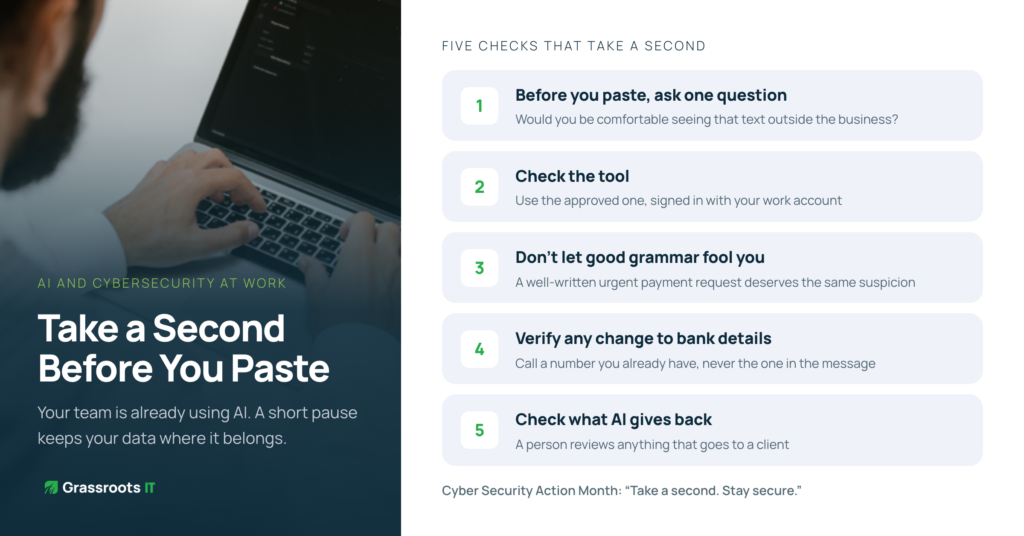
Five AI cybersecurity checks that take a second
This is where the campaign’s message earns its place. A short pause catches most of these attempts.
- Before you paste, ask whether you’d be comfortable seeing that text outside the business. If not, use your approved tool or leave it out.
- Check the tool. Is it the one your business has approved, and are you signed in with your work account?
- Don’t let good grammar fool you. A well-written email asking for an urgent payment deserves the same suspicion as a badly written one.
- Verify any change to bank details or payment instructions by calling a number you already have, never the one in the message.
- Check what AI gives back. Summaries and drafts can be confidently wrong, so a person reviews anything that goes to a client.
A simple place to start
You don’t need a 40-page AI policy. A one-page guideline covering approved tools, what never gets pasted and who to ask is a strong first step. Add a permissions review in Microsoft 365 and a short staff session on AI-assisted scams, and you have covered the biggest gaps.
We saw this with a not-for-profit client that wanted an HR assistant built on Copilot. Before building anything, we talked through where data goes in the free and paid versions of Copilot. We then gave the agent access to just one SharePoint library (policies and procedures), set it to answer only from that content, and tested it with a small group of staff before a wider rollout.
So take a second this October. Ask your team which AI tools they used this week. Their answers will tell you where to start.
SOURCES
- Cyber Security Action Month stakeholder toolkit (National Office of Cyber Security)
- Guidance on privacy and the use of commercially available AI products (OAIC)
- Enterprise data protection in Microsoft 365 Copilot (Microsoft Learn)
- Annual Cyber Threat Report 2024-25 factsheet for businesses (ASD)