Updated 27 May 2026 with new licensing details.
Every few months we speak with a business owner or operations manager who tried Microsoft Copilot, found it underwhelming, and quietly switched it off. Sometimes they blame the technology. Sometimes they blame themselves for expecting too much. Usually, the real issue is neither.
Copilot is a capable tool. But it operates entirely within the environment you give it, and if that environment isn’t set up properly, even a sophisticated AI assistant will produce mediocre results. The gap between expectation and reality almost always comes down to a handful of predictable problems. Here’s what we see most often.
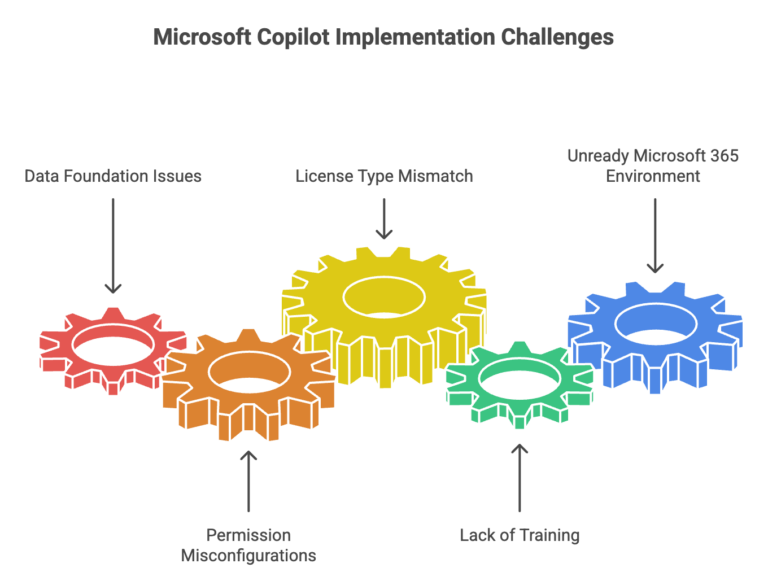
The data foundation isn’t there
Copilot draws on the information it can access within your Microsoft 365 environment: SharePoint files, emails, Teams conversations, and documents. This is what distinguishes it from generic AI tools: it can work with your actual business information, not just publicly available knowledge.
But that also means it reflects whatever your data looks like. Ask Copilot to summarise your organisation’s approach to a particular process, and it might surface a policy document from 2019 that nobody has opened since. Ask it to help draft a proposal, and it might pull context from the wrong project because files aren’t clearly named or consistently stored.
This isn’t a Copilot failure. It’s a data problem that Copilot makes visible. In our experience, businesses with well-organised SharePoint environments and consistent file management practices see noticeably better results from day one. Those with digital clutter accumulated over years find that Copilot is essentially trying to help you from inside a disorganised filing cabinet.
The fix isn’t an overnight overhaul. It is identifying where your actual sources of truth sit for the work your team does most often, making sure they’re in SharePoint or OneDrive, and ensuring they’re current. That foundation makes everything downstream work better.
Permissions aren’t configured correctly
Copilot respects the same access controls as your staff. If a user has access to a file, Copilot can use it. If they don’t, it can’t.
This is by design. It is good for security. But it also means that whatever your permission structure looks like today, Copilot inherits it. We regularly see two failure modes that cause problems.
The first is overly permissive environments. Broad, undifferentiated access means Copilot can surface sensitive information to users who shouldn’t see it: financial data, HR records, or confidential client information shared with staff who have no business reason to access it. This is a genuine risk, and businesses often don’t realise how open their SharePoint permissions actually are until they start thinking about AI.
The second is overly restrictive environments. Permissions so locked down that Copilot has almost nothing useful to work with, making it barely functional for the people trying to use it.
A permission review before rolling out Copilot is time well spent, not just for Copilot’s sake, but because it’s often the first honest look businesses have had at who can access what in years.
The licence type doesn’t match expectations
There’s currently more than one version of Copilot available to Microsoft 365 users, and the differences are significant.
Copilot Chat is now included at no extra cost across most Microsoft 365 business plans. It provides AI-powered chat functionality and is useful for web-grounded queries and basic assistance, but it doesn’t integrate into your Microsoft 365 apps, and it doesn’t have access to your organisational data.
Microsoft 365 Copilot is the full offering. It’s a separate paid add-on licence that integrates Copilot directly into Word, Excel, PowerPoint, Outlook, Teams, and other apps, and it can draw on your Microsoft 365 data. This is what most businesses mean when they talk about ‘getting Copilot.’
The reason this matters: some businesses believe they have Copilot when they’re actually using Copilot Chat. They’ve set expectations based on what the full product can do, tested it, found it lacking, and concluded Copilot doesn’t work. In reality, they’ve never had access to the product they were evaluating.
Nobody was given time to actually learn it
Rolling out Copilot and expecting staff to figure it out on top of their existing workload is one of the most common reasons it fails to take hold. People try it a few times, don’t find the output particularly impressive, and quietly stop using it. The tool gets a reputation as overhyped.
The problem usually isn’t Copilot. It is that nobody was given realistic time and space to develop prompting skills. Getting genuinely useful output from Copilot requires knowing how to ask the right questions, with the right context, at the right level of specificity. That’s a learnable skill, but it takes practice, and it doesn’t happen in stolen minutes between meetings.
The businesses we see getting consistent value from Copilot treated the rollout like any other tool adoption: dedicated time for learning, realistic expectations upfront, and a mechanism for sharing what’s working across the team. The investment is modest, but skipping it almost always leads to the ‘we tried it and it wasn’t worth it’ conclusion.
The Microsoft 365 environment wasn’t ready
Copilot sits on top of your existing Microsoft 365 setup. If that setup has drifted over time: inconsistent security configurations, apps deployed but not properly adopted, licences that don’t reflect actual usage: those issues become more visible when you try to layer something like Copilot on top.
Multi-factor authentication needs to be enabled and consistently enforced. The current M365 desktop apps need to be deployed and in active use. Security policies need to be configured in ways that are appropriate for AI tools accessing organisational data. None of these are unusual requirements. They’re good IT hygiene that should be in place regardless. But they matter more once AI is in the picture.
So is Copilot actually worth it?
For businesses with the right foundations in place, yes. We’ve seen genuinely meaningful productivity improvements across a range of functions: from drafting and summarising to meeting follow-up and data analysis. The businesses getting the most from it aren’t necessarily the most sophisticated technology users; they’re the ones who took the time to prepare properly.
If Copilot underwhelmed for you, or if you’re thinking about deploying it and want to understand what’s actually needed, a readiness assessment is a practical starting point. It looks at your data environment, permission structures, M365 configuration, and adoption approach, and gives you an honest picture of where you stand before you invest further.
Grassroots IT is a Brisbane-based managed IT services provider specialising in Microsoft solutions for businesses. Learn more about Copilot implementation and readiness assessments at grassrootsit.com.au/microsoft-copilot/