In September, a staff member at a family-owned furniture business in Melbourne’s Bayside area was working through a $118,000 order of outdoor furniture. The emails from the supplier were genuine. Then one arrived saying the supplier’s bank details had changed and the payment was urgent. She paid it.
The supplier hadn’t sent that email. Scammers had got into the thread and were impersonating them. Her bank flagged the transfer as possible fraud, she rang the supplier to check, and Victoria Police, working with the AFP-based Joint Policing Cybercrime Co-ordination Centre, blocked the transaction and returned the money.
SmartCompany reported this story in October, and it struck us as a timely reminder for any business that pays suppliers by bank transfer.
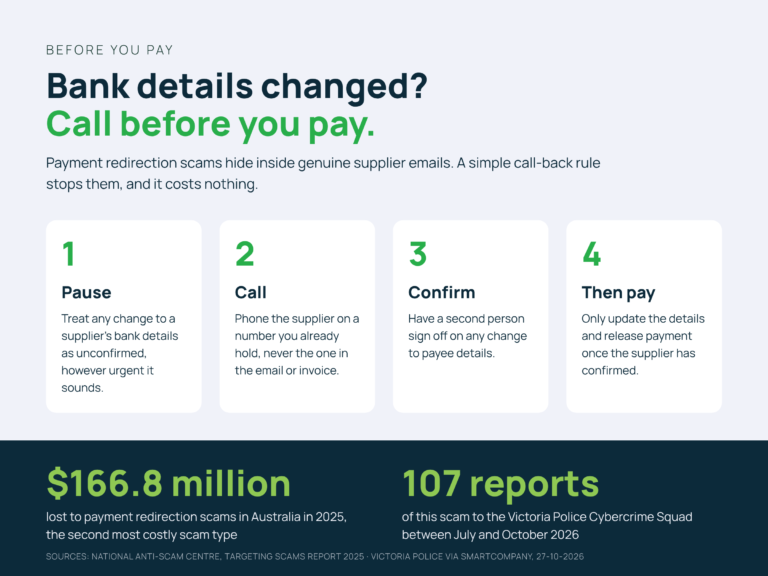
Victoria Police says its Cybercrime Squad has received 107 reports of this scam since July 2026, and the National Anti-Scam Centre puts payment redirection losses at $166.8 million in 2025, second only to investment scams.
Why payment redirection scams catch careful people
Payment redirection is a form of business email compromise, sometimes called invoice fraud. Most scam advice assumes the email looks suspicious. Payment redirection scams work because it doesn’t. Often the scammer has access to a real mailbox, either the supplier’s or yours, and replies inside a real conversation about a real order. The amount is right, the tone is right, and the only thing that changes is the account number.
Then comes the pressure: the payment is overdue, the goods won’t ship, the change needs to happen today. The person processing it is doing what a good accounts team does, keeping a supplier happy and an order moving. That instinct is exactly what the scam relies on.
So training people to spot a dodgy email only goes so far here. You need a process that doesn’t depend on spotting anything.
The process that stops it
The most effective control costs nothing: any change to a supplier’s bank details is confirmed by phone, on a number you already hold. That means the number in your supplier file or on their website, never the one in the email or the new invoice.
Two more steps make it stick:
- Two people sign off on any change to payee details, and on the first payment to any new account.
- Tell your suppliers how you work. A line on your purchase orders saying you will always call to confirm bank detail changes sets the expectation on both sides.
This is the step that saved the Bayside business. A phone call to the supplier confirmed the fraud while there was still time to act.
We practise this ourselves. Our admin team calls to check payment details before we pay invoices, and several of our suppliers have told us they rarely get those calls from other businesses. It takes a couple of minutes, and it’s a habit any business can adopt.
The Microsoft 365 controls behind it
Process catches the request. Technology makes it harder for scammers to get into the conversation in the first place. For most businesses on Microsoft 365, that means:
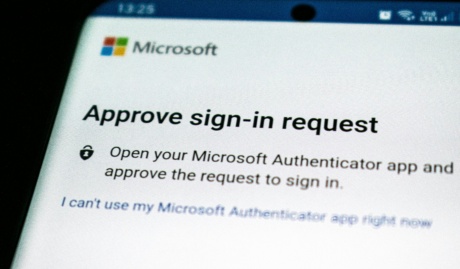
- MFA on every mailbox, including shared and finance mailboxes, so a stolen password alone can’t open an account.
- Alerts on new inbox rules. Attackers who get into a mailbox often set up rules that forward or hide replies, so the real supplier’s messages never reach you. Microsoft 365 can flag these as they’re created.
- External sender tags, so email from outside your organisation is clearly marked, even when the display name looks familiar.
- SPF, DKIM and DMARC on your own domain. These make it much harder for anyone to send email pretending to be you, which protects your clients from the same scam.
MFA is one of the Essential Eight strategies, and frameworks like SMB1001 give you a structured way to put these controls in place and show your clients you have.
If you’re not sure where your business stands, our post Cyber Security Action Month: Five Steps for Small Business covers the basics every business should have in place.
If it happens to you
Speed matters. The Bayside business got its money back because the bank, the staff member and police all moved quickly.
- Call your bank immediately and ask them to stop or recall the payment.
- Contact the supplier on a number you already hold to confirm what happened.
- Contact your cyber insurer as soon as possible, using the claims or incident line in your policy. Many policies require prompt notification, and some can bring in incident response help straight away.
- Talk to your IT provider straight away. If a mailbox was compromised, passwords, sessions and inbox rules need resetting before the scammer tries again.
- Report it to police and through ReportCyber at cyber.gov.au.
One habit worth adopting before Christmas
The end of the year is when accounts teams are busiest, with suppliers chasing payment before the shutdown. That pressure is what these scams feed on. Detective Sergeant Dean Waters of the Victoria Police Cybercrime Squad put it simply: don’t “let a scammer rush you into making a costly mistake”.
If you make one change before the holidays, make it the call-back rule, and make sure everyone who pays invoices knows it applies to them.